
Looking for sorting class 12 Computer Science? This page covers NCERT Class 12 Computer Science Chapter 5 — the chapter that teaches bubble sort, selection sort and insertion sort — and puts the official chapter PDF right here, above a plain-language walkthrough of every pass diagram. It follows the NCERT Computer Science textbook for Class XII and is maintained for the current academic session.
Download the NCERT Class 12 Computer Science Chapter 5 Sorting PDF
The official NCERT Class 12 Computer Science Chapter 5 Sorting PDF is hosted on the NCERT portal below — the single national source for every NCERT textbook, where you get the chapter exactly as printed, pass diagrams, algorithms and Python programs included.
On the portal, choose Class XII, then Computer Science, then Chapter 5 (Sorting).
| What the chapter holds | Count | Where it is used |
|---|---|---|
| Printed pages | 14 | |
| Sections in the chapter | 5 | |
| Figures with NCERT captions | 14 | |
| Tables | 6 | |
| Exercise questions | 6 | answered in our NCERT Solutions |
| Activities | 4 | |
| Official NCERT PDF | Download the chapter PDF | the chapter exactly as NCERT publishes it |
Chapter 5 Sorting at a Glance
The table below is the chapter’s full inventory — the topic sections, figures, activities and exercise questions inside the PDF — in one scannable place. Use it to find where a topic sits before you start reading.
What the Sorting Chapter Teaches
Sorting means arranging a collection of elements into a particular order — numbers in ascending or descending order, words alphabetically, or candidates by roll number (NCERT, p. 66). The chapter opens with a dictionary analogy: finding a word in a dictionary that is not alphabetically ordered would force you to search page after page, so ordering makes searching fast.
From there the chapter moves through five topics in a fixed pattern — idea, diagram, algorithm, Python program, activity:
- Introduction (NCERT, p. 66): what sorting is, everyday examples, and why the extra time spent sorting is worth it compared with searching an unsorted list.
- Bubble Sort (NCERT, p. 67): repeated adjacent comparisons and swaps; Figure 5.1 traces the list [8, 7, 13, 1, -9, 4] through the passes.
- Selection Sort (NCERT, p. 71): the same list is sorted again, this time by finding the smallest remaining value and swapping it to the front; Figure 5.2 shows every comparison with arrows.
- Insertion Sort (NCERT, p. 73): builds the sorted list from the front by shifting larger elements right and inserting one new element per pass; Figure 5.3 shows the sorted block growing.
- Time Complexity of Algorithms (NCERT, p. 76): why the choice of algorithm matters when data becomes large, with simple rules for constant, linear and quadratic time.
The chapter closes with a summary and an exercise set that mixes hand-tracing with program writing.
Key Concepts: Passes, Swaps and Sorted Sublists
All three algorithms share one mental model: divide the list into a sorted part and an unsorted part, and move one element between them per pass. They differ only in how that element is chosen and moved.
- Pass: the chapter defines a pass as every iteration through each element of the list (NCERT, p. 67). In bubble sort a pass is one left-to-right sweep of adjacent comparisons; in selection sort it is one full scan for the minimum; in insertion sort it is the work of placing one new element.
- Swap: exchanging the positions of two elements. Bubble sort and selection sort both change the list by swapping (NCERT, p. 67).
- Shift: insertion sort does not swap. It moves larger elements one place to the right to open a gap, then writes the saved value (temp) into the gap (Algorithm 5.3).
- Where the sorted part grows: bubble sort’s sorted region grows from the right — after each pass the largest remaining value is locked at the end (NCERT, p. 67). Selection and insertion build the sorted region from the left (NCERT, p. 71, p. 73).
- Why \( n-1 \) passes: each pass fixes exactly one element in its final position. Once \( n-1 \) elements are fixed, the last one has nowhere else to go, so no full \( n \)-th pass is needed. The book states \( n-1 \) passes for both bubble sort and selection sort, and insertion sort’s algorithm starts at the second element, giving \( n-1 \) passes.
Reading the Pass Diagrams in the Sorting Chapter
Each algorithm uses its own colour code, so learn the legend before tracing. In Figure 5.1 (bubble sort) the blue cells are the pair being compared and the green cells are already sorted (NCERT, p. 69). In Figure 5.2 (selection sort) arrows show which pair is compared and the smaller element is highlighted blue, with sorted elements green (NCERT, pp. 72-73).
In Figure 5.3 (insertion sort) the shaded block marks the sorted part of the list (NCERT, pp. 75-76).
Bubble Sort Pass by Pass (Figure 5.1)
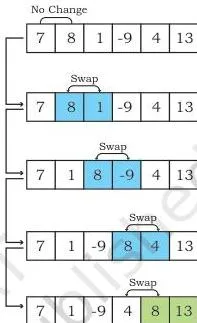
Bubble sort works on the book’s list numList = [8, 7, 13, 1, -9, 4]. Each pass compares adjacent pairs from the left; if a pair is out of order, the two values are swapped. The largest remaining value is the one that keeps moving right, so it “bubbles up” to the end (NCERT, p. 67).
![Bubble sort pass 1 on [8, 7, 13, 1, -9, 4]: blue marks each adjacent pair compared from left to right, and 13 settles at the last position in green](https://www.learncbse.net/images/sorting-comparison-in-pass-1.webp "Sorting Class 12: NCERT Computer Science Chapter 5")
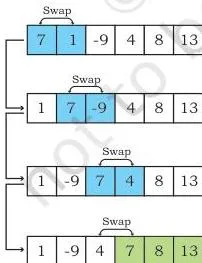
![Bubble sort pass 4: only the first pair is compared and the whole list turns green as [-9, 1, 4, 7, 8, 13], fully sorted](https://www.learncbse.net/images/sorting-comparison-in-pass-4.webp "Sorting Class 12: NCERT Computer Science Chapter 5")
In the pass 1 image, blue runs across all four adjacent pairs and 13 reaches index 5. The pass 2 image stops before that green cell and brings 8 to index 4.
The pass 3 image works only from index 0 to index 2, and pass 4 compares just the first pair. The book notes the list is fully sorted by pass 4, so a pass 5 would be redundant (NCERT, p. 67).
Selection Sort Pass by Pass (Figure 5.2)
Selection sort keeps a sorted left part and an unsorted right part. Each pass finds the smallest element in the unsorted part and swaps it with the leftmost unsorted element (NCERT, p. 71).
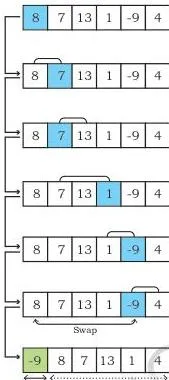
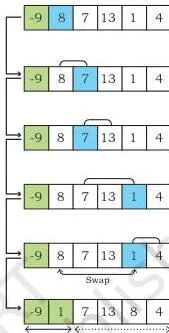
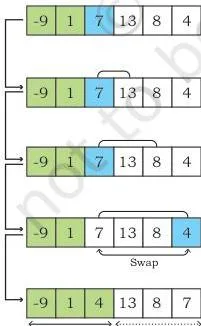
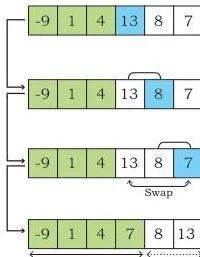
In the pass 1 image the arrows compare 8 with every other value, blue tracks the current smallest, and -9 wins — it is swapped into index 0. The pass 2 image starts from index 1 and brings 1 next; pass 3 brings 4; pass 4 leaves 7, 8 and 13 where they are.
![Overview of all selection sort passes on [8, 7, 13, 1, -9, 4]: arrows mark each comparison, blue highlights the smaller element and green forms the sorted prefix, as in the sorting class 12 chapter diagrams](https://www.learncbse.net/images/sorting-comparisons-done-in-different-passes-of-selection-sort.webp "Sorting Class 12: NCERT Computer Science Chapter 5")
Figure 5.2 puts every pass on one page so you can watch the green sorted prefix grow from the left while the arrows sweep through a shorter unsorted region each time (NCERT, p. 73).
Insertion Sort Pass by Pass (Figure 5.3)
Insertion sort also divides the list into a sorted part and an unsorted part, but instead of swapping it inserts: each pass takes the next unsorted element, shifts larger sorted elements one place right, and drops the element into the gap (NCERT, p. 73).
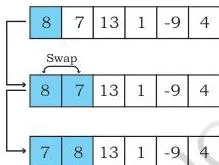
![Insertion sort pass 2: 13 is already larger than the shaded sorted block [7, 8], so it stays in place and the block grows to three cells](https://www.learncbse.net/images/sorting-comparison-in-pass-2-3.webp "Sorting Class 12: NCERT Computer Science Chapter 5")
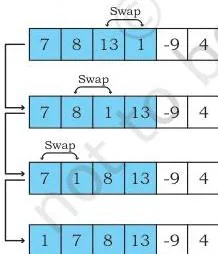
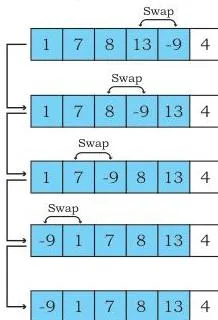
In the pass 1 image, 7 is compared with the shaded sorted block [8]; 8 shifts right and 7 is inserted before it. The pass 2 image shows 13 already larger than both shaded values, so nothing shifts. Pass 3 brings 1 to the front, and pass 4 brings -9 to the front as well.
![Overview of all insertion sort passes on [8, 7, 13, 1, -9, 4]: the shaded area marks the sorted block growing from the left as each pass inserts one new element](https://www.learncbse.net/images/sorting-comparisons-done-in-different-passes-of-insertion-sort.webp "Sorting Class 12: NCERT Computer Science Chapter 5")
Figure 5.3 shows the whole run: the shaded sorted block grows by one cell per pass until the final pass inserts 4 between 1 and 7, giving [-9, 1, 4, 7, 8, 13] (NCERT, p. 76).
Definitions You Need from the Sorting Chapter
Quick lookup for the terms the chapter uses, each with its page in the book, so you can fix a definition without rereading the whole section.
- Sorting — the process of ordering or arranging a given collection of elements in some particular order (NCERT, p. 66).
- Pass — every iteration through each element of the list while comparing or selecting (NCERT, p. 67).
- Swap — changing the positions of two elements with each other (NCERT, p. 67).
- Bubble sort — sorts by repeatedly comparing adjacent elements and swapping them when unordered; the largest element bubbles to the end in each of \( n-1 \) passes (NCERT, p. 67).
- Selection sort — repeatedly finds the smallest element in the unsorted part and swaps it with the leftmost unsorted element, building the sorted list from the front (NCERT, p. 71).
- Insertion sort — takes each element of the unsorted part and inserts it at its appropriate position in the sorted part by shifting larger elements to the right (NCERT, p. 73).
- Time complexity — the amount of time an algorithm takes to process given data (NCERT, p. 76).
- Constant time — no loop, so the number of instructions stays fixed whatever the data size (NCERT, p. 77).
- Linear time — one loop, so the work grows as \( n \) (NCERT, p. 77).
- Quadratic time — a nested loop, so the work grows as \( n^2 \) (NCERT, p. 77).
Worked Traces: Sorting a New List Step by Step
The book traces only one list, [8, 7, 13, 1, -9, 4]. These three traces use new numbers so you can practise the same technique and check your own hand-tracing.
Bubble Sort Trace on [5, 2, 9, 1, 7]
Here \( n = 5 \), so bubble sort makes \( n-1 = 4 \) passes. Each row shows every adjacent comparison and whether a swap followed.
| Pass | Adjacent pairs compared | Swaps | List after the pass |
|---|---|---|---|
| 1 | (5,2) swap (5,9) keep (9,1) swap (9,7) swap |
3 | [2, 5, 1, 7, 9] |
| 2 | (2,5) keep (5,1) swap (5,7) keep |
1 | [2, 1, 5, 7, 9] |
| 3 | (2,1) swap (2,5) keep |
1 | [1, 2, 5, 7, 9] |
| 4 | (1,2) keep | 0 | [1, 2, 5, 7, 9] |
The sorted suffix grows by one element per pass: 9, then 7, then 5. Pass 4 only confirms that 1 and 2 are already in order.
Selection Sort Trace on [4, 9, 2, 6, 1]
Here \( n = 5 \), so selection sort makes \( n-1 = 4 \) passes. Each pass scans the unsorted part for the minimum and swaps it to the front.
| Pass | Scan range | Smallest found | Swap | List after the pass |
|---|---|---|---|---|
| 1 | indices 1-4 | 1 at index 4 | swap 4 with 1 | [1, 9, 2, 6, 4] |
| 2 | indices 2-4 | 2 at index 2 | swap 9 with 2 | [1, 2, 9, 6, 4] |
| 3 | indices 3-4 | 4 at index 4 | swap 9 with 4 | [1, 2, 4, 6, 9] |
| 4 | index 4 | 6 at index 3 | none — already in place | [1, 2, 4, 6, 9] |
After four passes the first four elements are fixed, so the fifth element, 9, is automatically in its correct place.
Insertion Sort Trace on [3, 8, 1, 5, 2]
The algorithm starts at the second element (\( i = 1 \)), so the first element, 3, is treated as the initial sorted part. Each pass inserts one new element.
| Pass | Element to insert | Shifts made | List after the pass |
|---|---|---|---|
| 1 | 8 | 8 is already after 3 — no shift | [3, 8, 1, 5, 2] |
| 2 | 1 | 8 and 3 shift right | [1, 3, 8, 5, 2] |
| 3 | 5 | 8 shifts right; 5 lands between 3 and 8 | [1, 3, 5, 8, 2] |
| 4 | 2 | 8, 5 and 3 shift right; 2 lands after 1 | [1, 2, 3, 5, 8] |
The sorted prefix [1, 3, 5, 8] grows one element at a time, and the final pass places 2 correctly.
Common Mistakes Students Make in the Sorting Chapter
These are the errors the chapter’s own algorithms and activities warn about — read them before you trace, not after.
| Mistake | Correct rule | How to check your answer |
|---|---|---|
| Running bubble sort for \( n \) full passes instead of \( n-1 \) | The chapter states \( n-1 \) passes (NCERT, p. 67). The inner bound \( n-i-1 \) protects the already-sorted suffix; when \( i = n-1 \) the inner loop is empty. | After pass \( k \), the last \( k \) elements must be the \( k \) largest, in order. If your trace re-compares green cells, the bound is wrong. |
| Missing the redundant final pass | A pass with no swaps means the list is already sorted. The book’s own Think and Reflect notes the list was sorted by pass 4, yet pass 5 still ran (NCERT, p. 67). | Run one extra pass mentally: if nothing swaps, you can stop early. |
| Not resetting the selection sort flag each pass | Algorithm 5.2 sets min = i and flag = 0 at the start of every pass; the swap happens only when flag = 1 (NCERT, p. 73). | For each pass ask: was a strictly smaller element found? If no, no swap should be recorded. |
| Writing \( j \gt 0 \) instead of \( j \geq 0 \) in the insertion loop | The printed Algorithm 5.3 shows \( j \gt 0 \), but Program 5-3 uses \( j \geq 0 \). With \( j \gt 0 \), index 0 is never compared, so the smallest value can land at index 1 instead of index 0. | Trace the smallest element of the list: it must reach index 0, which needs the loop to examine \( j = 0 \). |
| Confusing shifting with swapping | Bubble and selection swap two elements; insertion shifts larger elements right and then writes temp into the gap (Algorithm 5.3). | In insertion, the only write is the final placement of temp; the moves before it are shifts, not swaps. |
| Using the wrong comparison direction | Activity 5.1 asks exactly this: reverse the comparison to change ascending into descending order. | State the order you want first, then check which element the comparison keeps in front. |
How the Exercises and Activities Test What You Have Learned
The chapter tests two skills: tracing lists by hand and writing small sorting programs. These are the patterns the sorting class 12 chapter itself uses, in its exercises and activities.
For any “partially sorted list after \( k \) passes” question, remember where each algorithm leaves its sorted region:
- Bubble sort — after \( k \) passes, the \( k \) largest elements sit in final position at the right end.
- Selection sort — after \( k \) passes, the \( k \) smallest elements occupy the first \( k \) positions on the left.
- Insertion sort — after \( k \) passes, the first \( k+1 \) elements are sorted among themselves.
| Skill | Where the chapter tests it | What a complete answer shows |
|---|---|---|
| Produce the partially sorted list after \( k \) passes | Exercise 1 (bubble, 3 passes); Activity 5.3 (selection, 4 passes); Activity 5.4 (insertion, 3 passes) | The exact list state after \( k \) complete passes, with the sorted end or start marked — stop at \( k \) passes, do not finish the sort. |
| Count swaps and compare techniques | Exercise 2 | Two separate swap counts for selection sort and bubble sort on the same list, then a conclusion stating which method is better and why. |
| Justify an answer with a diagram | Exercise 3 | A drawn pass-by-pass diagram using the chapter’s colour conventions, making the number of comparisons visible and a reason for the result. |
| Trace until a specific event | Activity 5.2 (find the pass in which the last swap happens) | A full trace of [8, 7, 6, 5, 4] with the final swap pass clearly marked. |
| Write programs that sort | Exercises 4, 5 and 6 | A user-defined function for each task — median using bubble sort, x-th percentile using selection sort, inserting names in ascending order (insertion sort) — with a call and printed output. |
Sorting Chapter Summary in One Page
This is the night-before version of the chapter, built from its own summary and complexity notes.
- Sorting is the process of placing or rearranging a collection of elements into a particular order (NCERT, p. 66).
- Bubble sort is the simplest sorting algorithm; it swaps adjacent elements whenever they are unordered, over \( n-1 \) passes (NCERT, p. 67).
- Selection sort selects the smallest element from the unsorted part, swaps it with the leftmost unsorted element, and that element joins the sorted part (NCERT, p. 71).
- Insertion sort places each element at its suitable position in each pass, like placing a playing card at its correct position in a hand (NCERT, p. 78).
- Complexity analysis explains how an algorithm will perform when the input grows larger (NCERT, p. 78).
The chapter’s complexity rules (NCERT, p. 77): no loop means constant time; a single loop means linear time; a nested loop means quadratic time; and if both a nested and a single loop exist, judge by the nested loop alone. Each sorting program in the chapter contains a nested loop, so all three have time complexity \( n^2 \).
| Algorithm | Core idea | Passes | Key operation | Time complexity |
|---|---|---|---|---|
| Bubble sort | Compare adjacent pairs and swap out-of-order neighbours; largest bubbles to the end | \( n-1 \) | Adjacent comparison + swap | \( n^2 \) |
| Selection sort | Find the smallest element of the unsorted part and swap it to the front | \( n-1 \) | Scan for minimum + swap | \( n^2 \) |
| Insertion sort | Insert each element into its correct position in the sorted part, shifting larger elements right | \( n-1 \) | Shift right + insert temp | \( n^2 \) |
Related Chapters and Resources
This listing is maintained for the 2026-27 academic session using the NCERT textbook information available to us. NCERT remains the authority for confirming the latest edition.
Use the Class 12 Computer Science notes to revise every chapter of this book, or go to the Class 12 hub for other subjects. The main CBSE notes library covers all classes.
Within the same book, the next chapter, Searching, builds directly on sorting — searching a sorted list is faster than searching an unsorted one. The Matplotlib chapter notes practise the same Python list and function skills.
You can also verify everything here against the official NCERT textbook portal, which hosts the complete Computer Science book for Class XII.
Reference: NCERT Class 12 Computer Science textbook, chapter 5, official edition on ncert.nic.in.
Sources and Data Verification
- This page describes Chapter 5 (Sorting) of the NCERT Computer Science textbook for Class XII, as published on ncert.nic.in. It covers that chapter only — not other editions, companion books or publishers’ versions.
- The contents described here — topic sections, pass diagrams, activities and exercises — come from the chapter file in the official NCERT PDF.
- This listing is maintained for the current academic session.
- NCERT settles textbook editions and the official PDFs; CBSE settles the curriculum and syllabus. Textbook contents and the examinable syllabus are not always identical — check the current official syllabus before relying on any chapter for an examination.
Sorting Class 12: Frequently Asked Questions
Short answers to the questions students search most about this chapter.
Which sorting algorithm in Class 12 Computer Science is easiest to trace by hand?
Bubble sort. The chapter itself calls it the simplest sorting algorithm (NCERT, p. 67): you only compare two neighbouring values and swap them when they are out of order. One element settles into place per pass, so the trace is mechanical — every pass is just a left-to-right sweep over a shorter range.
How many passes does bubble sort make for a list of n elements?
\( n-1 \). For a list with \( n \) elements, the bubble sort makes a total of \( n-1 \) passes (NCERT, p. 67). After pass \( k \), the \( k \) largest elements are in place at the end, so the final pass has only one comparison left.
Why does the Sorting chapter compare insertion sort to arranging playing cards?
Because both insert one item into an already sorted collection. The chapter’s summary says insertion sort is similar to placing a card at its right position while playing cards (NCERT, p. 78): you slide the larger cards right and drop the new card into the gap, instead of re-sorting everything.
What is the time complexity of bubble sort, selection sort and insertion sort?
All three have time complexity \( n^2 \). The chapter’s rule is: no loop gives constant time, one loop gives linear time, and a nested loop gives quadratic time — every sorting program in the chapter has a nested loop, so each runs in \( n^2 \) time (NCERT, p. 77).
What does partially sorted list after three passes mean in the Sorting chapter?
It asks for the exact state of the list after exactly three complete passes — stop there, do not finish the sort. After three bubble passes the three largest values are settled at the end; after three selection passes the three smallest are at the start; after three insertion passes the first four elements are sorted among themselves.
Do students need to write full Python programs for sorting in the chapter exercises?
Yes. Exercise 4 asks for a user-defined function that finds the median using bubble sort, Exercise 5 for a function that calculates the x-th percentile using selection sort, and Exercise 6 for a function that inserts names in ascending order — insertion sort. Practise writing the function definition, the function call and the printed output for each.
Explore Class 12 Computer Science Books
- Previous: Plotting Data using Matplotlib
- Next: Searching
Related chapters:
- Exception Handling in Python
- Querying and SQL Functions
- File Handling in Python