
This is the official NCERT Class 12 Computer Science Chapter 2, File Handling in Python, from the current NCERT textbook for Computer Science (Code 083). The official chapter PDF is offered right below, and the rest of this page walks through the chapter section by section — file types, access modes, reading and writing text files, tell() and seek(), and the pickle module.
Download the File Handling in Python Class 12 PDF
The official file is available directly from NCERT’s website — download the File Handling in Python Class 12 chapter PDF from ncert.nic.in to get the exact printed pages of this chapter from the Class 12 Computer Science (Code 083) textbook: its activity boxes, its worked programs and its complete exercise set.
Reference: NCERT Class 12 Computer Science textbook, chapter 2, official edition on ncert.nic.in.
| What the chapter holds | Count | Where it is used |
|---|---|---|
| Printed pages | 20 | |
| Sections in the chapter | 24 | |
| Figures with NCERT captions | 1 | |
| Tables | 3 | |
| Exercise questions | 10 | answered in our NCERT Solutions |
| Activities | 4 | |
| Official NCERT PDF | Download the chapter PDF | the chapter exactly as NCERT publishes it |
Chapter at a glance: what the chapter holds
The table below shows how much the chapter holds — its sections, figures, activities and exercise questions — so you can see at a glance what the file contains before you start.
Beyond the numbered sections, the chapter follows one clear learning path: it opens with why files exist at all, moves through reading and writing text files, shows how to move around inside a file with offsets, then switches to binary files and pickling, and closes with a SUMMARY and an EXERCISE section.
Short Activities and “Think and Reflect” prompts sit inside the text at the points where they matter most.
What each NCERT section of the chapter teaches
Use this map to jump straight to the part you are stuck on. Each row names the official section, what it teaches, and where it begins in the printed book.
| NCERT section | What it teaches | NCERT page |
|---|---|---|
| 2.1 Introduction to files | Why data must outlive a program run; the file as permanent storage | p. 19 |
| 2.2 Types of files | Text vs binary: character codes against raw byte content; the EOL character | pp. 20–21 |
| 2.3 Opening and closing a text file | open(), the file handle, Table 2.1 access modes, close() and the with clause | pp. 21–23 |
| 2.4 Writing to a text file | write() and writelines(), the str() conversion trap, the write buffer | pp. 23–25 |
| 2.5 Reading from a text file | read(), readline(), readlines(), split() vs splitlines(), Program 2-1 | pp. 25–27 |
| 2.6 Setting offsets in a file | tell() and seek(), random file access, Program 2-2 | pp. 28–29 |
| 2.7 Creating and traversing a text file | Programs 2-3, 2-4 and 2-5: building a file, reading it, and one program that does both | pp. 29–31 |
| 2.8 The pickle module | Serialization, dump() and load(), binary file handling, Programs 2-6 to 2-8 | pp. 32–35 |
| SUMMARY | The chapter’s official takeaway points | pp. 35–36 |
| EXERCISE | The end-of-chapter question set | pp. 37–38 |
The sections build in a deliberate order: access modes come before methods, writing before reading, linear access before random access, and text files before binary ones — so each section assumes only what came before it.
Core concepts of file handling, explained in order
This is the working core of the chapter. Each concept is explained the way a teacher would walk you through it, with the NCERT page beside it so you can follow along in your own book.
What a file is, and why programs need files
Everything your programs have done so far evaporates when the program ends: variables hold values only while the program runs, and anything typed at the keyboard is gone with it. A file exists to break that limit.
A file is a named location on a secondary storage media where data are permanently stored for later access (NCERT, p. 19). Organisations need this constantly — employee records, inventory and sales data are saved once and reused without retyping.
To see why file size depends on content, Activity 2.1 asks you to save your name as a .txt file and again as a .docx file. The plain text file weighs a handful of bytes; the .docx file runs to kilobytes even though the word is identical, because it also stores the author, page settings, fonts and dates (NCERT, p. 19).
A text file stores only the characters; a document file stores the document and the story around it.
Text files and binary files: the difference that decides everything
The chapter’s central distinction: every file is a series of bytes, but the meaning of those bytes changes how the file must be handled.
A text file is a sequence of characters — alphabets, digits, special symbols — stored as the code of each character. ASCII 65 is stored as the binary 1000001 and a text editor displays it as the letter A (NCERT, p. 20).
Because of that, text files open readably in any editor, and each line ends with an End of Line (EOL) character — Python’s default is \n (NCERT, p. 20).
A binary file stores the actual content bytes of an image, audio file, video, compressed archive or executable. Those bytes are not character codes, so a text editor shows garbage, and a single changed bit can corrupt the whole file (NCERT, p. 21). Python can read and write both kinds.
The file handle and the open() function
The file handle is your remote control for the file — every read and write goes through it.
open() takes a file name and an access mode, and returns a file object that you store in a variable:
file_object = open(file_name, access_mode)
The file object links the program to the stored data, and if the named file does not exist, open() creates a new empty file with that name (NCERT, p. 21). The object also carries three attributes: name returns the file’s name, mode returns the access mode, and closed returns True when the file is closed (NCERT, p. 21).
File access modes: what r, w, a, + and b each do
Access modes decide what you may do to the file before you do anything at all — and, just as important, where the file object starts.
Each mode is built from operation letters: r for reading, w for writing, a for appending, + for both reading and writing, and b for binary handling. Table 2.1 on page 22 lists the seven standard modes.
| File mode | What it allows | File offset position |
|---|---|---|
| r | Read only | Beginning of the file |
| rb | Binary, read only | Beginning of the file |
| r+ or +r | Read and write | Beginning of the file |
| w | Write; overwrites existing contents or creates the file | Beginning of the file |
| wb+ or +wb | Read, write and binary; overwrites or creates | Beginning of the file |
| a | Append; creates the file if it does not exist | End of the file |
| a+ or +a | Append and read; creates the file if it does not exist | End of the file |
The offset column is the part students miss. The r and w families park the file object at the beginning; the a family parks it at the end. So open(‘myfile.txt’, ‘a+’) leaves the object at the end — you can write new data there and still read what is already in the file (NCERT, p. 22).
Activity 2.2 asks about the remaining combinations — rb+, wb, w+, ab, ab+. The same pattern answers them: rb+ reads and writes in binary with the object at the beginning; wb writes in binary only, truncating or creating; w+ reads and writes in text with truncation; ab and ab+ append in binary with the object at the end.
Closing a file, the with clause, and the buffer
Opening a file claims system memory; closing it gives that memory back — and closing is also the moment Python finally pushes your written data from the buffer out to the file.
close() flushes any unsaved data to the file and frees the memory allocated to it (NCERT, p. 23). If you reassign the file object to another file, the earlier file closes automatically (NCERT, p. 23).
You can avoid thinking about closing entirely with the with clause: with open(file_name, access_mode) as file_object: — the file closes automatically when control leaves the block, even if an exception occurs (NCERT, p. 23).
The buffer is the middleman. write() places data in memory, not straight on disk; close() moves buffered contents to the file. When you need data on disk immediately, flush() forces the buffer out on demand (NCERT, p. 24).
Writing to a text file: write() and writelines()
Writing to a file is not like printing to the screen — the file has no idea where a line ends unless you put a newline there yourself.
write(string) writes exactly one string and returns the number of characters written; \n counts as a single character, and you must add it yourself (NCERT, p. 24).
Numbers are the trap. write() accepts only strings, so write(58) raises a TypeError; you must convert first — write(str(58)) writes the two characters ‘5’ and ‘8’ (NCERT, p. 24).
writelines(iterable) writes multiple strings from a list or tuple and returns nothing (NCERT, p. 24). It does not insert line breaks between them — each string must still carry its own \n, exactly as Figure 2.1 shows. Activity 2.3 asks what happens if you pass the same list to write() instead: since write() accepts a single string only, a list raises a TypeError.
The three ways this chapter writes data to files, side by side:
| Method | What it writes | Return value | Buffering note |
|---|---|---|---|
| write(string) | One string to a text file | The number of characters written; \n counts as one | Data goes to the buffer; close() or flush() moves it to the file |
| writelines(iterable) | Multiple strings from a list or tuple to a text file | Nothing | Same buffer behaviour; no line breaks are inserted between strings |
| dump(data_object, file_object) | One pickled Python object to a binary file opened in ‘wb’ | Nothing | Close the file after dumping; reading it back needs load() |
Reading from a text file: read(), readline(), readlines()
The three reading methods differ in how much they pull from the file in one call — and that choice decides what your loop looks like.
read(n) reads n bytes of data. With no argument, or a negative number, it reads the entire file (NCERT, p. 25).
readline(n) reads one complete line, up to the newline; the optional n limits it to at most n bytes, never past \n. Without n it returns the whole line including the trailing \n. At end of file it returns an empty string — which is exactly what makes a while str: loop stop (NCERT, p. 26; Program 2-4, NCERT, p. 30).
readlines() reads all the lines at once and returns them as a list of strings, each element still carrying its newline (NCERT, p. 26). You can also iterate directly over the file object itself — for line in fobject — which reads line by line (Program 2-1, NCERT, p. 27).
To process what you read, split() breaks one line into its word elements, while splitlines() keeps each whole line as a single element (NCERT, p. 27). For the file in Figure 2.1, split() produces the words of each line as separate list elements; splitlines() produces the lines themselves, without the \n.
The three methods side by side:
| Method | What it returns | At end of file | Best use |
|---|---|---|---|
| read(n) | n bytes of data; the whole file when called with no argument or a negative number | Returns whatever remains, then an empty string | Reading a fixed chunk, or reading everything at once |
| readline(n) | One complete line including \n; at most n bytes and never past \n | Returns an empty string — which stops while str: loops | Line-by-line loops with while |
| readlines() | All remaining lines as a list of strings, each ending with \n | Returns an empty list | When you want the whole file as a list you can index |
Worked example with original numbers — write marks, read them back, print the total:
f = open(‘marks.txt’, ‘w’)
marks = [72, 85, 91, 68]
for m in marks:
f.write(str(m) + ‘\n’)
f.close() f = open(‘marks.txt’, ‘r’)
total = 0
for line in f:
total += int(line)
print(total)
f.close()
The pattern to copy: str(m) converts each number before writing, the newline keeps each mark on its own line, and int(line) converts back while reading. The program prints 316 — and the for loop over the file object ends by itself at end of file, the same mechanism Program 2-1 relies on.
Moving around the file: tell() and seek()
Normal reading and writing move through a file from front to back. tell() and seek() let you ask where the file object currently is and jump it anywhere you like.
tell() returns an integer — the byte position from the beginning of the file up to the current position of the file object (NCERT, p. 28). After reading a whole file, tell() reports its total byte length, because the object is now at the end.
seek(offset, reference_point) moves the file object. The reference point is 0 for the beginning of the file (the default), 1 for the current position, and 2 for the end. For example, seek(5, 0) parks the object at byte position 5 (NCERT, p. 28).
Worked trace with original numbers. Suppose a file stores the line Delhi|Mumbai|Chennai followed by a newline — 21 bytes in all. After writing it in w+ mode, tell() returns 21, the end of the file. Call read() right now and you get an empty string, because nothing remains after the object. Call seek(0) and read() again, and you recover all 21 bytes.
Program 2-2 performs this same dance — read everything, note the position, seek back to 0, jump to byte 10, read from there — and the final read skips the first ten characters because the object started ten bytes in (NCERT, p. 29).
One caveat the book raises as a Think and Reflect prompt: seek() does not behave the same in text and binary files (NCERT, p. 28). In text mode, positions measured from the current position or the end (reference points 1 and 2) are unreliable; only positions returned by tell() are guaranteed valid.
In binary mode every byte position is fair game — which is why binary files are read with relative offsets freely.
The pickle module: dump(), load(), and why binary records need try-except
Writing every value to a text file means converting it to a string and back. Pickling skips that entirely: Python saves a whole object — list, dictionary, anything — as a byte stream and rebuilds it later, structure intact.
Think of food pickling: you preserve food so you can consume it later. Python pickling preserves an object’s data so you can restore it in a later run. The formal names: serialization (pickling) converts an in-memory object to a byte stream; deserialization (unpickling) converts that byte stream back into a Python object (NCERT, p. 32).
The pickle module works only with binary files and provides two methods:
- dump(data_object, file_object) — pickles the object into a file opened in ‘wb’ mode (NCERT, p. 32).
- load(file_object) — unpickles one object from a file opened in ‘rb’ mode and returns it (NCERT, p. 33).
Program 2-8 shows the real-world shape. Employee records are entered one by one, each stored as a list, and appended to a binary file opened in ‘ab’ mode. After entry, bfile.tell() reports the total file size in bytes.
Reading back needs a loop that keeps calling load(), and that is where the exception comes in: load() raises EOFError when no more pickled objects remain, so the loop wraps load() in try/except EOFError: pass (NCERT, p. 35). Without that guard, the program crashes right after printing the last record.
Figure 2.1 explained: the writelines() output in Notepad
This is the chapter’s one captioned figure, and it answers a quiet question: what does a file actually look like after writelines() runs?
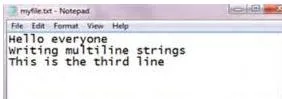
This is myfile.txt after the writelines() example: three strings were passed as one list — each ending with \n — and Notepad displays them as three separate lines. The line breaks come entirely from those newline characters, never from writelines(). If the strings had carried no \n, all three would appear on one jammed line.
This one figure explains two later behaviours. readlines() returns a three-element list in which each element still ends with \n — exactly the structure the figure shows (NCERT, p. 26). And splitlines() removes the \n to produce a list that looks the same on screen (NCERT, p. 27).
Definitions you need from this chapter
Use this glossary to look up any term without re-reading the chapter. Each entry gives a plain definition and the page where the chapter introduces it.
| Term | What it means |
|---|---|
| File | A named location on secondary storage where data are permanently stored for later access (p. 19) |
| Text file | A file whose bytes are the codes of its characters (ASCII/UNICODE); human-readable in a text editor; examples include .txt, .py and .csv (p. 20) |
| Binary file | A file whose bytes are actual content — image, audio, executable; not human-readable (p. 21) |
| End of Line (EOL) | The character that terminates each line of a text file; Python’s default is \n (p. 20) |
| File handle / file object | The object open() returns, which links the program to the stored file and carries name, mode and closed attributes (p. 21) |
| Access mode | The operation for which a file is opened — r, w, a, + and b in their combinations (p. 22) |
| File offset | The position at which the file object sits when the file is opened in a given mode (p. 22) |
| Buffer | Temporary memory where write() places data until close() or flush() moves it to the file (p. 24) |
| flush() | Forces buffered data out to the file immediately (p. 24) |
| tell() position | The byte position of the file object measured from the beginning of the file (p. 28) |
| seek() offset | The number of bytes by which the file object is moved, relative to a reference point (p. 28) |
| Serialization (pickling) | Converting a Python object in memory into a stream of bytes (p. 32) |
| Deserialization (unpickling) | Converting a byte stream back into a Python object (p. 32) |
| EOFError | The exception pickle.load() raises when no more pickled objects remain in the file (p. 35) |
Common mistakes in file handling — and the fixes
Most marks are lost in this chapter on assumptions, not syntax. Each row names the wrong assumption, the rule to replace it with, and a quick self-check.
| Mistake | Correct rule | How to check your answer |
|---|---|---|
| Writing a number without converting it | write() accepts only strings — write(58) raises a TypeError; use str(58) first (p. 24) | If you see TypeError, wrap the value in str() |
| Forgetting \n between separate writes | write() never adds line breaks; each line needs its own \n (p. 24) | Read the file back — one jammed line means \n is missing |
| Opening an existing file in ‘w’ and losing old data | Truncation is by design: ‘w’ erases existing contents; use ‘a’ to keep them (p. 23) | If old data vanishes, you chose ‘w’; ‘a’ preserves it |
| Assuming write and append differ for a new file | For a newly created file there is no practical difference — the file is empty, so the beginning and the end are the same position; the difference matters only for an existing file (p. 23) | Create a file both ways — the contents are identical |
| Passing a tuple of numbers to writelines() | writelines() expects an iterable of strings; a tuple of numbers raises a TypeError (p. 26) | Convert each number to a string before calling writelines() |
| Using seek() from the end or current point in text mode | In text files, reference points 1 and 2 are unreliable; only positions returned by tell() and seek(0) are safe (p. 28) | In text mode stick to tell() positions or seek(0); in binary mode all three reference points work |
| Reading multiple pickled records without try/except | load() raises EOFError at the end of the file; wrap the reading loop in try/except EOFError (p. 35) | If the program crashes after the last record, add the except block |
Exam notes: what the exercise questions are actually testing
This section maps every exercise question to the concept it tests, so your revision targets the skill behind each question rather than a memorised answer.
| Question | Concept tested | What a full answer should show |
|---|---|---|
| Q1 | The three core comparisons: text vs binary file; readline() vs readlines(); write() vs writelines() | For each pair, state the defining difference — byte meaning, return value, newline handling |
| Q2 | Method syntax: open(), read(), seek(), dump() | Give both the use and the exact syntax of each method |
| Q3 | File modes and open() statements | example.txt → r+ or w+; bfile.dat → wb; try.txt → a+; btry.dat → rb — each with the correct open() statement |
| Q4 | Buffering and close() | The honest answer: Python flashes no error when you forget close(), so closing must become a habit; close() flushes the buffer and frees memory |
| Q5 | read(10) vs the with clause | (a) reads only the first ten bytes; (b) reads the whole file, and the with clause closes it automatically |
| Q6 | Writing commands to hello.txt in append mode | Three strings each ending in \n, written with write() or writelines() |
| Q7 | Append vs write on the same file | Reading is identical, but write mode would destroy the earlier lines that append mode preserved |
| Q8 | A reading loop with a filter condition | Accept input until ‘END’, save it, then read back and print only sentences beginning with an uppercase letter |
| Q9 | Pickling definitions | Define serialization and deserialization in your own words, and name the two directions |
| Q10 | Binary records with a computed field | dump() each record, read back with load() inside try/except EOFError, and display Amount = Price * Qty |
The set moves from direct recall (Q1, Q9) through syntax (Q2) and mode selection (Q3) to complete programs (Q7, Q8, Q10). A full answer to the programming questions shows the code and the reasoning — the mode chosen, the loop’s stopping condition, the exception handled.
Note that textbook contents and the examinable syllabus are not always identical — check the current official syllabus for what is examinable this session.
Quick revision summary: the chapter’s summary in plain words
A night-before list built from the chapter’s own SUMMARY section (NCERT, pp. 35–36), rewritten for speed.
- A file is a named location on secondary storage where data are stored permanently for later access.
- Text files store the codes of their characters; every line ends with an EOL character, by default \n.
- Binary files store raw content bytes — images, audio, executables — and are not human-readable.
- open() returns a file handle; the io module’s functions do the actual reading and writing.
- close() frees the resources and flushes any buffered data out to the file.
- write() writes one string and returns the character count; \n counts as one character.
- writelines() writes an iterable of strings and returns nothing.
- read(n) reads n bytes; with no argument it reads the whole file.
- readline(n) reads one line, at most n bytes and never past \n.
- readlines() returns all lines as a list of strings, each still ending in \n.
- tell() reports the file object’s byte position from the start of the file.
- seek(offset, reference_point) repositions the file object; 0 is the start (default), 1 the current position, 2 the end.
- Pickling converts a Python object to a byte stream; dump() writes it to a binary file and load() reads it back.
Related chapters and resources
This listing is maintained for the 2026-27 academic session using the NCERT textbook information available to us. NCERT remains the authority for confirming the latest edition.
Move to the rest of the Class 12 Computer Science book from here — or confirm the official sources.
- Class 12 Computer Science book page — every chapter of this textbook in one place.
- Chapter 1 of this book, the previous chapter in the sequence.
- Chapter 3 of this book, what comes next after file handling.
- Class 12 hub to reach the other Class 12 NCERT books.
The chapter PDF linked at the top of this page is taken directly from NCERT.
You can verify the current official edition of the whole book on the NCERT e-textbook portal, and check the current official Computer Science syllabus on the CBSE Academic site — textbook contents and the examinable syllabus are not always identical, so confirm against the syllabus before an exam.
Sources and data verification
The details on this page describe the NCERT Computer Science textbook for Class XII (Code 083), Chapter 2, File Handling in Python, in the official NCERT edition published on ncert.nic.in.
This page covers that one chapter — not the other chapters of this book, and not other Class 12 subjects.
The listing is maintained for the current academic session using the NCERT information available to us.
NCERT settles textbooks, editions and PDFs; CBSE settles the curriculum, syllabus and examinations. Where the two differ, the current official syllabus is the document to follow.
Frequently asked questions
Direct answers to the questions students search for most about this chapter.
What is the difference between a text file and a binary file in Python?
A text file stores the encoded values of its characters — alphabets, digits and symbols — so any text editor can display it, and each line ends with an End of Line character, by default \n.
A binary file stores the raw bytes of actual content such as images, audio or executables, so opening it in a text editor shows garbage, and even a single changed bit can corrupt it (NCERT, pp. 20–21).
What do seek() and tell() do in Python file handling?
tell() returns the current byte position of the file object measured from the beginning of the file, and seek(offset, reference_point) moves the file object to a chosen position — with 0 meaning the start (the default), 1 the current position and 2 the end (NCERT, p. 28).
Use them when you need to jump to a particular part of a file instead of reading it sequentially.
Is there any difference between write() and append mode for a newly created file?
No — for a newly created file the two behave the same, because the file is empty and therefore the beginning and the end are the same position (NCERT, p. 23). The difference only matters when the file already has data: write mode (‘w’) erases the old data, while append mode (‘a’) adds the new data after it.
Why do I get an error when I pass a tuple of numbers to writelines()?
Because writelines() expects an iterable of strings, and a tuple of numbers is an iterable of integers. Passing something like (1, 2, 3) raises a TypeError; convert each number to a string first (NCERT, p. 26).
What is pickling in Python, and why is it used in Class 12 file handling?
Pickling (serialization) converts a Python object in memory into a stream of bytes so that it can be saved to a binary file and restored later; unpickling (deserialization) does the reverse (NCERT, p. 32). It is used when you need to store whole structures such as lists, dictionaries or records without converting them field by field into strings.
What happens if I do not close a file after reading or writing it?
No error message is flashed — which is precisely why forgetting close() is a problem (NCERT, p. 23). Data you wrote may still be waiting in the buffer, and the memory held by the file is not released until the file is closed. Close explicitly every time, or use the with clause, which closes the file for you automatically.
Reference: NCERT Class 12 Computer Science textbook, chapter 2, official edition on ncert.nic.in.
Explore Class 12 Computer Science Books
- Previous: Querying and SQL Functions
- Next: Stack
Related chapters:
- Exception Handling in Python
- Data Handling Using Pandas – I
- Data Handling using Pandas – II