
This page is for the Exception Handling in Python chapter — Chapter 1 of the NCERT Computer Science textbook for Class XII. The chapter runs 18 printed pages, and the official PDF is right below, followed by a plain-language walkthrough of every section, figure and exercise in it.
Download the NCERT Class 12 Computer Science Chapter 1 Exception Handling in Python PDF — this is the official chapter from the NCERT Computer Science Class XII textbook, published free of cost on ncert.nic.in, the single authoritative source for NCERT textbooks.
| What the chapter holds | Count | Where it is used |
|---|---|---|
| Printed pages | 18 | |
| Sections in the chapter | 14 | |
| Figures with NCERT captions | 13 | |
| Tables | 2 | |
| Exercise questions | 9 | answered in our NCERT Solutions |
| Official NCERT PDF | Download the chapter PDF | the chapter exactly as NCERT publishes it |
Chapter at a Glance: What Is Inside This File
The book’s own record of what this chapter contains is below. The chapter opens with a quote by Bjarne Stroustrup on writing clean code — code that handles errors completely — which sets up why exception handling matters.
| What the chapter holds | Count |
|---|---|
| Printed pages | 18 |
| Numbered sections | 14 |
| Figures | 13 |
| Tables | 2 |
| Worked programs | 7 |
| Exercise questions | 9 |
What This Chapter Covers, Section by Section
A program fails in one of three ways: it never runs, it runs but produces the wrong result, or it stops in the middle of running. This chapter teaches the third case — and how to plan for it. Here is the book’s own structure, with page numbers so you can jump straight to the part you need.
- Introduction (p. 1) — explains that programs fail through syntax errors, runtime errors or logical errors, and that exceptions are errors Python can handle through program code.
- Syntax Errors (pp. 1–2) — errors from breaking the language’s grammar rules, also called parsing errors. The interpreter refuses to run the program until they are fixed.
- Exceptions (p. 3) — errors that arise even when the code is syntactically correct, like dividing by zero. An exception is a Python object that represents an error.
- Built-in Exceptions (pp. 3–4) — twelve common exceptions (including SyntaxError) listed in Table 1.1, plus the idea of user-defined exceptions a programmer creates.
- Raising Exceptions (pp. 4–6) — the raise and assert statements that forcefully throw an exception; once raised, nothing after it in that block runs.
- Handling Exceptions (pp. 7–12) — why handling is needed, how the runtime searches for a handler through the call stack, and the try, except and else clauses.
- Finally Clause (pp. 13–15) — the block that runs whether or not an exception occurred, and what happens to an unhandled exception after finally.
Key Concepts: How Exception Handling Works
Python programs fail in three ways, and this chapter is about the one failure a programmer can plan for. Read this section in order — each idea builds on the one before it, exactly as the book builds them.
Syntax Errors vs Exceptions vs Logical Errors
A syntax error means you broke the grammar of the language itself — a missing colon, a wrong indent, an unclosed bracket. Python detects these while reading the code, before executing anything, and displays the error name and a short description with a fix suggestion (p. 1–2). These errors are also called parsing errors.
An exception is different: the code is grammatically perfect, but something goes wrong while it runs — you open a file that does not exist, or divide by zero (p. 3). A logical error is the third kind: the program runs and finishes, but the output is wrong because the logic was flawed. Python cannot detect logical errors at all.
| Kind of error | When it is detected | Example |
|---|---|---|
| Syntax (parsing) error | Before the program runs | print "Hello" — missing parentheses in Python 3 |
| Runtime exception | During execution | numerator / denom where denom is 0 |
| Logical error | Never detected by Python | Using + where you meant - — the program runs and gives a wrong answer |
One subtle point the book makes (p. 3): SyntaxError itself is also an exception. It is the one exception raised when the program is not syntactically correct; every other exception is raised only when the program is syntactically correct but something fails at runtime.
Built-in Exceptions (Table 1.1)
The interpreter ships with ready-made exceptions for the most common errors. Table 1.1 on pages 3–4 lists twelve of them. Each is a Python object with a name and a standard explanation that appears when it is raised.
- SyntaxError — error in the syntax of the code
- ValueError — right data type, but an inappropriate value (e.g. converting
"abc"toint) - IOError — a file named in the program cannot be opened
- KeyboardInterrupt — user hits Delete or Esc, interrupting the program
- ImportError — the requested module definition is not found
- EOFError — end of file reached while
input()is waiting for data - ZeroDivisionError — denominator in a division is zero
- IndexError — index or subscript is out of range
- NameError — a variable name used is not defined
- IndentationError — incorrect indentation
- TypeError — an operator gets a value of the wrong data type
- OverFlowError — a calculation result exceeds the maximum for the numeric type
Memory trick — “SVKI IEEZ NIT O”: take the first letters in the order the book lists them — SyntaxError, ValueError, IOError, KeyboardInterrupt, ImportError, EOFError, EOFError, ZeroDivisionError, NameError, IndentationError, TypeError, OverFlowError — and read it as “SVKI IEE Z NIT O”. Saying it aloud once fixes the order in your head.
Beyond these, a programmer can create user-defined exceptions to suit specific needs (p. 4). The chapter explains handling exceptions in the next section.
Raising Exceptions: raise and assert
Every time Python detects an error, the interpreter raises (throws) an exception. But a programmer can also force an exception deliberately, using two statements. The point of raising manually is to stop execution at a point where continuing would produce nonsense.
The raise statement (p. 5) has the syntax:
raise exception-name[(optional argument)]The optional argument is usually a string shown when the exception is raised — for example, raise IndexError("List index out of range"). The raised exception may be built-in or user-defined. Once raise executes, no further statement in the current block runs — the message after the raise is never printed.
The assert statement (p. 6) is a conditional test:
assert Expression[, arguments]Python evaluates the expression after assert. If it is false, an AssertionError is raised with the optional arguments as its message. It is placed at the start of a function or just after a function call to validate input.
| Feature | raise | assert |
|---|---|---|
| Syntax | raise exception-name[(argument)] |
assert Expression[, arguments] |
| When it triggers | Always, the moment it runs | Only when the expression is false |
| Exception raised | Whatever you name | Always AssertionError |
| Typical use | Force an error at a known bad point | Check valid input at function entry |
The try-except Flow
Raising an exception is only half the story — something has to catch it. Suspicious lines of code go inside a try block; the handler code for each possible exception goes inside an except block that follows it (p. 9). The syntax:
try:
    [statements where exceptions might occur]
except [exception-name]:
    [handler code for that exception]
When an exception occurs inside try, the rest of the try block is skipped and control jumps to the matching except. If no exception occurs, the except blocks are skipped entirely. If a single piece of code could fail in several ways, you write multiple except blocks for one try; they are searched in order until one matches.
If nothing matches and no bare except exists, the program terminates (pp. 11–12).
A final bare except — an except with no exception name — catches anything the named handlers missed, and must be the last except clause.
else and finally: The Two Optional Clauses
Two optional clauses fine-tune the flow (pp. 12–13). The else clause runs only when no exception occurred in the try block — it is where you put code that depends on the try having succeeded. The finally clause runs regardless — whether an exception occurred or not, whether it was handled or not.
It is commonly used with files to guarantee the file object is closed. Order matters: try, then all except blocks, then else, then finally at the very end.
Worked Example: Average Marks with try, except, else and finally
Here is a complete original program that combines all four clauses. It reads a student’s marks and divides the total by the number of subjects.
print("Marks average calculator")
try:
    total = int(input("Enter total marks: "))
    subjects = int(input("Enter number of subjects: "))
    average = total / subjects
except ZeroDivisionError:
    print("Number of subjects cannot be zero")
except ValueError:
    print("Enter whole numbers only")
else:
    print("Average marks:", average)
finally:
    print("Calculation attempt finished")
Trace it for three inputs:
- Valid input — total 480, subjects 6. No exception.
exceptblocks are skipped,elseprintsAverage marks: 80.0, thenfinallyprintsCalculation attempt finished. - Zero — total 480, subjects 0. The division raises ZeroDivisionError. The rest of
tryis skipped, the firstexceptprintsNumber of subjects cannot be zero.elseis skipped (an exception did occur).finallystill printsCalculation attempt finished. - Not a number — total “eighty”.
int()raises ValueError. The secondexceptprintsEnter whole numbers only.elseis skipped,finallystill runs.
Notice what stays constant: finally runs in all three cases. That is the clause’s whole purpose.
Figure Walkthrough: Reading the Error Screens and the Flowchart
The chapter teaches mostly through IDLE screenshots. Each one shows what Python actually prints when an error occurs. Here is what you are looking at in each figure.
Figures 1.1–1.3 (p. 2): How a Syntax Error Appears
These three figures show the same idea in three places. Figure 1.1 shows a syntax error in shell mode, where you type one line at a time — Python prints the error name and a caret pointing at the offending spot. Figure 1.2 shows an error in a script file, and Figure 1.3 the dialog box that pops up naming the error.
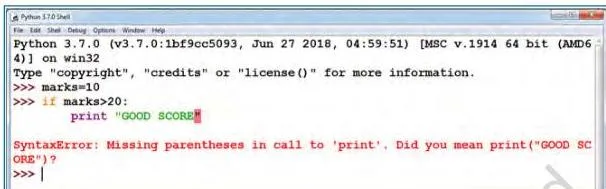
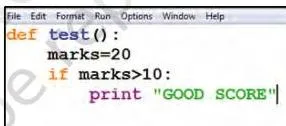
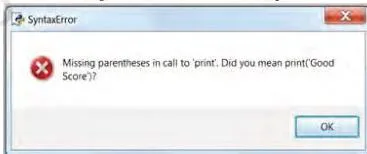
The lesson across all three: a syntax error stops the program before it executes. The interpreter will not run the code until the error is fixed, saved and rerun.
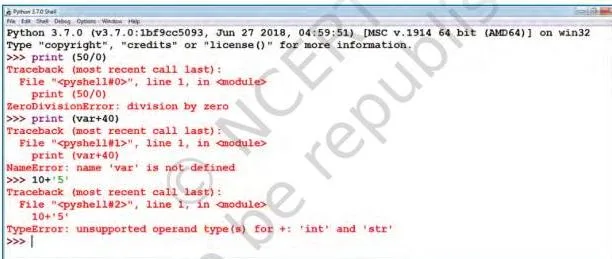
Figure 1.4 (p. 4): Built-in Exceptions in Action
This figure shows three built-in exceptions side by side as the interpreter raised them in different situations: ZeroDivisionError (denominator zero), NameError (undefined variable) and TypeError (wrong data type for an operator). Each message tells you both the exception name and the reason — which is exactly the information a handler can catch.
Figures 1.5–1.6 (pp. 5–6): The raise Statement and the Traceback
Figure 1.5 shows a deliberate raise of a user-defined exception with the message “OOPS : An Exception has occurred”. Figure 1.6 raises the built-in IndexError because the index used is larger than the list — and the message “NO EXECUTION” after the raise never prints.
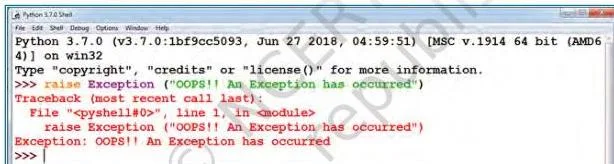
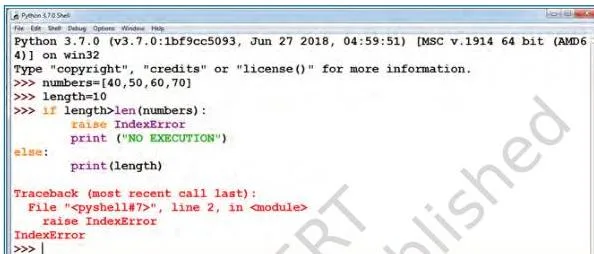
A stack traceback is the structured block of text Python prints alongside the error — it lists the sequence of function calls in the branch of execution where the exception was raised. It tells you where the error happened, not just what it was.
Figure 1.7 (p. 7): assert in Action
Program 1-1 defines a function negativecheck(number) whose first line is assert(number >= 0), "OOPS... Negative Number". Calling it with 100 prints the square; calling it with -350 makes the assert false, so Python raises AssertionError with the message “OOPS… Negative Number” and skips the rest of the function.
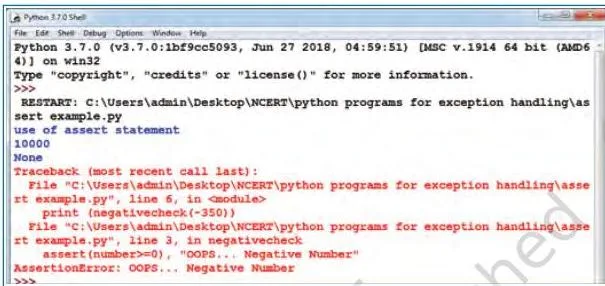
Figure 1.8 (p. 9): The Exception Handling Flowchart
This is the most important figure in the chapter — it is the whole process in one picture. Follow it from the top:
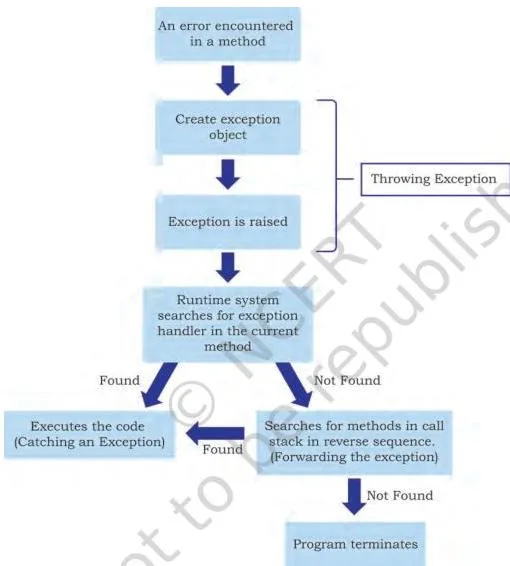
- Throw. An error occurs in the
tryblock; the interpreter creates an exception object and hands it to the runtime system. - Search. The runtime searches for an appropriate exception handler. It looks first in the method where the error occurred, then in the method that called it, and so on up — this reverse-order chain of methods is the call stack (p. 8).
- Catch. When a matching handler is found, the runtime executes it. That is called catching the exception.
- Fail. If no handler is found anywhere in the call stack, the program’s execution stops.
In plain words: Python looks for a rescue plan in the place the error happened, then in every place that called that place, moving outward until someone can handle it. If nobody can, the program dies.
Figures 1.9–1.13 (pp. 11–15): The Outputs of Programs 1-2 to 1-7
The remaining figures are outputs of the chapter’s worked programs, all variations of a division program. Figure 1.9 (Program 1-2 with a non-zero denominator) shows the quotient printed and the except block skipped. Figure 1.10 (denominator zero) shows the handler message “Denominator as ZERO… not allowed”.
In both, the final line “OUTSIDE try..except block” prints — proof that after an exception is handled, execution continues after the try-except block.
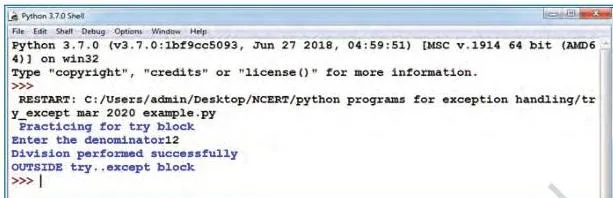
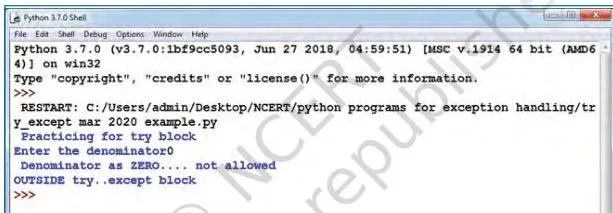
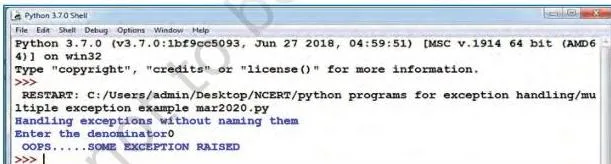
Figure 1.11 (Program 1-4) shows the bare except catching a ZeroDivisionError because no named handler for it exists — the message “ OOPS…SOME EXCEPTION RAISED” appears. Figure 1.12 (Program 1-5) shows the else clause printing the result when no error occurs.
Figure 1.13 (Program 1-7) is the subtle one: a non-numeric input raises ValueError, no handler matches it, yet “OVER AND OUT” from finally prints first — and then the unhandled exception is re-raised.
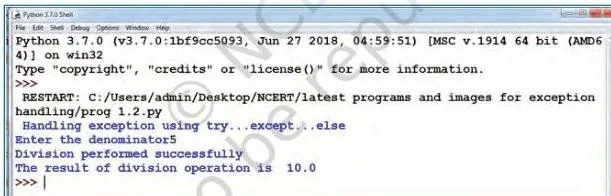
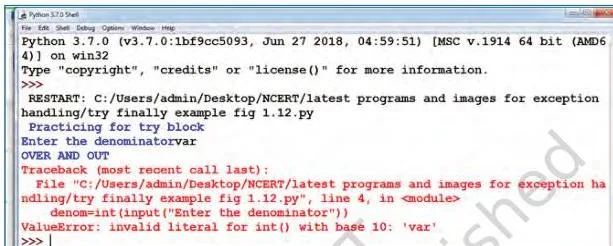
The one sentence to take from all of these: else runs only when nothing went wrong, finally runs no matter what.
Definitions: The Terms You Must Know
Exercise Question 5 asks for definitions, and the same terms run through the whole chapter. Learn these in the book’s own sense — they are the vocabulary of every answer you write.
- Syntax error / parsing error (p. 1)
- An error caused by not following the grammar rules of the programming language; the program will not execute until it is fixed.
- Exception (p. 3)
- A Python object that represents an error which arises during execution even when the code is syntactically correct.
- Built-in exception (p. 3)
- An exception already defined in the interpreter for a commonly occurring error, e.g. ZeroDivisionError.
- User-defined exception (p. 4)
- A custom exception created by a programmer to suit specific requirements.
- Exception object (p. 8)
- The object the interpreter creates when an error occurs; it carries the error’s type, file name and position in the program.
- Throwing an exception (p. 8)
- The process of creating the exception object and handing it to the runtime system so it can find suitable handler code.
- Call stack (p. 8)
- The list of methods searched, in reverse order of calling, for a handler that can catch the raised exception.
- Exception handler (p. 8)
- A block of code designed to execute when a specific exception is raised, so the program does not terminate abruptly.
- Catching an exception (p. 9)
- The process of executing a suitable handler once it is found in the call stack.
Common Mistakes Students Make in Exception Handling
Most lost marks in this chapter come from misreading the control flow, not from wrong syntax. Each mistake below names the wrong belief, the correct rule, and a way to check yourself.
| Mistake | Correct rule | How to check your answer |
|---|---|---|
| Thinking the program stops after an exception is handled | Execution continues after the try-except block | In Figures 1.9–1.10, “OUTSIDE try..except block” prints in both the error and no-error cases |
Writing statements after raise and expecting them to run |
Once raised, no further statement in the current block executes | In Figure 1.6 the message after the raise never prints |
Using a bare except where a named one is needed |
Name the specific exception first; use bare except only as the last clause |
Program 1-4: the bare clause catches only what the named handlers missed |
Omitting the final bare except |
An unhandled exception terminates the program | Program 1-7: ValueError with no handler ends in a traceback |
Thinking else runs when an exception occurred |
else runs only when no exception occurs in try |
Trace Program 1-5 with zero — else is skipped |
Forgetting finally runs even when nothing matches |
finally always runs; after it, an unhandled exception is re-raised |
Figure 1.13: “OVER AND OUT” prints before the ValueError traceback |
Confusing raise and assert |
raise throws the named exception unconditionally; assert throws AssertionError only if its expression is false |
AssertionError appears only in assert, never in a plain raise of another type |
Writing finally before except |
Order is try, all except clauses, else, then finally last (except for the else clause placement) |
A SyntaxError appears if except comes after finally |
Exam Preparation: How This Chapter Is Asked
The chapter’s own EXERCISE block on pages 17–18 is the best guide to how this material is asked: definitions, justifications, code-writing with a specific exception, and fill-in-the-blanks that test control flow, not syntax.
| Question | Concept it tests | What a full answer needs |
|---|---|---|
| Q1 | Syntax error vs exception | A justification: SyntaxError is itself an exception, but other exceptions arise only when code is syntactically correct |
| Q2 | Built-in exceptions ImportError, IOError, NameError, ZeroDivisionError | When each is raised, plus a supporting example for each |
| Q3 | Writing a raise statement |
Complete code that reads two numbers, divides, and raises an exception when the denominator is zero |
| Q4 | Rewriting with assert |
The same division program with an assert testing the denominator against zero |
| Q5 | Definitions: exception handling, throwing, catching | Three short precise definitions in the book’s own sense |
| Q6 | try and except blocks | An explanation that suspicious code goes in try and handlers go in except |
| Q7 | Fill in the blanks: ValueError, ZeroDivisionError, finally | Naming the correct built-in exception for each blank plus finally as the closing block |
| Q8 | Wrong argument count to math.sqrt() or math.pow() |
Code that calls a math method with too many arguments and catches the resulting TypeError — note the question’s framing mentions ValueError, but the class-level distinction between TypeError and ValueError is precisely what the chapter’s Table 1.1 prepares you to make |
| Q9 | Use of finally |
State that finally always executes, then add it to the Q7 program block |
One honest caution: textbook contents and the examinable syllabus are not always identical — check the current official CBSE syllabus for the session you are appearing in before treating any chapter section as examinable.
Revision Summary: Exception Handling in One Look
This is the whole chapter compressed, rebuilt from the book’s SUMMARY and NOTES in fresh words. Read it the night before the exam.
- Syntax errors (parsing errors) block execution until fixed; Python shows the error name, a description and a fix suggestion.
- An exception is a Python object that represents an error, raised when a syntactically correct statement fails at runtime.
- SyntaxError is also an exception — the one exception raised before runtime.
- The interpreter raises or throws the exception; the programmer must handle it or the program terminates abruptly.
- raise and assert both raise exceptions deliberately; after either runs, nothing after it in that block executes.
- An exception is caught in the try block and handled in the except block.
- Multiple except blocks are searched in order; a final bare except catches anything unmatched.
- else runs only when no exception occurs in the try block.
- finally always executes, whether or not an exception occurred — and after finally, an unhandled exception is re-raised.
- The runtime finds a handler by searching the call stack from the error’s method outward; if no handler exists anywhere, the program stops.
Related Resources: Class 12 Computer Science
This listing is maintained for the 2026-27 academic session using the NCERT textbook information available to us. NCERT remains the authority for confirming the latest edition.
Exception handling is Chapter 1 of the NCERT Computer Science book for Class XII. For notes and revision material on this chapter and the rest of the syllabus, see the Class 12 Computer Science notes and the Class 12 study hub for all subjects.
Python’s raise statement is the book’s own bridge to the next idea: the next chapter in this book continues the language tour. The book itself notes (p. 5) that the Stack is taken up in Chapter 3, so you can follow its planned path forward.
Sources and Data Verification
Four plain facts about where this page’s content comes from:
- The chapter contents, figures, page numbers and programs above describe the NCERT Computer Science textbook for Class XII, Chapter 1 (Exception Handling in Python), in the edition currently published on ncert.nic.in.
- This page covers that one chapter of that one book — not the full Class 12 Computer Science syllabus, which includes optional and elective components this page does not index.
- The page is maintained for the current academic session using the NCERT information available to us.
- NCERT settles textbooks, editions and official PDFs; CBSE settles the curriculum, syllabus and examinations. For an edition question, NCERT is the authority; for what is examinable, check the current CBSE syllabus.
Reference: NCERT Class 12 Computer Science textbook, chapter 1, official edition on ncert.nic.in.
Frequently Asked Questions
What is exception handling in Python and why is it needed?
Exception handling is the process of writing additional code that gives proper messages or instructions when an error occurs, so the program does not crash abruptly (p. 7). It is needed because every exception must be handled by the programmer — without a handler, the runtime system finds no matching code and the program’s execution stops (p. 8).
What is the difference between a syntax error and an exception?
A syntax error (or parsing error) means you broke the language’s grammar rules, and the program will not execute until it is fixed (p. 1). An exception arises during execution even when the code is syntactically correct — for example, dividing by zero (p. 3).
The chapter’s key point: SyntaxError is itself an exception, but all other exceptions are generated only when the program is syntactically correct.
What is the difference between the raise and assert statements?
raise throws an exception unconditionally the moment it runs — you name the exception and optionally pass an argument string (p. 5). assert tests an expression and raises AssertionError only if that expression is false, typically at the start of a function to check valid input (p. 6).
Is the finally clause always executed even when no exception occurs?
Yes. The statements inside the finally block always execute, regardless of whether an exception occurred in the try block or not (p. 13). It is commonly used with files to guarantee the file object is closed. If an exception occurs and no except block handles it, the finally block still runs first, and only then is the exception re-raised (p. 14).
What happens when no except block matches the exception that was raised?
The runtime system searches the entire call stack for a suitable handler; if none is found, the program’s execution stops (p. 8). If a bare except clause is present as the last clause, it catches the unmatched exception (p. 11–12). And if a finally block exists, it executes before the unhandled exception is re-raised (p. 14).
Which built-in exceptions are most important for Class 12 Computer Science?
The ones the chapter’s own exercises use: ZeroDivisionError (Q2d, Q7), ValueError (Q7, Q8), ImportError, IOError and NameError (Q2) — plus AssertionError for the assert statement and SyntaxError for Q1. All twelve from Table 1.1 are listed on pages 3–4.
Explore Class 12 Computer Science Books
- Next: File Handling in Python
Related chapters:
- Querying and SQL Functions
- Data Handling Using Pandas – I
- Stack