
Database Concepts is Chapter 8 of the NCERT Class 12 Computer Science textbook. It runs from page 110 to page 130 of the printed book and covers the file system, its six limitations, the database management system (DBMS), the relational data model and keys.
The official chapter PDF is linked below, and the rest of the page walks through what the chapter teaches, section by section.
You can download the NCERT Class 12 Computer Science Chapter 8 Database Concepts PDF from the official NCERT portal, where the complete textbook is published free of charge, so you can verify every page and table used here.
| What the chapter holds | Count | Where it is used |
|---|---|---|
| Printed pages | 20 | |
| Sections in the chapter | 11 | |
| Figures with NCERT captions | 3 | |
| Tables | 20 | |
| Exercise questions | 6 | answered in our NCERT Solutions |
| Activities | 1 | |
| Official NCERT PDF | Download the chapter PDF | the chapter exactly as NCERT publishes it |
What This Chapter Covers
This is the first chapter of the book that deals with storing and managing data electronically — getting data out of paper registers and loose files, and into a form a computer system can control. It opens by recalling the importance of data from the chapter before it, so you may want the preceding chapter’s notes open nearby.
The chapter’s counts table on this page lists how many captioned figures and exercise questions the chapter holds. The map below shows where each topic starts in the printed book, so you can follow along with a finger on your own copy.
| Chapter section | Printed page | What you will find there |
|---|---|---|
| 8.1 Introduction | p. 110 | The school attendance-register example and Activity 8.1 on manual record keeping |
| 8.2 File System | p. 112 | The STUDENT and ATTENDANCE files (Tables 8.1 and 8.2) |
| 8.2.1 Limitations of a File System | p. 114 | Six limitations, (A) to (F) |
| 8.3 Database Management System | p. 115 | The definition of a DBMS and real-life uses (Table 8.3) |
| 8.3.1 File System to DBMS | p. 116 | Redesigning the two files into the STUDENTATTENDANCE database |
| 8.3.2 Key Concepts in DBMS | p. 118 | Schema, constraint, meta-data, instance, query, manipulation, engine |
| 8.4 Relational Data Model | p. 120 | Relations and the five terms: attribute, tuple, domain, degree, cardinality |
| 8.4.1 Three Important Properties of a Relation | p. 123 | What makes a relation different from a data file |
| 8.5 Keys in a Relational Database | p. 123 | Candidate, primary, composite primary and foreign keys |
| SUMMARY | p. 125 | The chapter’s own recap of the main ideas |
| EXERCISE | p. 126 | The exercise set that closes the chapter (runs to p. 130) |
File System: Why Files Are Not Enough
A file is a container for data in a computer — text, program code, images, video (NCERT, p. 112). A computer can hold thousands of files without trouble; the trouble starts when files grow large and need to relate to each other. That is the problem this section sets up.
The chapter’s running example is a school. The office maintains a STUDENT file with six columns — RollNumber, SName, SDateofBirth, GName, GPhone, GAddress — and the class teacher maintains an ATTENDANCE file with AttendanceDate, RollNumber, SName and AttendanceStatus, marking P or A against each roll number each working day (NCERT, p. 112-113).
The same student’s name now lives in both files, and that is exactly where the problems start.
A file has no built-in way to retrieve data. To get anything out of it — say, a monthly attendance report for the school website — someone must write an application program for that specific purpose, and write a new one for every new question (NCERT, p. 114). Once the data grows, five more weaknesses appear.
The table below lists all six limitations, each with the school example that illustrates it.
| Limitation | What it means | The school example |
|---|---|---|
| (A) Difficulty in Access | Files provide no mechanism to retrieve data; every retrieval needs a freshly written application program | A monthly attendance report for the website requires a new program each time (p. 114) |
| (B) Data Redundancy | The same data is stored in more than one place | Student names appear in both STUDENT and ATTENDANCE; roll numbers 3 and 5 share a guardian, so that guardian’s details are stored twice (p. 114) |
| (C) Data Inconsistency | Copies of the same data stop matching when only one copy is changed | A name-spelling change or a leaving student is updated in one file by the office but not in the other by the teacher (p. 114) |
| (D) Data Isolation | Related files have no link or mapping between them | STUDENT and ATTENDANCE describe the same students, yet separate programs are needed to read each file (p. 114) |
| (E) Data Dependence | Programs stop working correctly if the file’s structure changes | Adding a column or changing a format means rewriting every program that reads the file (p. 115) |
| (F) Controlled Data Sharing | No way to give different users different access rights | Guardians and office staff should only read attendance; only the teacher should update it — a file system cannot enforce this (p. 115) |
Notice the redundancy and inconsistency pair: redundancy means the same fact sits in several places, and inconsistency is what happens when those copies disagree. Redundancy wastes storage and invites inconsistency (NCERT, p. 114).
Database Management System: The File System Fix
A database management system (DBMS) is the fix the chapter offers: software used to create and manage databases, sitting between the users and the stored data (NCERT, p. 115). MySQL, Oracle, PostgreSQL, SQL Server, Microsoft Access and MongoDB are the examples the book names (NCERT, p. 115).
Instead of unrelated files, a DBMS holds logically related data in one place and lets many users — office staff, teachers — work on it at the same time. The book lists real uses in Table 8.3: banking, crop loans, inventory management, organisation resource management and online shopping (NCERT, p. 115).
To convert the school’s two files into a database, the chapter makes three design changes (NCERT, p. 116-117):
- SName is dropped from ATTENDANCE. RollNumber already appears in both tables, so a student’s name can always be retrieved through it.
- STUDENT is split into STUDENT and GUARDIAN, so each guardian’s details are stored exactly once, even when two siblings share a guardian.
- A new column GUID (guardian ID) is added to GUARDIAN and copied into STUDENT, to say which student has which guardian. The book notes that phone number could distinguish guardians but can change, so it is not a safe choice (NCERT, p. 117).
This produces the STUDENTATTENDANCE database — STUDENT(RollNumber, SName, SDateofBirth, GUID), GUARDIAN(GUID, GName, GPhone, GAddress) and ATTENDANCE(AttendanceDate, RollNumber, AttendanceStatus).
Centralising data is not free. The chapter names two costs: increased complexity in managing security and consistency, and increased data vulnerability, because a single central failure can halt every user at once (NCERT, p. 120).
Section 8.3.2 then defines seven key terms (NCERT, p. 118-120). These are the terms most often confused with each other, so learn them as a set:
| Term | Meaning |
|---|---|
| Database Schema | The design of the database — table names, columns, data types, constraints and relationships (p. 118) |
| Data Constraint | A restriction on the data a column can hold, for example NOT NULL and UNIQUE on RollNumber (p. 118-119) |
| Meta-data / Data Dictionary | Data about the data — the schema and constraints stored by the DBMS in a catalog (p. 118-119) |
| Database Instance | The snapshot of the database at a given time, after data has been loaded (p. 119) |
| Query | A request to the database for information, written in SQL — the language the next chapter of the book puts to work (p. 120) |
| Data Manipulation | The three operations that change data: Insertion, Deletion and Update (p. 120) |
| Database Engine | The underlying component or set of programs that creates the database and handles queries (p. 120) |
If you remember one pair from this list, make it schema versus instance: the schema is the fixed design, and the instance is the moving snapshot of data inside it at any moment (NCERT, p. 118-119).
Relational Data Model: Tables, Tuples and Terminology
Of the several data models in use, the relational data model is the most common: store data in tables called relations and link related tables through shared columns (NCERT, p. 120). Everything later in the book, including SQL, assumes this model.
In a relation, each column has a unique name, and each row holds the data of one real-world entity — one student, one guardian, one day’s attendance.
Relations in a database are not independent tables. ATTENDANCE links to STUDENT through RollNumber, and STUDENT links to GUARDIAN through GUID; without these linking attributes the database cannot stay in a correct state or answer queries (NCERT, p. 120-121). Figure 8.3, read in the walkthrough below, draws the three linked relations.
The chapter anchors its terminology in the GUARDIAN relation (Figure 8.4, p. 121), which has four attributes — GUID, GName, GPhone, GAddress — and five tuples (NCERT, p. 121-122):
| Term | Definition | In GUARDIAN |
|---|---|---|
| Attribute | A column of a relation, also called a field | GUID, GName, GPhone, GAddress — 4 of them |
| Tuple | A row — with n columns, the n related values | One complete guardian record — 5 of them |
| Domain | The set of values an attribute may take, usually fixed by its data type | RollNumber’s domain is integers; SName’s is character strings (NCERT, p. 122) |
| Degree | The number of attributes in a relation | 4 |
| Cardinality | The number of tuples in a relation | 5 |
Worked example: find the degree and cardinality
Try it on fresh numbers. A library keeps the relation BOOK(BOOKID, Title, Author, ShelfNo) with these rows:
| BOOKID | Title | Author | ShelfNo |
|---|---|---|---|
| B101 | Chasing the Monsoon | R. Anand | A3 |
| B102 | Salt and Spice | L. Menon | B1 |
| B103 | The Last Post | V. Iyer | A1 |
| B104 | City of Flags | R. Anand | C2 |
| B105 | Paper Trails | S. Das | B2 |
- Degree = 4, because the relation has four attributes: BOOKID, Title, Author, ShelfNo.
- Cardinality = 5, because the relation has five tuples (five books).
- R. Anand appears twice, but that breaks no rule. Tuples must be distinct as whole rows, and no two rows above are identical.
The chapter then states the three properties that make a relation different from a data file or a simple table (NCERT, p. 123):
- Property 1 — attributes: every attribute has a unique name, and the sequence of attributes is immaterial.
- Property 2 — tuples: every tuple is distinct (no two identical rows), and the sequence of tuples is immaterial.
- Property 3 — state: all values in an attribute come from the same domain; every value is atomic (not divisible into meaningful parts — a phone number is one ten-digit value); no attribute can hold several values in one tuple; and the special value NULL represents unknown or non-applicable data, such as a guardian who did not share a phone number (NCERT, p. 123).
Two of these rules do most of the work in the exercise set. Atomicity is why one student cannot have two sports preferences, and NULL is the stored value when data is genuinely unknown. You will see both tested in Exercise 6.
Keys in a Relational Database
Property 2 says no two tuples in a relation may be identical, so every relation needs at least one attribute that is always distinct and never NULL. Keys are the constraints that guarantee this (NCERT, p. 123).
Candidate key: any attribute that always takes distinct values. Every such attribute is a candidate for the primary key. In GUARDIAN, both GUID and GPhone always take unique values, so both are candidate keys (NCERT, p. 124).
Primary key: the candidate the designer actually chooses to identify the tuples. If GUID is chosen, GPhone becomes an alternate key — a candidate key that did not make it (NCERT, p. 124).
Composite primary key: when no single attribute is unique, two or more attributes are used together as the primary key. In ATTENDANCE, RollNumber repeats across dates and AttendanceDate repeats across students, but the pair {RollNumber, AttendanceDate} is always unique — that pair is the composite primary key (NCERT, p. 124).
Foreign key: an attribute whose value comes from the primary key of another relation, used to represent the relationship between two relations. The relation holding it is the foreign (referencing) relation; the one holding the referenced primary key is the primary or master relation (NCERT, p. 125). In this database, GUID in STUDENT references GUARDIAN, and RollNumber in ATTENDANCE references STUDENT.
Because a relationship may not apply yet, a foreign key may hold NULL — as long as it is not part of its own table’s primary key (NCERT, p. 125). In Table 8.4, one student’s GUID cell is empty because that guardian’s record has not been created; the link simply does not exist yet.
Figure 8.5 draws the whole schema with keys marked, and the walkthrough below reads it for you.
| Key | What it does | NCERT example |
|---|---|---|
| Candidate key | Attribute that always holds a distinct, non-NULL value; a candidate for the primary key | GUID and GPhone in GUARDIAN (p. 124) |
| Primary key | The chosen candidate key used to identify tuples | GUID in GUARDIAN (p. 124) |
| Alternate key | A candidate key not chosen as the primary key | GPhone, once GUID is primary (p. 124) |
| Composite primary key | Two or more attributes taken together as the primary key | {RollNumber, AttendanceDate} in ATTENDANCE (p. 124) |
| Foreign key | Attribute that refers to the primary key of another relation | GUID in STUDENT refers to GUID in GUARDIAN (p. 125) |
Worked example: spot the keys in a cinema database
The CINEMA database below manages the movies screened by a multiplex. It is designed for this page with fresh numbers. Its two relations are MOVIE(MovieID, Title, Language, ReleaseYear, CensorCertNo) and SHOW(AudiNo, ShowDate, ShowTime, MovieID, TicketPrice), and SHOW contains these rows:
| AudiNo | ShowDate | ShowTime | MovieID | TicketPrice |
|---|---|---|---|---|
| 1 | 2024-01-15 | 10:00 | M101 | 220 |
| 2 | 2024-01-15 | 10:00 | M102 | 320 |
| 1 | 2024-01-15 | 13:30 | M103 | 320 |
| 2 | 2024-01-16 | 10:00 | M101 | 180 |
| 3 | 2024-01-16 | 19:00 | M104 | 260 |
- Candidate keys of MOVIE: MovieID and CensorCertNo, because both are guaranteed unique and never NULL. Title is not a candidate — two different films could share a title.
- Primary key of MOVIE: MovieID, the designer’s choice. The alternate key is CensorCertNo.
- Candidate key of SHOW: no single attribute qualifies — AudiNo repeats, ShowDate repeats, ShowTime repeats, MovieID repeats. But the combination {AudiNo, ShowDate, ShowTime} is always unique, because one auditorium runs one film at one time. It is the composite primary key of SHOW.
- Foreign key: MovieID in SHOW refers to MOVIE(MovieID). It is how a show knows which movie is playing.
Figure Walkthrough: What the Diagrams Show
Three diagrams carry most of the chapter’s visual ideas, and they show the same database at three stages: as an environment, as a set of related tables, and as a schema with keys. Reading them in that order follows the chapter’s own argument (NCERT, p. 119, 121, 125).
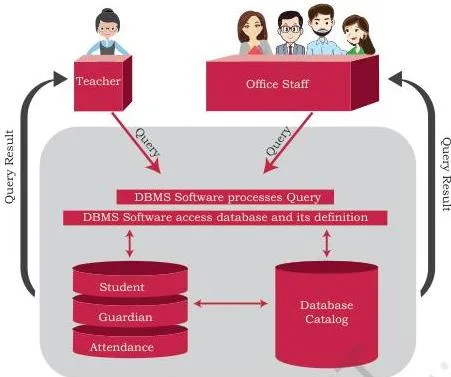
This diagram belongs to section 8.3.1 (File System to DBMS, p. 119). It shows the big structural change of the chapter: instead of two unconnected files, all data now sits in a single central repository, and the users — office staff and the teacher — reach that same data through the DBMS.
Centralisation is what allows the DBMS to enforce constraints and to serve several users at once. It is also the source of the trade-off the chapter flags a page later: one central store means one point of failure, which is the increased data vulnerability of a single database (NCERT, p. 120).
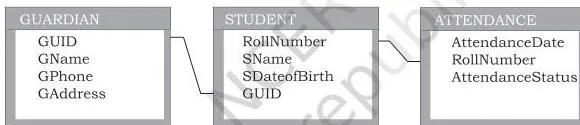
This diagram belongs to section 8.4 (Relational Data Model, p. 121). It redraws the same database as three relations — STUDENT, GUARDIAN and ATTENDANCE — and shows why they form one database rather than three files: the shared linking attributes. RollNumber appears in STUDENT and ATTENDANCE, and GUID appears in STUDENT and GUARDIAN.
Those columns are what let you combine data across tables, for instance attaching a student’s name to an attendance record.
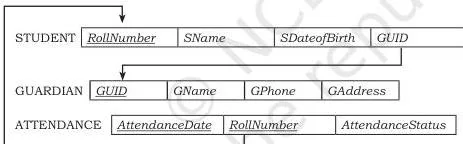
This diagram belongs to section 8.5 (Keys, p. 125). It is a schema diagram of the same three tables with the keys marked. The underlined attributes are the primary keys: RollNumber in STUDENT, GUID in GUARDIAN, and the pair (AttendanceDate, RollNumber) in ATTENDANCE — the composite primary key with two underlined columns.
The directed arcs (arrows) run from each foreign key to the primary key it references: GUID in STUDENT points to GUID in GUARDIAN, and RollNumber in ATTENDANCE points to RollNumber in STUDENT. Reading the arrows tells you, at a glance, which columns carry the relationships between tables.
Common Mistakes Students Make in This Chapter
The exercise set at the end of the chapter is the best map of where students slip. Five errors come up again and again, and each one is tied to a specific exercise question.
| Mistake | Correct rule | How to check your answer |
|---|---|---|
| Degree counts rows | Degree counts attributes (columns); cardinality counts tuples (rows). GUARDIAN has degree 4 and cardinality 5 (NCERT, p. 121-122) | Count the column headings for degree and the data rows for cardinality. Exercise 3(c) asks you to differentiate the two |
| Any unique-looking attribute can be the primary key | A primary key must be unique and must never be NULL; a single NULL in the column disqualifies it (NCERT, p. 123) | Scan the column for NULLs and duplicates before naming it. In Exercise 6 the table has a NULL in Roll_no and two rows for roll 17, so neither column alone can be the key; Exercise 13(a) applies the same rule |
| A foreign key must always match a primary key value | A foreign key may be NULL when it is not part of its own table’s primary key — the relationship simply does not apply yet (NCERT, p. 125) | Ask whether the relationship exists for this row; if it does not, NULL is legal. Exercise 2 asks you to explain the NULL cases with an example |
| Repeated values in a table are harmless | Storing the same fact in two places is redundancy; the chapter splits STUDENT precisely because siblings repeated guardian details (NCERT, p. 114, 116) | If updating one fact requires editing two rows or two tables, it is redundant. Exercise 4 asks how a DBMS avoids this |
| Reordering columns makes a different relation | Property 2: the sequence of attributes and the sequence of tuples are immaterial (NCERT, p. 123) | Compare the set of (attribute, value) pairs, not the arrangement. Exercise 7 gives two tables in different orders and asks whether the states are equivalent |
Exam Notes: What to Revise and How to Answer
This chapter is mostly vocabulary and design logic, so its questions come in a few predictable shapes. The printed exercise set is the pattern to practise against — this is honest guidance, not a promise about any particular paper.
One-line term questions. Exercise 1 (p. 126) is pure terminology. Learn the terms in pairs that are easy to confuse: schema with instance, degree with cardinality, candidate key with alternate key, data redundancy with data inconsistency. For each term, be ready to write the definition in one line — the book’s phrasing for NULL, candidate key, alternate key and meta-data is precise.
The ‘justify’ answer pattern. Justify questions such as Exercise 7 (p. 127) want a three-line shape: state the rule, apply it, conclude.
- State the rule: Property 2 of a relation — the sequence of attributes and of tuples is immaterial (NCERT, p. 123).
- Apply it: both tables hold the same five Roll_no–Sports pairs; section 2 has only reordered the columns and the rows.
- Conclude: the two relation states are equivalent.
Design questions. Exercises 8 and 10 (p. 127-129) reward a fixed format: write every relation as RELATION(attr1, attr2, …) with a data type for each attribute, name the primary key of each table, and state any extra constraint.
Exercise 10 is the cleanest model — UNIFORM takes UCode as its primary key, COST takes the composite primary key (UCode, Size), and the price column carries the constraint Price greater than 0. Exercise 12’s PROJECT_ASSIGNED is the second pattern to practise: a linking table that joins two master tables carries one foreign key to each of them (p. 129-130).
Reading the rules backwards. Exercises 12 and 13 (p. 130) make you apply the NULL and key rules in reverse: which insertions must be rejected, and why a value cannot be duplicated.
One last thing: the printed chapter and the examinable syllabus are not always identical. Check the current official CBSE syllabus for Class 12 Computer Science to confirm what is in scope this session.
For in-class notes and further practice for this book, use the Class 12 Computer Science notes page; to revise other subjects in the same sitting, the Class 12 index holds all subject notes.
Revision Summary
- A file is a container for data, but a file system fails at scale: no built-in retrieval, redundancy, inconsistency, isolation, dependence on structure, and no controlled sharing (NCERT, p. 114-115).
- A DBMS is software for creating and managing databases; MySQL, Oracle, PostgreSQL, SQL Server, Microsoft Access and MongoDB are the named examples (NCERT, p. 115).
- Schema is the design; instance is the data snapshot at a moment. A schema can have many instances over time (NCERT, p. 118-119).
- A query is a request for retrieval or manipulation, written in SQL; manipulation means Insertion, Deletion or Update (NCERT, p. 120).
- In the relational model a table is a relation; rows are tuples, columns are attributes. Degree counts attributes, cardinality counts tuples (NCERT, p. 121-122).
- Three properties: unique attribute names and immaterial order; distinct tuples and immaterial order; atomic same-domain values, no multi-valued attributes, and NULL for unknown data (NCERT, p. 123).
- Keys: candidate keys are the unique-attribute candidates; the chosen one is the primary key, the rest are alternate keys; a composite primary key uses two or more attributes; a foreign key points at another relation’s primary key and may be NULL when the link does not apply (NCERT, p. 123-125).
Sources and Data Verification
This listing is maintained for the 2026-27 academic session using the NCERT textbook information available to us. NCERT remains the authority for confirming the latest edition.
- All content on this page is drawn from NCERT’s Class 12 Computer Science textbook, Chapter 8 ‘Database Concepts’ (pages 110-130 of the printed book), official edition on ncert.nic.in.
- This page covers the Database Concepts chapter only. Later chapters of the same book implement these ideas in SQL and are not covered here.
- The page is maintained for the current academic session using the NCERT information available to us. It sits inside the CBSE notes library, which indexes classes and subjects separately.
- NCERT settles textbook editions and PDFs; CBSE settles the curriculum, the syllabus and the examinations. Because the printed book and the examinable syllabus are not always identical, verify what is examinable against the current official CBSE syllabus.
Frequently Asked Questions
What is the difference between a file system and a database management system?
A file system keeps data in separate files with no built-in way to retrieve or link them, so every access needs a new application program and the same data gets repeated across files.
A DBMS is software that stores logically related data in tables, lets multiple users query and update the same data, and enforces constraints such as keys — which removes redundancy, inconsistency, isolation and dependence (NCERT, p. 114-115).
What is the difference between degree and cardinality of a relation?
Degree is the number of attributes (columns) — GUARDIAN has degree 4 (GUID, GName, GPhone, GAddress). Cardinality is the number of tuples (rows) — GUARDIAN has cardinality 5. Column count versus row count (NCERT, p. 121-122).
Why can a foreign key have a NULL value?
Because a foreign key represents a relationship to another relation, and that relationship may not apply yet — for example, a student whose guardian record has not yet been created. NCERT states the rule as: a foreign key may hold NULL provided it is not part of its own table’s primary key (NCERT, p. 125).
How do candidate key, primary key and alternate key differ from each other?
Candidate keys are all attributes that always hold distinct, non-NULL values. The designer chooses one as the primary key, and the remaining candidate keys are called alternate keys. In GUARDIAN, GUID and GPhone are candidates; if GUID is primary, GPhone is alternate (NCERT, p. 124).
What is a composite primary key and when is it needed?
When no single attribute is unique, two or more attributes are taken together as the primary key. In ATTENDANCE, RollNumber repeats across dates and AttendanceDate repeats across students, but the pair {RollNumber, AttendanceDate} is always unique, so it forms the composite primary key (NCERT, p. 124).
What are the limitations of a file system that a DBMS overcomes?
The six are difficulty in access, data redundancy, data inconsistency, data isolation, data dependence and lack of controlled data sharing. A relational DBMS overcomes them by keeping related data in linked tables, storing each fact once, and enforcing keys and constraints (NCERT, p. 114-115).
Reference: NCERT Class 12 Computer Science textbook, chapter 8, official edition on ncert.nic.in.
Explore Class 12 Computer Science Books
- Previous: Project Based Learning
- Next: Structured Query Language (SQL)
Related chapters:
- Exception Handling in Python
- Querying and SQL Functions
- File Handling in Python