
Computer Networks Class 12 — chapter 10 of the NCERT Computer Science textbook — takes you from the basic idea of connected computers to the Domain Name System that turns a name you can type into an IP address a computer can use.
The chapter runs 22 printed pages, NCERT pages 181-202, and the official Computer Networks Class 12 chapter 10 PDF is available right below from the NCERT portal.
Below it, this page walks through the chapter section by section — network types, devices, topologies, addressing, web and DNS — with the NCERT page numbers so you can follow along in your own book.
Download the Computer Networks Class 12 Chapter 10 PDF
This is the official textbook file, not a summary or a third-party copy.
If you want to read the chapter exactly as printed in the book — including the diagrams and the closing exercise — you can download the Computer Networks Class 12 chapter 10 PDF from NCERT, hosted on the official NCERT textbook portal and free for students to use.
| What the chapter holds | Count | Where it is used |
|---|---|---|
| Printed pages | 22 | |
| Sections in the chapter | 29 | |
| Figures with NCERT captions | 22 | |
| Tables | 1 | |
| Exercise questions | 16 | answered in our NCERT Solutions |
| Activities | 4 | |
| Official NCERT PDF | Download the chapter PDF | the chapter exactly as NCERT publishes it |
What Does the Computer Networks Class 12 Chapter Contain?
The chapter table on this page shows its size at a glance — how many sections, figures, activities and exercise questions it holds, counted from the NCERT edition itself.
This chapter teaches: introduction to computer networks, evolution of networking, types of networks, network devices, networking topologies, identifying nodes in a networked communication, Internet, web and the Internet of Things, and the domain name system.
What This Chapter Covers: ARPANET to DNS in Order
This reading roadmap follows the chapter’s own section order, so you always know where you are in the book. Use it to plan one focused pass through the chapter.
| Section | What it teaches | NCERT pages |
|---|---|---|
| 10.1 Introduction to Computer Networks | What a network is, nodes, hosts, packets, wired and wireless media | 181-182 |
| 10.2 Evolution of Networking | ARPANET and the first message between UCLA and Stanford Research Institute | 183 |
| 10.3 Types of Networks | PAN, LAN, MAN and WAN, classified by area and data transfer rate | 184-186 |
| 10.4 Network Devices | Modem, Ethernet card, RJ45, repeater, hub, switch, router, gateway | 187-191 |
| 10.5 Networking Topologies | Mesh, ring, bus, star, tree or hybrid | 191-194 |
| 10.6 Identifying Nodes in a Networked Communication | MAC address and IP address | 194-195 |
| 10.7 Internet, Web and the Internet of Things | The Internet, the WWW, HTML, URL, HTTP | 195-196 |
| 10.8 Domain Name System | Domain names, domain name resolution, DNS server | 197-198 |
Along the way the book includes hands-on activities: Activity 10.1 asks you to identify networks in the real world, Activity 10.2 to create a hotspot from a smartphone, Activity 10.3 to list Internet service providers in your region, and Activity 10.4 to find the MAC address of your computer.
Key Concepts in Computer Networks
A network exists so devices can share data and resources among themselves. The subsections below cover the working ideas of the chapter — the definitions and distinctions you will be asked to reproduce — each tied to the NCERT page where it appears.
What a Network Is, and Why It Matters
The chapter’s opening idea is simple: a group of two or more similar things or people interconnected with each other is called a network (NCERT, p. 181). Social networks, mobile networks, and the networks used by airlines, railways, banks and hospitals are all examples of the same idea.
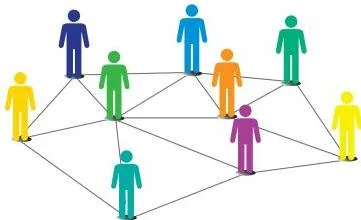
Figure 10.1 shows this general idea — a web of people connected to each other. The chapter uses it to show that a social network and a computer network share the same basic shape: nodes joined by connections.
A computer network is an interconnection among two or more computers or computing devices. That connection is what lets the devices share data and resources — a printer made available to many computers, or a networked storage drive accessed by several machines (NCERT, p. 182).
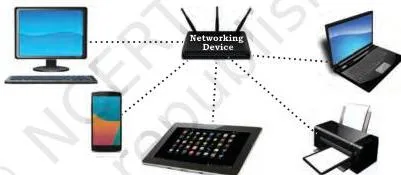
Figure 10.2 is the chapter’s basic picture of a computer network: computers and a printer joined together. The devices in such a network are called hosts or nodes — servers, desktops, laptops and phones can all be nodes (NCERT, p. 182).
Two more terms matter here. Data in a network is divided into smaller chunks called packets, which are carried across the network. A node is any device that is part of the network and can receive, create, store or send data along different network routes — including modems, hubs, switches, routers, printers and computers (NCERT, p. 182).
From ARPANET to the Internet
One historical fact runs through this topic: the network we use today grew out of ARPANET. In the 1960s the Advanced Research Projects Agency Network was commissioned by the U.S. Department of Defence to connect academic and research institutions so they could collaborate scientifically (NCERT, p. 183).
The first message travelled between the University of California, Los Angeles (UCLA) and Stanford Research Institute (SRI). More organisations joined over time, many independent smaller networks formed, and together they evolved into today’s Internet.
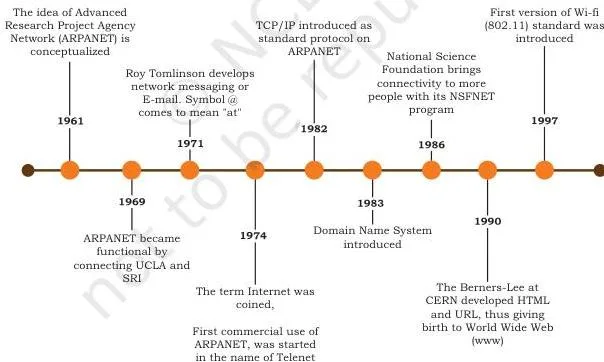
Figure 10.3 is a timeline of that journey. Read it as a sequence of milestones: ARPANET at the start, then the gradual joining of more organisations and networks, until the worldwide Internet we know today.
Choosing the Scale: PAN, LAN, MAN and WAN
Networks are classified by geographical area covered and data transfer rate (NCERT, p. 184). Ask how far the network reaches and how fast it moves data, and the four types place themselves.
| Network type | Area covered | Range and data rate | Example from the chapter |
|---|---|---|---|
| PAN (Personal Area Network) | A few personal devices close together | Within about 10 metres; wired or wireless | Phone connected to a laptop by USB (wired); two phones linked by Bluetooth (wireless) — p. 184 |
| LAN (Local Area Network) | One room, floor, office or campus | Up to about 1 km; 10 Mbps (Ethernet) to 1000 Mbps (Gigabit Ethernet) | School, college or university network — p. 185 |
| MAN (Metropolitan Area Network) | A city or town | Up to 30-40 km; data rate in Mbps but lower than LAN | Cable TV network, cable-based broadband — pp. 185-186 |
| WAN (Wide Area Network) | A country, or across countries and continents | Connects LANs and MANs; the Internet is the largest WAN | A bank’s network spanning branches worldwide — p. 186 |
The LAN row introduces Ethernet — the set of rules that decides how computers and other devices connect through cables in a LAN (NCERT, p. 185). The four figures below show the scale growing.
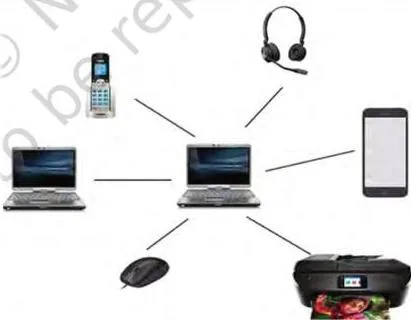
Figure 10.4 shows a personal area network: a small cluster of personal devices within reach of each other, wired or wireless.
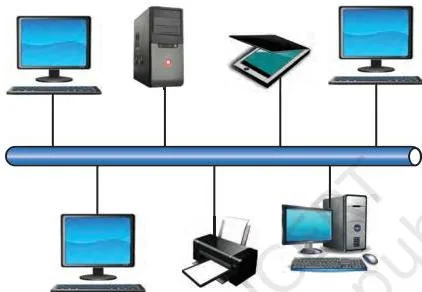
Figure 10.5 shows a local area network, where devices in one building or campus connect through wires, Ethernet cables, fibre optics or Wi-Fi (NCERT, p. 185).
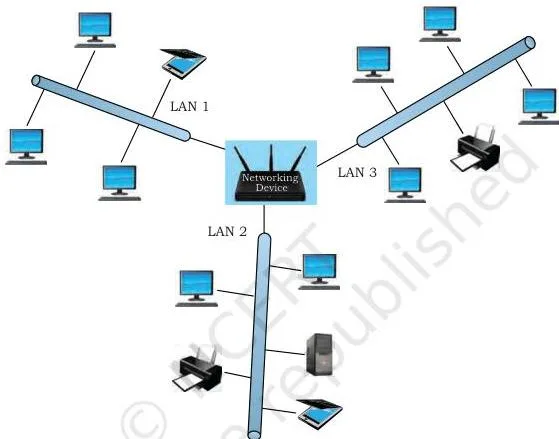
Figure 10.6 shows a metropolitan area network, sometimes formed by joining many LANs together across a city (NCERT, pp. 185-186).
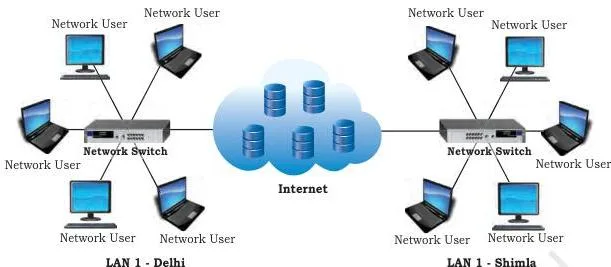
Figure 10.7 shows a wide area network, which connects LANs and MANs spread across a country or continents (NCERT, p. 186).
The book’s Think and Reflect asks whether your bank’s network is a LAN, MAN or WAN — since the chapter defines a WAN as reaching across different geographical locations of a country, a bank network you can access from anywhere points to a WAN.
Network Devices: What Each One Does
Devices are the hardware that makes the connections work. Learn the eight devices the chapter introduces by their one-line job, and keep the hub-versus-switch difference separate — it is the confusion students most often carry into a test.
| Device | What it does | NCERT page |
|---|---|---|
| Modem | MOdulator-DEModulator: converts digital bits to analog signals at the sending end and back to digital at the receiving end | 187 |
| Ethernet card (NIC) | Network adapter that sets up a wired network; acts as the interface between computer and network; carries the MAC address | 188 |
| RJ45 | Eight-pin connector used exclusively with Ethernet cables | 188 |
| Repeater | Analog device that regenerates a weakened signal and puts it back on the cable | 189 |
| Hub | Sends data arriving on any line out to all other lines; data from two devices arriving at the same time collides | 189 |
| Switch | Reads the destination address from a data packet and forwards it only to the right device; drops corrupted signals | 189 |
| Router | Receives data, analyses it and transmits it to other networks; can repackage data for a different network type | 190 |
| Gateway | Entry and exit point of a network; all incoming and outgoing data passes through it; firewall often integrated | 190-191 |
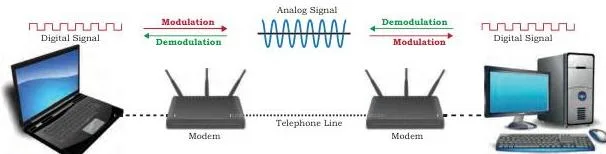
Figure 10.8 shows where the modem sits: between the computer and the transmission medium. At the sender it modulates digital data into an analog signal; at the receiver a second modem demodulates it back into digital bits (NCERT, p. 187).
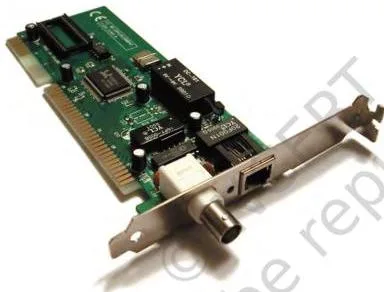
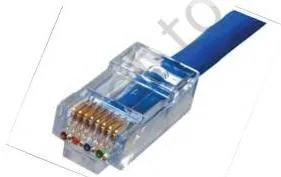
The chapter gives each device a picture, and recognising hardware helps in a test. Figure 10.9 shows the network interface card mounted on a motherboard; Figure 10.10 shows the RJ45 plug you see at the end of every Ethernet cable (NCERT, p. 188).
Figures 10.11 and 10.12 place the hub and the switch side by side. The hub repeats incoming data to every port; the switch looks up the destination address from the packet and sends it only where it belongs (NCERT, p. 189).
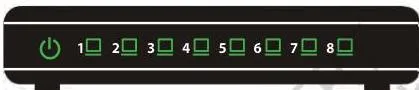
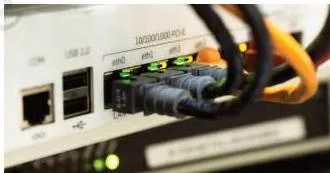
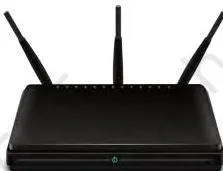
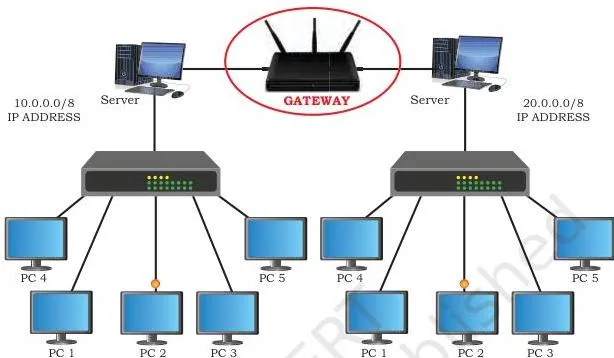
Figure 10.13 shows a router — and a home Wi-Fi router today often does the work of a router, modem and switch together (NCERT, p. 190). Figure 10.14 shows the gateway at the edge of a network, the gate through which all data must pass on its way to the outside Internet; a firewall is usually integrated with it (NCERT, pp. 190-191).
The switch section also defines an ISP — an Internet Service Provider is any organisation that provides services for accessing the Internet (NCERT, p. 189).
Topologies: The Shape of the Network
A network’s topology is the arrangement of computers and other peripherals in the network — the shape the connections make (NCERT, p. 191). The chapter presents five: mesh, ring, bus, star, and tree or hybrid. Each trades cabling cost against reliability and security.
| Topology | Shape | Strength | Weakness |
|---|---|---|---|
| Mesh | Every node connects to every other node | Handles heavy traffic, more reliable, more secure | High cabling cost, many redundant connections |
| Ring | Each node connects to exactly two neighbours; links are unidirectional | Simple structure with a clear data path | Less secure and less reliable |
| Bus | All nodes share one backbone cable called the bus | Cheaper and easier to maintain | Less secure and less reliable |
| Star | Each device connects to a central hub or switch | Effective, efficient and fast | Whole network fails if the central device fails |
| Tree or hybrid | Hierarchical branches, each branch a basic topology | Flexible; usually realised in WANs | More complex to set up |
Mesh topology deserves special attention because it has a formula. To build a fully connected mesh of \( n \) nodes you need \( \frac{n(n-1)}{2} \) wires — each node connects to every other node, and each cable is counted twice in the product \( n(n-1) \) (NCERT, p. 192).
- Step 1: Write the formula for a fully connected mesh of \( n \) nodes: \( \frac{n(n-1)}{2} \).
- Step 2: Put \( n = 6 \), because each of the six nodes needs to reach the other five.
\[ \frac{6 \times (6-1)}{2} = \frac{6 \times 5}{2} = \frac{30}{2} = 15 \]
Final answer: a 6-node mesh needs 15 cables.
The book’s Think and Reflect on page 193 asks you to reason about a bus and a ring when a node goes down. Use the definitions: a bus is one shared backbone every node depends on, and a ring passes data in one direction through neighbouring nodes — so trace where a signal can and cannot travel if one node fails.
MAC and IP Addresses: Telling Nodes Apart
Every node on a network needs a unique identity so data can be routed correctly. The chapter gives you two addresses that do this in different ways — a permanent physical one and a changeable logical one (NCERT, p. 194).
MAC address stands for Media Access Control. It is also called the physical or hardware address: it is engraved on the NIC at the time of manufacture, so it is permanent.
Each MAC address is a 12-digit hexadecimal number (48 bits): the first six digits (24 bits) are the manufacturer’s ID, the Organisational Unique Identifier (OUI), and the last six digits are the card’s serial number (NCERT, p. 194).
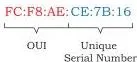
The figure at NCERT page 194 shows a MAC address in its written form: twelve hexadecimal digits (using 0-9 and A-F), the first half of the address belonging to the manufacturer.
IP address stands for Internet Protocol address. Unlike the MAC address, an IP address is assigned to each node in a network that uses the Internet Protocol, so it can change when a node is removed from one network and connected to another (NCERT, p. 195).
IPv4 is a 32-bit address written as four numbers from 0 to 255 separated by periods — for example \( 172.16.254.1 \). IPv6 is a 128-bit address written as eight groups of hexadecimal digits separated by colons — for example \( 2001:0DB8:0000:0000:0000:0000:1428:57AB \). IPv4 offers just under 4.3 billion unique addresses, which is why IPv6 was proposed (NCERT, pp. 194-195).
Internet, WWW and DNS
Two terms get confused every year: the Internet and the World Wide Web. The Internet is the global network of computing devices — desktops, laptops, servers, phones, printers and even smart appliances like TVs and refrigerators. The web is the collection of interlinked web pages and resources that sit on top of that network (NCERT, pp. 195-196).
Smart appliances that communicate through a network are part of the Internet of Things, which the chapter recalls was studied in Class 11 (NCERT, p. 195).
Sir Tim Berners-Lee, a British computer scientist, invented the World Wide Web in 1990 by defining three technologies (NCERT, p. 196): HTML (HyperText Markup Language) designs standardised web pages; URL (Uniform Resource Locator, also called URI) is the unique address of each resource on the web; HTTP (HyperText Transfer Protocol) is the set of rules used to retrieve linked web pages, with HTTPS as the more secure version.

The figure at NCERT page 196 shows how a URL is put together — and the point to notice is that a URL is not just the domain name; it carries the extra parts that complete the web address.
Because IP addresses are hard to remember, each server hosting a website is given a domain name — a name mapped to its IP address, like a phonebook entry (NCERT, p. 197). The chapter’s Table 10.1 pairs real domain names such as ncert.nic.in and wikipedia.org with their IP addresses.
Conversion of a domain name to its IP address is called domain name resolution, and it is done through a DNS server (NCERT, p. 197). When you enter a URL, the HTTP protocol asks a DNS server for the IP address of that domain name, then retrieves the page using that address.
DNS servers are placed in hierarchical order, with 13 root servers at the top named using letters A to M; the Internet Assigned Numbers Authority (IANA) keeps the list of root servers (NCERT, p. 197).
How to Read the Computer Networks Diagrams
Questions often ask you to identify a topology from a diagram, or to draw one. Learn to read each figure by its parts — what the circles, lines and arrows actually mean.
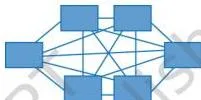
Figure 10.15 shows mesh topology. Every node has its own cable to every other node, so you see many crossing lines. That is why mesh handles heavy traffic, stays reliable when a node fails, and is more secure — but costs the most in cabling (NCERT, p. 192).
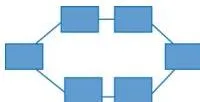
Figure 10.16 shows ring topology: nodes arranged in a circle, each connected to exactly two neighbours. The links are unidirectional, so data flows one way only — clockwise or counterclockwise (NCERT, p. 192).
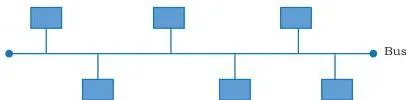
Figure 10.17 shows bus topology: every node attaches to a single backbone cable called the bus. Data sent by a node travels the length of the bus in both directions, so any node can receive it (NCERT, pp. 192-193).
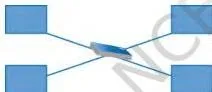
Figure 10.18 shows star topology: each device connects by its own cable to a central node — a hub or a switch. Trace any path and it always passes through the centre, which is why the whole network fails if the central device fails (NCERT, p. 193).
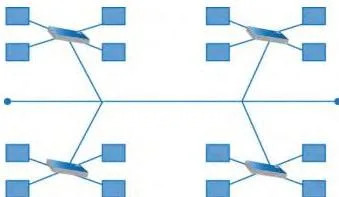
Figure 10.19 shows a hybrid topology — specifically four star topologies connected along a bus. Data from a source first reaches the centralised device and then passes through every branch, where each branch can have links for more nodes (NCERT, p. 193).
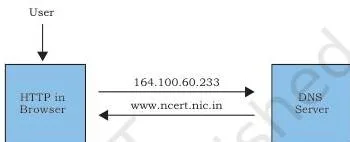
Finally, Figure 10.20 carries the book’s caption “Request of IP address corresponding to domain name”. Read it as a two-step dialogue: the browser’s HTTP protocol asks the DNS server for the IP address that belongs to the domain name you typed, and the DNS server replies with that IP address.
Only after that reply can the page be fetched and loaded (NCERT, p. 197).
Key Terms and Definitions in Computer Networks
This glossary turns the chapter’s terminology into one-line definitions you can reproduce under pressure. Each term appears in the chapter, with the page where it is defined.
| Term | Plain-language definition | NCERT page |
|---|---|---|
| Network | A group of two or more similar things or people interconnected with each other | 181 |
| Node | Any device in a communication network that can receive, create, store or send data | 182 |
| Packet | A smaller chunk into which data is divided for carrying over a network | 182 |
| PAN | Network of a few personal devices within about 10 metres, wired or wireless | 184 |
| LAN | Network covering a limited distance, from a single room to a campus | 185 |
| MAN | Extended LAN covering a city or town, up to 30-40 km | 185-186 |
| WAN | Network across a country, countries or continents | 186 |
| Ethernet | The set of rules for how devices connect through cables in a LAN | 185 |
| Modem | Device that converts between analog signals and digital bits | 187 |
| NIC | Network adapter that acts as the interface between a computer and a wired network | 188 |
| RJ45 | The eight-pin connector used with Ethernet cables | 188 |
| Repeater | Analog device that regenerates weakened signals on a cable | 189 |
| Hub | Device that sends data arriving on any line out to all other lines | 189 |
| Switch | Device that reads the destination address from a packet and sends data only to the selected device | 189 |
| Router | Device that receives, analyses and transmits data to other, possibly different types of, networks | 190 |
| Gateway | Entry and exit point of a network through which all data must pass | 190 |
| Topology | The arrangement of computers and other peripherals in a network | 191 |
| MAC address | Permanent physical address of a NIC, 48 bits or 12 hexadecimal digits | 194 |
| IP address | Address assigned to a node that uses Internet Protocol; IPv4 is 32-bit, IPv6 is 128-bit | 194-195 |
| Internet | The global network of computing devices | 195 |
| WWW | The interlinked collection of web pages and web resources | 196 |
| HTML | Markup language used to design standardised web pages | 196 |
| URL / URI | The unique address or path of each resource on the web | 196 |
| HTTP | The set of rules used to retrieve linked web pages; HTTPS is the secure version | 196 |
| Domain name | The name given to a server hosting a website, mapped to its IP address | 197 |
| DNS server | Server that converts a domain name into its IP address | 197 |
Common Mistakes Students Make in Computer Networks
The confusions below are the ones this chapter is built to expose. Name them now so you do not repeat them in a test.
| Mistake | Correct rule | How to check your answer |
|---|---|---|
| A hub sends data only to the destination device | A hub sends data arriving on any line out to all other lines; a switch reads the destination address and sends only to the selected device | If two devices send at the same time on a hub, their data collides (NCERT, p. 189) |
| The MAC address changes when I join a new network | MAC is permanent, engraved on the NIC at manufacture; the IP address is what can change | MAC identifies the hardware, IP identifies the node on a network (NCERT, pp. 194-195) |
| The Internet and the web are the same thing | The Internet is the global network of computing devices; the web is the interlinked collection of pages over it | The Internet can exist without any webpage to share; the web is accessed over the Internet (NCERT, p. 196) |
| Ring and bus topologies are the most reliable | Both are considered less secure and less reliable | A bus has one shared backbone and a ring has one direction of travel — no alternative path (NCERT, pp. 192-193) |
| A star network keeps working if its centre fails | Any failure in the central hub or switch leads to failure of the complete network | Every node depends on its single link to the centre (NCERT, p. 193) |
| A mesh of n nodes needs n(n-1) wires | It needs \( \frac{n(n-1)}{2} \) wires | Each cable is counted twice in n(n-1), so divide by 2 (NCERT, p. 192) |
| A MAC address is four decimal numbers | MAC is 12 hexadecimal digits; IPv4 is four decimal numbers from 0 to 255 | Hex digits include A-F; IPv4 numbers never exceed 255 (NCERT, p. 194) |
Three Think and Reflect boxes in the chapter pose exactly these traps: whether a mobile phone’s MAC address is different from its IMEI number (p. 195), whether the bank’s network is a LAN, MAN or WAN (p. 186), and how bus and ring topologies behave when a node is down (p. 193).
Use the definitions above to work each one out as a self-test.
How to Use the Closing Exercise to Revise Computer Networks
The closing exercise is a built-in self-test for the whole chapter. Use the map below to see which section answers each style of question, then go back to that section only if you hesitate.
| Exercise questions | What they test | Where the answer is |
|---|---|---|
| Q1 (a)-(d): expand ARPANET, MAC, ISP, URI | Abbreviations spread across the chapter | ARPANET p. 183; MAC p. 194; ISP p. 189; URI p. 196 |
| Q2, Q3: the term network and two advantages | Section 10.1 | pp. 181-182 |
| Q4: differentiate LAN and WAN | Section 10.3 | pp. 184-186 |
| Q5: commonly used networking devices | Section 10.4 | pp. 187-191 |
| Q6: two universities in different states | WAN — it connects locations across a country | p. 186 |
| Q7-Q9: topology, tree vs bus, identify the topology | Section 10.5 | pp. 191-194; the single-cable answer is bus, the central-switching answer is star |
| Q10: modem and why it is used | Section 10.4.1 | p. 187 |
| Q11 (a)-(e): switch, repeater, router, gateway, NIC | Device explanations | pp. 188-191 |
| Q12: draw star and bus topologies with five computers | Diagram reading | See Figures 10.17 and 10.18 in the walkthrough above; pp. 192-193 |
| Q13: significance of MAC address | Section 10.6.1 | p. 194 |
| Q14: IP address vs MAC address | Section 10.6 | pp. 194-195 |
| Q15: DNS and DNS server | Section 10.8 | pp. 197-198 |
| Q16: Sahil’s Internet vs WWW confusion | Section 10.7.1 | p. 196 |
For a complete answer to a definition question, state the term, give the chapter’s meaning, and add one distinguishing detail — for example, a modem converts digital to analog at the sender and back to digital at the receiver, and IP addresses can change while MAC addresses cannot.
One honest warning: textbook contents and the examinable syllabus are not always identical. Before you plan what to study, check the current official syllabus on the CBSE website (cbse.gov.in).
Five-Minute Recap: Computer Networks from Start to DNS
Five minutes before the test, read this list. It is built from the points NCERT itself uses to close the chapter (SUMMARY and NOTES, pp. 198-200), rewritten so you can skim them fast.
- A computer network is an interconnection among two or more computers or computing devices, and it exists so they can share data and resources.
- A node is any network device that can receive, create, store or send data along network routes.
- Based on area and data transfer rate, networks are classified as PAN, LAN, MAN and WAN; the Internet is the largest WAN.
- Ethernet sets the rules for cable-based connection in a LAN; LAN data rates run from 10 Mbps to 1000 Mbps.
- Modem converts between analog signals and digital bits; NIC gives each computer its MAC address; repeater regenerates weakened signals; switch forwards data to the right device; router connects different types of networks; gateway is the entry-exit point of a network.
- Topology is the arrangement of computers and peripherals — mesh, ring, bus, star, tree or hybrid.
- MAC address is the permanent hardware address of a NIC; IP address can change when a node moves between networks.
- The Internet is the global network of devices; the WWW is the interlinked collection of web pages over it, invented by Tim Berners-Lee in 1990 with HTML, URL and HTTP.
- Domain names map easy-to-remember names to IP addresses; domain name resolution converts the name back to an IP address through a DNS server.
Continue with Class 12 Computer Science
Once this chapter is done, continue with the rest of the book. Start at the Class 12 Computer Science NCERT book page, which lists every chapter alongside the resources for it. For the chapters on either side of this one, the next links take you to chapter 9 of the Class 12 Computer Science book and chapter 11 of the Class 12 Computer Science book.
You can also jump to the Class 12 NCERT books hub to move to another subject, or browse the full directory of NCERT book pages on this site.
Sources and data verification
This listing is maintained for the 2026-27 academic session using the NCERT textbook information available to us. NCERT remains the authority for confirming the latest edition.
This page describes the NCERT Class 12 Computer Science textbook, Chapter 10 (Computer Networks), in the official edition published on ncert.nic.in. The chapter’s printed pages are 181-202; the page references, figures and exercise questions cited above come from that edition.
This page covers this chapter only, not the full Class 12 Computer Science textbook or the full subject syllabus. NCERT settles textbooks, editions and PDFs, while CBSE settles curriculum, syllabus and examinations — and textbook contents and the examinable syllabus are not always identical, so check the current official syllabus for what is examinable.
The chapter table in this page’s contents section is maintained against the NCERT edition currently published on the official portal.
Reference: NCERT Class 12 Computer Science textbook, chapter 10, official edition on ncert.nic.in.
Frequently Asked Questions about Computer Networks Class 12
What is a computer network in the Class 12 Computer Science chapter?
A computer network is an interconnection among two or more computers or computing devices that allows them to share data and resources (NCERT, p. 181). The devices in the network are called nodes or hosts — servers, desktops, laptops and phones — and the data they exchange is divided into smaller chunks called packets (NCERT, p. 182).
What is the difference between a hub and a switch?
A hub sends data arriving on any of its lines out to all the other lines, so data from two devices arriving at the same time will collide. A switch extracts the destination address from each packet and forwards it only to the selected device; it also drops corrupted signals and asks the sender to resend them (NCERT, p. 189).
What is the difference between MAC address and IP address?
A MAC address is the physical or hardware address engraved on the NIC at manufacture — it is permanent and 48 bits long, written as 12 hexadecimal digits. An IP address is assigned to a node that uses the Internet Protocol and can change when the node moves to another network; IPv4 is 32 bits and IPv6 is 128 bits (NCERT, pp. 194-195).
What is DNS and what does a DNS server do?
DNS is the Domain Name System. Because IP addresses are hard to remember, each web server is given a domain name, and the conversion of a domain name back to its IP address is called domain name resolution.
A DNS server does this conversion: when you enter a URL, HTTP asks the DNS server for the IP address of that domain name, and the server replies with it (NCERT, p. 197).
Is the Internet the same as the World Wide Web?
No. The Internet is the global network of computing devices — the infrastructure that connects them. The web is the collection of interlinked web pages and resources stored on those computers and accessed over the Internet. The Internet may or may not have any file or webpage to share, but the web cannot be accessed without the Internet (NCERT, pp. 195-196).
Explore Class 12 Computer Science Books
Related chapters:
- Exception Handling in Python
- Querying and SQL Functions
- File Handling in Python