
These are the complete Societal Impacts Class 12 notes for the 2026-27 session, prepared from the NCERT Informatics Practices textbook (pages 167–194). The page condenses the whole chapter — digital footprints, digital society and netizen etiquettes, data protection and intellectual property rights, Creative Commons licenses, cyber crime, the Indian IT Act 2000, e-waste and health — into a form you can revise in one sitting.
Use the notes in three passes. First read the concept sections in order to rebuild the full picture. Then test yourself on the worked examples, the common mistakes table and the self-check list. Finally run through the Revision Summary and the FAQ — if you can answer those from memory, the chapter is done.
These notes sit inside the larger Class 12 Informatics Practices notes collection. The chapter has no mathematical formulas, so the revision burden is definitions, classifications and scenario reasoning — which is exactly what the tables below are built for. To verify any definition against the official text, the official NCERT chapter PDF (leip106.pdf) is available on ncert.nic.in.
Societal Impacts in One Look: The Chapter Map
The textbook’s order is also the best revision path: it moves from the personal trail you leave (digital footprints), to the rules society expects online (netizen etiquettes), to legal protection (IPR and the IT Act), and finally to the physical world (e-waste and health). Follow that order and every concept builds on the one before it.
| Topic | What to remember | Textbook pages |
|---|---|---|
| Digital Footprints | Active vs passive trails; stored on servers; no guarantee of full deletion | 168–169 |
| Digital Society and Netizen | Three etiquette codes — net, communication, social media | 169–174 |
| Data Protection and IPR | Sensitive data; copyright, patent, trademark; licensing | 174–178 |
| Creative Commons | Six licenses decoded from BY + NC/ND/SA conditions | 178–179 |
| Cyber Crime | Hacking, phishing, identity theft, ransomware; computer as medium or tool | 179–182 |
| Indian IT Act 2000 | Amended 2008; digital signatures; Cyber Appellate Tribunal | 182–183 |
| E-waste | Environment and human impact; the 3 Rs; Polluter Pays Principle | 183–186 |
| Impact on Health | Ergonomics, eye strain, posture | 186–188 |
The chapter has no formulas, so classification questions matter more than calculation. If you need quick theory from another subject while revising, browse all Class 12 notes on this site.
Digital Footprints: The Trail You Cannot Erase
Whenever you search, book a ticket, reply to email or check a score online, you leave a trail of data reflecting those activities. That trail is your digital footprint, and it is created and used with or without your knowledge (NCERT, p. 168).
It includes the websites you visit, the emails you send and the information you submit, along with the computer’s IP address, location and other device-specific details.
- Active footprint: data you intentionally submit — emails you write, responses or posts on websites and mobile apps.
- Passive footprint: data generated unintentionally — what gets logged when you visit a website, use an app or browse.

Figure 6.1 collects exemplar web applications — search, social, booking, messaging and more — to show how many everyday apps are sources of the trail. The browser itself stores browsing history, cookies, passwords and autofill data (NCERT, p. 169). But most of your footprint sits on the servers where the applications are hosted — data you cannot remove and cannot control.
That is why deleting your posts gives no guarantee of full elimination: the trail remains, and it can be used to trace the user, their location, device and usage details. Being cautious about what you write, upload, download or browse is therefore not optional. The Internet and Web chapter notes explain the technologies behind browsing and servers in more depth.
Digital Society, Netizen and the Three Etiquette Codes
A digital society runs daily activities — communication, banking, shopping, education, entertainment and transport — through online transactions. Anyone who uses digital technology along with the Internet is a digital citizen or netizen. A good netizen practises safe, ethical and legal use of digital technology, and must follow three codes: net etiquettes, communication etiquettes and social media etiquettes (NCERT, p. 169).
| Etiquette family | Where it applies | The Be-rules | One warning to remember |
|---|---|---|---|
| Net etiquettes | General online behaviour — browsing, forums, sharing content | Be ethical, be respectful, be responsible | Every online action can be traced back through the digital footprint |
| Communication etiquettes | Email, chat, calls, forums, comments | Be precise, be polite, be credible | Posted or commented content is never permanently deleted |
| Social media etiquettes | Social networking platforms | Be secure, be reliable | Files stay on remote servers even after deletion; never meet an online friend |
Net Etiquettes: Ethical, Respectful, Responsible
The three net-etiquette rules cover how a person treats others and their work while online.
- Be Ethical: avoid copyright violation — do not use copyrighted material without the creator’s or owner’s permission; share expertise only when the information is true, unambiguous and not already available online (no redundancy).
- Be Respectful: think before sharing credentials; keep personal information protected by passwords; respect privacy — do not share private images, documents or files without each person’s consent; respect diversity of knowledge, experience and culture in groups and forums.
- Be Responsible: avoid cyber bullying — repeated posting of rumours, online threats, posting a victim’s personal information, or comments aimed to publicly ridicule a victim (NCERT, pp. 170–171); do not feed the troll — a troll deliberately sows discord online for amusement and thrives on attention, so ignoring is the best discouragement.
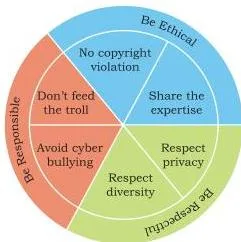
Figure 6.2 illustrates net etiquettes — the manners a netizen should exhibit while online. The chapter’s warning is grounded: actions can be traced back using digital footprints, so online behaviour has real-world consequences.
Communication Etiquettes: Precise, Polite, Credible
Digital communication includes email, text and instant messaging, calls, conferencing, forums and social posts. Figure 6.3 summarises the communication etiquettes expected across all of them.
- Be Precise: respect the recipient’s time — no unnecessary replies; avoid spam — on junk email, never reply and never open attachments; respect data limits — send compressed files or cloud-shared links (Google Drive, OneDrive, Dropbox) instead of very large attachments.
- Be Polite: stay non-aggressive whether the communication is synchronous (chat, calls) or asynchronous (email, forum posts) — even when you disagree.
- Be Credible: your comments and replies decide your credibility over time; forums judge a person’s reliability by their previous comments.
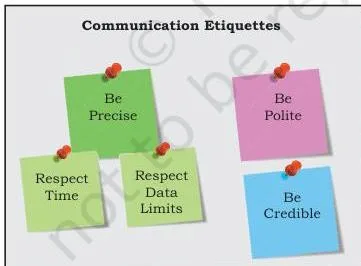
The critical warning in this family is No Permanent Deletion: anything posted or commented can be deleted later, but never permanently. It stays recorded in the digital footprint — which is how culprits who spread hate, bully or commit crimes are traced and apprehended (NCERT, p. 172).
Social Media Etiquettes: Secure, Reliable
Social media are websites or applications that enable users to participate in social networking by creating and sharing content. Figure 6.4 presents the etiquettes expected on these platforms.
- Be Secure: choose strong, frequently changed passwords and never share credentials; be careful while befriending unknown people — their intentions may be malicious; beware fake news, messages and posts — validate before believing.
- Be Reliable: think before uploading — files remain on the remote server even after deletion, so be cautious with sensitive content; never arrange to meet an online friend, because people can pretend and hide their real identity; think carefully before sharing personal photos.
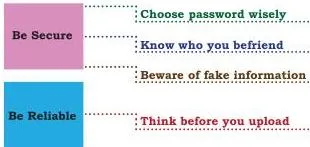
The chapter’s own reflection question asks whether one password for all accounts is safe. It is not: a single leaked credential opens every account you own, which is exactly why the security rules demand strong, different passwords.
Data Protection and Intellectual Property Rights
Data protection is about the privacy of digitally stored data. Sensitive data is data that can cause substantial harm, embarrassment, inconvenience or unfairness if it is breached or compromised — biometric information, health and financial information, personal documents, and images, audio or video (NCERT, p. 174).
Privacy is implemented through encryption, authentication and other secure methods, so that data stays accessible only to authorised users for legitimate purposes. Each country has its own data protection policies — legal documents that set guidelines on the processing, storage and transmission of sensitive information.
Copyright, Patent, Trademark: The IPR Trio
An original idea is intellectual property: inventions, literary and artistic expressions, designs and symbols, names and logos. Ownership lies with the creator, who can earn recognition or financial benefit from it. IPR is legally protected through copyrights, patents and trademarks.
| Type | What it protects | How it is granted | Example / term |
|---|---|---|---|
| Copyright | Original creative works — writing, photographs, audio, video, sculptures, architectural works, software | Automatic, on creation; holder gains rights to copy, create derivative works, distribute, and publicly display or perform | Rudyard Kipling’s The Jungle Book |
| Patent | Inventions | Must be filed by the inventor | Exclusive control of use, sale and distribution for 20 years, then free use |
| Trademark | Visual symbols, words, names, designs, slogans, labels that distinguish a brand | Registered for brand use | Only Nike may use the Nike mark; a confusing “Nikke” is barred |
A license is the permission agreement between the creator and the user, generally for a price; copyright is the creator’s legal protection over the original work. Only the copyright owner can enter into a license agreement.
An End User License Agreement (EULA) lists the dos and don’ts of software purchase — how many copies can be installed, whether the source is available, whether it can be modified and redistributed (NCERT, p. 175).
Violations of IPR: Plagiarism and Infringement
Violation of intellectual property rights happens in three ways (NCERT, pp. 176–177):
| Violation | Definition | Key point |
|---|---|---|
| Plagiarism | Presenting someone else’s idea or work as your own | Missing citation — a serious ethical offence, sometimes fraud |
| Copyright infringement | Using another’s work without permission, or without paying if it is sold | Missing permission — even citing the source does not make it legal |
| Trademark infringement | Unauthorised use of another’s registered trademark | The owner may commence legal proceedings |
The cleanest way to separate the first two: plagiarism is about a missing citation; copyright infringement is about missing permission or payment. Just because an image is on the Internet does not mean it is free for use — check the copyright status before using it (NCERT, p. 176).
FOSS, Freeware and Software Piracy
Copyright restricts use; licenses provide the rules for legal reuse. The key software terms:
- GNU GPL: the most widely used free software license — grants freedom to run, study, share and modify, and the same rights must be preserved in derivative works; distributors may charge a fee for copies (NCERT, p. 177).
- Freeware: free copying for personal use, but no commercial distribution and closed source — examples are Skype and Adobe Acrobat Reader.
- Proprietary software: sold commercially; the source code is not shared or distributed.
- FOSS (Free and Open Source Software): source code is open for anyone to access, modify, correct and improve — examples are Ubuntu, Fedora, LibreOffice and Mozilla Firefox.
- Software piracy: unauthorised use or distribution of software. Making extra copies without permission is infringement whether the copies are for sale, free distribution or your own use. Piracy degrades system performance and hurts the software industry and the economy (NCERT, p. 178).
Creative Commons Licenses: The Six Combinations
Creative Commons is a non-profit organisation that builds a publicly accessible global platform where creative and academic works are shared freely (NCERT, p. 178). Anyone can access, share and build upon them without infringing copyright, because CC licenses give proper attribution to the owners. The CC Search feature of the platform makes licensed material easier to find.
| License | What users may do | Restriction |
|---|---|---|
| CC BY | Distribute, remix, tweak and build upon the work, even commercially | Must credit the original creator |
| CC BY-SA | Remix, tweak and build upon it, even commercially | Credit + new works must carry the identical license |
| CC BY-ND | Reuse the work for any purpose, including commercial | Cannot share adapted versions |
| CC BY-NC | Remix, tweak and build upon it non-commercially | New works must credit and be non-commercial |
| CC BY-NC-SA | Remix, tweak and build upon it non-commercially | New works must credit and carry the identical license |
| CC BY-NC-ND | Download and share with credit | Most restrictive: no changes and no commercial use |
You can decode all six without memorising each row. BY (attribution) is the base that is always present. Add NC to ban commercial use, add ND to ban sharing adapted versions, and add SA to demand that derivative works carry the same license.
Because SA requires derivatives while ND forbids them, ShareAlike and NoDerivs never combine — that is why there are six licenses, not eight. CC BY-NC-ND is the most restrictive of the six (NCERT, p. 179).
The chapter’s Remember box adds the summary: CC licenses give recipients the rights to copy, modify and redistribute the creative material while the author sets the conditions; the GPL grants the same copy-modify-redistribute rights for software, preserved in all derivative works (NCERT, p. 177).
Cyber Crime: Types, Tactics and Prevention
Cyber crime covers criminal activities carried out in a digital environment, against an individual, group, organisation or country, with intent to cause physical harm, financial loss or mental harassment (NCERT, p. 179). The chapter’s test: the computer is either the medium of the crime (hacking, phishing, spamming) or a tool used to commit a crime (extortion, data breaches, theft).
A virus is malicious code that can copy itself and damage systems; malware is software designed specifically to gain unauthorised access.
For the headline offences, remember HIPR: Hacking, Identity theft, Phishing and Ransomware.
The chapter’s prevention checklist (NCERT, p. 182) condenses into one list:
- Take regular backups of important data.
- Use an antivirus and keep it updated.
- Avoid pirated software; download only from known, secure (HTTPS) sites.
- Keep the system software, browser and applications updated.
- Avoid untrusted websites and heed certificate warnings.
- Use strong, different passwords for different sites; ignore common words and names.
- On shared computers, browse in a private window and do not save passwords or autofill data.
- Decline cookies on unknown sites.
- Transact only on well-known, secure sites.
- Secure the home wifi with a strong password, changed regularly.
Hacking and Ethical Hacking
Hacking is unauthorised access to a computer, network or digital system by exploiting bugs (NCERT, p. 180). Ethical hacking (white hat hackers) is done with positive intent: experts probe software to discover vulnerabilities and report them to the owner, in effect preparing the owner against attack.
Non-ethical hacking (black hat hackers or crackers) is unauthorised access to steal sensitive data, damage systems, leak information or commit identity theft. The chapter’s Beware warning: never open email links or attachments from untrusted sources — they may carry a virus or lead to a malicious website.
Phishing, Email Spoofing and Identity Theft
Phishing is the unlawful collection of sensitive personal details using fake websites or emails that look original, targeting usernames, passwords and banking or credit card details (NCERT, p. 180). Email spoofing is a forged email address that makes the user believe the mail is from an authentic source — the logo may imitate the original, but the URL is fake.
Identity theft steals a person’s identifiable data — demographics, email ID, banking credentials, passport, PAN, Aadhaar — to commit fraud (NCERT, p. 181). It takes three forms:
- Financial identity theft: the stolen identity is used for financial gain.
- Criminal identity theft: criminals hide their true identity behind the victim’s.
- Medical identity theft: drugs or treatment are obtained using the stolen identity.
Ransomware
In ransomware, the attacker gains access to the computer and blocks the user, usually by encrypting the data, then blackmails the victim for payment — sometimes threatening to publish personal or sensitive information or photos (NCERT, p. 181). It enters through malicious or unsecure websites, doubtful software repositories, spam email attachments and malicious advertisements.
Notice that these are exactly the risky behaviours the prevention checklist targets.
Indian IT Act 2000 (Amended 2008): Legal Backbone
The Information Technology Act, 2000, amended in 2008, is the Government of India’s legal measure against cyber fraud and cyber crime (NCERT, p. 182). It provides guidelines on the processing, storage and transmission of sensitive information; it creates a legal framework for electronic governance by recognising electronic records and digital signatures; and it outlines cyber crimes and their penalties.
In many Indian states, cyber cells in police stations accept cyber crime reports.
The Cyber Appellate Tribunal resolves disputes arising from cyber crime — such as tampering with computer source documents, hacking a computer system, using another person’s password, and publishing sensitive personal data without consent.
Digital signatures are the digital equivalent of a paper certificate. They work on a unique digital ID issued by a licensed Certifying Authority under Section 24 of the IT Act 2000; signing a document digitally attaches the user’s identity, which can be used for authentication. The Act also lets government departments accept filing, creation and storage of official documents in digital format.
E-waste: Hazards and Management
E-waste, or Waste Electrical and Electronic Equipment (WEEE), includes electric and electronic gadgets that are near or at the end of their useful life — discarded computers, laptops, mobile phones, televisions, tablets, music systems, speakers, printers and scanners (NCERT, p. 183). Globally, e-waste constitutes more than 5 per cent of municipal solid waste.
Leaching is the process of removing a substance from another by passing water through it — the mechanism by which dumped e-waste releases chemicals into the ground.
Impact of E-waste on Environment and Humans
Environment: when e-waste is dumped in landfills and comes in contact with air and moisture, it leaches. Harmful chemicals seep into the soil (soil pollution), contaminate groundwater (water pollution, making it unfit for humans, animals and agriculture), and heavy-metal dust enters the atmosphere (air pollution) (NCERT, p. 184).
Humans: the metals inside e-waste cause specific damage (NCERT, pp. 184–185):
| Metal / material | Common source in devices | Effect on human health |
|---|---|---|
| Lead | Monitors, batteries | Damages kidneys, brain and central nervous system; children are especially vulnerable |
| Beryllium | Burning circuit boards | Skin diseases, allergies, increased risk of lung cancer |
| Mercury | Some electronic devices | Respiratory disorders and brain damage |
| Cadmium | Semiconductors, resistors | Damages kidneys, liver and bones |
| Plastics | Used in all electronic devices | Passes harmful chemicals into soil and water; damages the immune system; causes stress and anxiety |
Most of these materials are difficult to recycle and are considered toxic and carcinogenic (carcinogenic means may cause cancer). Burning insulated wires to extract copper can also cause neurological disorders.
Management of E-waste and Indian Rules
E-waste management follows three feasible R’s (NCERT, p. 185):
- Reduce: buy electronic devices only as needed, use them to maximum capacity, maintain them well and discard only after their useful life ends.
- Reuse: donate or sell equipment that still functions. Re-selling old electronic goods at lower prices is called refurbishing.
- Recycle: convert e-waste into reusable material — but only recycle what cannot be repaired, refurbished or reused. Many companies and NGOs offer door-to-door pickup of e-waste.
Indian rules:
- Environmental Protection Act, 1986: enforces the Polluter Pays Principle — anyone causing pollution pays for the damage; violations are punishable (NCERT, p. 185).
- Central Pollution Control Board (CPCB) guidelines: the manufacturer is personally responsible for the final safe disposal of the product when it becomes e-waste.
- Department of Information Technology (DIT): issued the technical guide Environmental Management for Information Technology Industry in India (NCERT, p. 186).
The chapter’s device-care list is short but frequently tested: clean the system with a liquid solution made for electronic screens, wipe the monitor with a microfibre cloth, keep it away from direct heat and sunlight in a ventilated room, and never eat or drink over the keyboard.
Impact on Health: Ergonomics and Screen Habits
Excessive screen time affects both physical and psychological well-being. Ergonomics is the branch of science that designs or arranges workplaces — furniture, equipment and systems — so they are safe and comfortable for the user, reducing strain, fatigue and injuries caused by prolonged use (NCERT, p. 186).
- Eye strain: continuous exposure to screen glare, made worse by small handheld devices. Maintain the viewing distance and angle, periodically focus on distant objects, and take breaks for outdoor activity to relieve dry, watering or itchy eyes.
- Posture: bad posture causes backaches and neck and shoulder pain; arranging the workspace as ergonomics recommends prevents them. Figure 6.5 shows the correct posture to maintain while sitting in front of a computer in order to avoid fatigue from prolonged use.
- Keyboard overuse: physical or touchscreen keyboards not aligned with ergonomics can cause a painful condition of the wrists and fingers that may need medical help.
- Broader impact: stress, physical fatigue and obesity are the other related effects of spending too much time on digital devices.
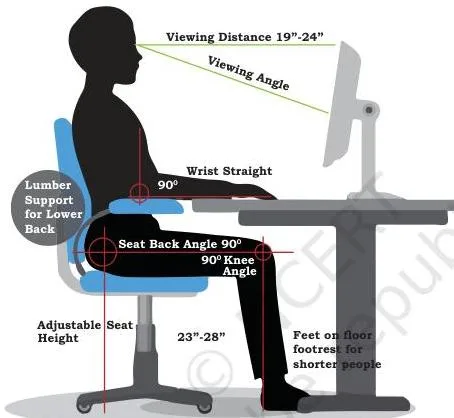
Figure 6.5 shows the posture to maintain — the position that prevents fatigue caused by prolonged use of computer systems and other digital devices. The chapter closes with a balance idea: enjoy digital devices alongside sports and hobbies, and value real-life friendships, because wholesome real interactions cannot be compared to online social networking alone.
Key Terms Table for Quick Revision
Revise the chapter’s vocabulary in one pass through this glossary.
| Term | Meaning | Example or reminder |
|---|---|---|
| Digital footprint | Trail of data left by online activity | Created with or without our knowledge (p. 168) |
| Active footprint | Data we intentionally submit online | Emails, posts, online responses |
| Passive footprint | Data generated unintentionally online | Visiting a site, using an app, browsing |
| Netizen | Anyone who uses digital technology with the Internet | Also called a digital citizen |
| Cyber bullying | Repeated insulting, degrading or intimidating online behaviour | Aims to hurt or embarrass a specific victim |
| Troll | Person who deliberately sows discord online for amusement | Thrives on attention — do not feed the troll |
| Spam | Unwanted junk email | Never reply or open attachments |
| Sensitive data | Data whose breach causes harm, embarrassment or unfairness | Biometric, health and financial information |
| Phishing | Fraudulent collection of sensitive details via fake sites or emails | Targets usernames, passwords, banking details |
| Email spoofing | Forged email address that looks authentic | URL is fake though the logo may imitate the original |
| Identity theft | Stealing identifiable personal data to commit fraud | Financial, criminal or medical forms |
| Ransomware | Encrypts user data and blackmails for payment | Enters via malicious sites and spam attachments |
| Hacking | Unauthorised access to a computer or network | Done by exploiting bugs |
| Ethical hacking (white hat) | Probing software to find and report vulnerabilities | Prepares the owner against attack |
| Cracker (black hat) | Non-ethical hacking for theft or damage | Steals data, brings systems down |
| Intellectual Property | Inventions, literary and artistic works, designs, symbols, names, logos | Ownership lies with the creator |
| Copyright | Automatic legal right over original creative works | Right to copy, distribute, display, make derivatives |
| Patent | Filed protection for an invention | Exclusive control for 20 years, then free use |
| Trademark | Word, name, symbol, slogan or label distinguishing a brand | The Nike mark; “Nikke” is barred |
| License | Permission agreement between creator and user | Only the copyright owner can grant one |
| EULA | End User License Agreement — dos and don’ts of software | Covers copies, source, modification, redistribution |
| Plagiarism | Presenting another’s idea or work as your own | Missing citation; serious ethical offence |
| Copyright infringement | Using a work without permission or payment | Even a reference does not make it legal |
| Trademark infringement | Unauthorised use of a registered trademark | Owner may start legal proceedings |
| FOSS | Free and Open Source Software with open source code | Ubuntu, Fedora, LibreOffice, Firefox |
| GNU GPL | Free software license preserving freedoms in derivatives | Run, study, share, modify |
| Freeware | Free for personal copying; no commercial distribution | Skype, Adobe Acrobat Reader; closed source |
| Software piracy | Unauthorised use or distribution of software | Extra copies without permission |
| Creative Commons | Non-profit offering free, standardised copyright licenses | Six license types (NCERT, p. 179) |
| E-waste (WEEE) | Discarded electric and electronic gadgets | Over 5 per cent of municipal solid waste |
| Leaching | Removing a substance by passing water through it | How e-waste chemicals reach soil and water |
| Refurbishing | Re-selling old electronic goods at lower prices | A reuse strategy |
| Ergonomics | Science of designing safe, comfortable workplaces | Reduces strain, fatigue and injuries |
| Digital signature | Digital equivalent of a paper certificate | Unique digital ID from a licensed Certifying Authority |
| IT Act 2000 | India’s law on electronic records, digital signatures and cyber crimes | Amended in 2008 |
| Polluter Pays Principle | Whoever causes pollution pays for the damage | Under the Environment Protection Act 1986 |
Patterns That Work Like Formulas
This chapter has no numerical formulas — but three decision patterns settle most classification questions. Learn each as a short sequence you can run during a question.
Pattern 1 — the cyber crime test (NCERT, p. 179):
- Ask: what is the computer doing in this incident?
- If the computer is the medium of the crime → hacking, phishing, spamming.
- If the computer is used as a tool to commit a crime → extortion, data breaches, theft.
Pattern 2 — the software IPR triplet (NCERT, p. 174):
- Look at what is being protected: the code, the function, or the identity.
- Code → copyright.
- Functional expression of the idea → patent.
- Name and logo → registered trademark.
Pattern 3 — the CC decoder (NCERT, pp. 178–179):
- BY (attribution) is always present.
- Add NC → no commercial use.
- Add ND → no sharing of adapted versions.
- Add SA → derivative works must carry the same license.
- SA and ND never appear together — SA requires derivatives, ND forbids them.
Worked Examples: Classifying Footprints, IPR and Cyber Crime
These three examples follow the chapter’s typical application questions. For each, name the method first, then apply the rule at every step.
Example 1: Classifying Active versus Passive Footprints
Method: decide who caused the data — the user knowingly, or the system around the visit.
Meera books a train ticket online. She enters her name and contact details on the booking form; the site afterwards shows her ads for hotels near her destination.
Step 1: Identify the data Meera submits deliberately — her name and contact details on the booking form.
This is an active footprint because she intentionally submitted it.
Step 2: Identify the data generated around the visit — the destination ads shown afterwards, plus the device and location details logged by the site.
This is a passive footprint because it was generated unintentionally.
Step 3: Conclude — both types were created in one session: her submission is active; the browsing and advertising trail is passive.
Concluded answer: Meera leaves both an active and a passive digital footprint.
Example 2: Separating Plagiarism from Copyright Infringement
Method: ask what is missing — a citation, or permission/payment.
Aarav pastes a labelled diagram from a website into his school project without naming the source. Separately, he inserts a licensed stock photo into a paid brochure without paying for the license.
Step 1: Check citation in the first action — the source is not named, and the diagram is presented as part of his own project.
This is plagiarism.
Step 2: Check permission and payment in the second action — the photo is licensed and sold; Aarav neither bought the license nor asked permission.
This is copyright infringement.
Step 3: Check whether citing would fix the second action — no.
The license requires payment, so even a citation would not make the use legal.
Concluded answer: The first action is plagiarism (missing citation); the second is copyright infringement (missing permission/payment).
Ethical project preparation like Aarav’s is covered further in the project-based learning notes.
Example 3: Distinguishing Phishing from Ransomware
Method: track what the attacker does with the access they gain.
Ritu receives an SMS asking her to “verify” her bank PIN on a lookalike page; her account is later emptied. Her friend’s laptop then shows a screen demanding payment to unlock encrypted files.
Step 1: For Ritu — check how her details were collected.
A fake, authentic-looking page fraudulently collected her PIN.
This is phishing.
Step 2: For her friend — check what happened after access.
The data was encrypted, the user was blocked, and payment was demanded.
This is ransomware.
Step 3: Conclude — Ritu’s case is credential theft through deception; her friend’s machine was hit by a block-and-blackmail attack.
Concluded answer: Ritu fell for phishing; her friend’s laptop was attacked by ransomware.
Common Mistakes Students Make (and the Correct Version)
These are the chapter-specific errors that cost students in written answers. Each row gives the strict correction and the reason.
| Students write X | Correct is Y | Why |
|---|---|---|
| “Plagiarism and copyright infringement are the same” | Plagiarism is presenting another’s work as your own; copyright infringement is using a work without permission or payment | The first is about a missing citation, the second about missing permission (NCERT, p. 176) |
| “Deleting a post removes it from the Internet forever” | The post stays in the digital footprint and on servers | Data is stored on application servers beyond the user’s reach; deletion gives no guarantee of full elimination (NCERT, pp. 169, 172) |
| “Freeware equals Free and Open Source Software” | Freeware allows copying for personal use but bans commercial distribution; FOSS opens the source code | GPL-based FOSS grants modify-and-redistribute freedoms; freeware like Skype is closed source (NCERT, p. 177) |
| “Copyright must be registered to be valid” | Copyright is granted automatically on creation | Unlike a patent, no application is needed — rights exist from the moment of creation (NCERT, p. 174) |
| “A patent is automatic like copyright” | A patent must be filed by the inventor and lasts 20 years | The inventor needs to apply; exclusive control expires after 20 years and the invention becomes freely usable (NCERT, p. 175) |
| “All Creative Commons licenses allow commercial use” | The NC (NonCommercial) versions ban commercial use | CC BY and CC BY-SA allow commercial use; CC BY-NC licenses do not (NCERT, p. 179) |
| “Citing the source makes any use of an image legal” | Permission is still required when the image is not free | Copyright infringement occurs even with a reference when the owner does not permit free usage (NCERT, p. 176) |
| “Hacking is always a crime” | Ethical (white hat) hacking is a legitimate security practice | Positive intent — probing and reporting vulnerabilities — prepares the owner against attack (NCERT, p. 180) |
| “Trolling and cyber bullying are the same” | A troll sows discord for amusement; cyber bullying repeatedly targets a specific victim | Trolling feeds on attention; cyber bullying is directed, repeated and intimidating (NCERT, pp. 170–171) |
| “E-waste only harms the environment” | E-waste also affects human health through toxic metals | Lead, beryllium, mercury and cadmium damage organs; most e-waste materials are toxic and carcinogenic (NCERT, pp. 184–185) |
Exam Notes: How to Answer the Chapter’s Exercise Questions
The chapter’s exercises are almost all scenario questions. For every scenario, use the define–apply–conclude routine: name the exact term, give its definition, match the scenario facts to the definition, then state the conclusion as a justification.
| Question pattern | Answer skeleton |
|---|---|
| Classification scenario (the logged-in email prank, the edited video clip, the threatening message) | State the crime or violation, define it, map the scenario facts to the definition, conclude with a justification. |
| Matching exercise | Work from the Key Terms table above; a reliable term matches exactly one description. |
| Differences question pair (copyright vs patent; plagiarism vs copyright infringement; ethical vs non-ethical hacking; active vs passive footprint; free software vs FOSS) | One contrast per line, or a two-column table; state both points for each difference (NCERT, p. 192). |
| Deleted-images explanation | Explain that server copies and copies already shared with others persist after deletion, so the images cannot be fully removed from the digital record (NCERT, p. 191). |
| Mass email with a fake URL | Spot the spoofed sender and the fake URL, then classify the email as phishing and justify from the definition (NCERT, p. 192). |
| Email snapshot missing etiquettes | List the missing parts — subject, formal greeting, identity of the sender, regards — with a one-line justification for each (NCERT, p. 193). |
| Health advice | List ergonomics and screen-time measures from Section 6.9: posture, viewing distance and angle, periodic focus on distant objects, breaks, and balance with offline activities. |
The common thread is justification — every answer must show why, not just what. When a question asks “which cyber crime?”, run the medium-vs-tool test from Pattern 1 first.
Self-Check Prompts: Activities and Think and Reflect
These prompts come from the chapter’s own activities and reflection boxes. If you can answer all of them from memory, the chapter is revised.
- List the online services you avail as a digital citizen (NCERT, p. 169).
- Find out how to report an abusive or inappropriate post or sender on a social network (NCERT, p. 171).
- Suggest a stronger replacement for a weak password such as “technology” (NCERT, p. 174).
- Explore creativecommons.org to learn how CC licenses work, and gnu.org to learn about the GNU GPL (NCERT, p. 175).
- Find out how to unsubscribe from a mail group or block an email sender (NCERT, p. 180).
- Find out how to file a complaint with the cyber cell in your area (NCERT, p. 181).
- List the precautions that keep you healthy while using digital technologies (NCERT, p. 185).
Revision Summary: The Night-Before Recap
One last look at the whole chapter — this recap closes with the wider CBSE notes library one level up if you need another subject.
| Topic | One-line must-know |
|---|---|
| Digital footprints | The active or passive trail that stays on servers; deletion gives no guarantee of full removal. |
| Netizen etiquettes | Net: ethical, respectful, responsible; communication: precise, polite, credible; social media: secure, reliable. |
| Data protection and IPR | Copyright is automatic, patent is filed for 20 years, trademark protects brand marks; licenses set the legal terms of reuse. |
| Creative Commons | Six licenses; BY always present; NC, ND and SA are the conditions; SA and ND never combine. |
| Cyber crime | HIPR — hacking, identity theft, phishing, ransomware; the computer is the medium or the tool. |
| IT Act 2000 | Amended 2008; recognises electronic records and digital signatures; the Cyber Appellate Tribunal resolves disputes. |
| E-waste | Over 5 per cent of municipal solid waste; manage by reduce, reuse and recycle; India follows the Polluter Pays Principle. |
| Impact on health | Ergonomics prevents strain; posture, eye care and balance with offline life matter. |
Quick-fire facts most likely to be needed in a short answer:
- A digital footprint can be created with or without our knowledge and includes IP address, location and device details (NCERT, p. 168).
- Online actions can be traced back through the digital footprint — the reason careless posting is risky (NCERT, p. 171).
- Copyright infringement is a violation even when the source is cited; being on the Internet does not make a work free (NCERT, p. 176).
- The six CC licenses collapse to one pattern: BY plus the combinations of NC, ND and SA (NCERT, p. 179).
- Cyber crime prevention is a behaviour checklist — backups, updates, strong passwords, secure transactions (NCERT, p. 182).
- E-waste reaches humans through a metal-to-disease chain: lead, beryllium, mercury, cadmium (NCERT, pp. 184–185).
Societal Impacts: Frequently Asked Questions
What is the difference between active and passive digital footprints?
Active footprints are data you intentionally submit; passive footprints are data generated unintentionally. Emails, posts and online responses are active; the data logged when you visit a website, use an app or browse is passive (NCERT, p. 168). Both together form your full trail, and the passive part is the one you cannot even see being collected.
If I copy text from the Internet and mention the source, is it still plagiarism?
No — mentioning the source avoids plagiarism. Plagiarism is presenting someone else’s idea or work as your own without adequate citation (NCERT, p. 176). But citation does not buy permission: if the text is copyrighted and the license does not allow copying, you may still need the owner’s permission — that becomes a copyright matter, separate from plagiarism.
What is the difference between freeware and Free and Open Source Software (FOSS)?
Freeware is free for personal copying but closed source; FOSS opens the source code. Freeware like Skype and Adobe Acrobat Reader allows personal copying but prohibits commercial distribution. FOSS — Ubuntu, Fedora, LibreOffice, Firefox — opens the source code for anyone to access, modify, correct and improve (NCERT, p. 177).
How can I quickly tell the six Creative Commons licenses apart?
Start from BY (attribution), which is always present, then read the added letters. NC bans commercial use, ND bans sharing adapted versions, and SA requires derivative works to carry the same license (NCERT, p. 179). SA and ND never combine, so the six licenses are exactly the combinations you can build from these conditions.
What does the Indian IT Act 2000 say about digital signatures?
A digital signature is the digital equivalent of a paper certificate. It works on a unique digital ID issued by a Certifying Authority licensed under Section 24 of the IT Act 2000 (NCERT, p. 182). Signing a document digitally attaches the user’s identity, which can be used to authenticate the document.
How does e-waste affect human health?
The metals inside e-waste enter the body through contaminated food, water, air or soil.
Lead damages the kidneys, brain and central nervous system (children are most vulnerable); beryllium causes skin diseases, allergies and an increased lung-cancer risk; mercury causes respiratory disorders and brain damage; cadmium damages the kidneys, liver and bones; and plastics damage the immune system and cause stress and anxiety (NCERT, pp. 184–185). Most of these materials are toxic and carcinogenic.
Reference: NCERT Class 12 Informatics Practices textbook, chapter Societal Impacts.
Explore Class 12 Informatics Practices Notes
- Class 12 Informatics Practices Notes
- Class 12 CBSE Notes
- CBSE Notes for Classes 1 to 12
- Previous: Internet and Web
- Next: Project Based Learning
Related chapters:
- Data Handling Using Pandas – I notes
- Data Handling using Pandas – II notes
- Plotting Data using Matplotlib notes