
Chapter 5 of the Class 12 Informatics Practices textbook, Internet and Web, is a theory chapter that builds the exact vocabulary of networking and the web: what makes a network, how LAN, MAN and WAN differ, what each networking device does, how the Internet carries services such as the web and email, and how a website reaches a browser.
These notes follow the NCERT textbook for the 2026-27 session and organise the chapter for fast revision.
Work through the page in this order: check the chapter map, fix the three basic ideas of network, node and packet, scan the device and topology tables, then try the worked examples at your own pace. The key-terms table and the one-page revision summary at the end are built for a final two-minute scan.
Everything here comes from the NCERT Class 12 Informatics Practices textbook. For every other chapter of this subject, use the Class 12 Informatics Practices notes hub as your single entry point.
Internet and Web: Chapter Map and Revision Route
The textbook opens with the general idea of a network and builds layer by layer towards browsers. The map below follows that order, so you can revise in sequence or jump straight to a weak topic. The chapter also closes with a summary (pages 162–165) and an exercise set (pages 165–166); the final sections of this page mirror that closing structure.
| Topic | Pages in the textbook |
|---|---|
| Introduction to computer networks | 137–139 |
| Types of networks (LAN, MAN, WAN) | 139–142 |
| Network devices | 142–146 |
| Networking topologies | 146–148 |
| The Internet | 148–149 |
| Applications of the Internet (WWW, email, chat, VoIP) | 149–153 |
| Website and web pages | 153–156 |
| Web server and hosting | 156–158 |
| Browser | 158–162 |
The other chapters of this subject are covered in separate notes — the Plotting Data Using Matplotlib notes handle Python visualisation, and the Societal Impacts notes continue the privacy ideas that begin with cookies in this chapter. To zoom out across all subjects, the Class 12 notes hub is the place.
The full chapter text itself is available on the official NCERT textbook portal.
Computer Networks: The Building Blocks
Start with the general idea: a network is a group of two or more similar things or people that are interconnected. Real-life examples include a social network, a mobile network, and the networks used by airlines, railways, banks and hospitals.
A computer network is the same idea applied to machines — an interconnection among two or more computers or computing devices that lets them share data and resources (NCERT, p. 138). A basic network can be as small as a few computers in one room.
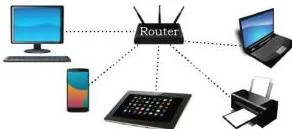
Figure 5.2 shows the core picture: devices joined by links, with data packets travelling across those links. Three terms from this figure carry through the whole chapter (NCERT, pp. 138–139):
- Node — any device in a network that can receive, create, store or send data along network routes. Nodes (also called hosts) can be servers, desktops, laptops or cellular phones.
- Packet — data is divided into smaller chunks called packets before transmission, and the packets are carried over the network.
- Wired or wireless media — devices connect through cables (wired) or through the air (wireless). The networking devices that join them include the switch, router and modem.
A railway analogy holds well: tracks are the links, stations are the nodes, and each train (a packet) carries its own load between stations. Why form networks at all?
Two reasons dominate: communication — exchanging information simultaneously with many parties through email, websites or audio/video calls — and resource sharing — making one printer available to many computers, or a networked storage device accessible to all. A smartphone hotspot is a small personal network made the same way.
LAN, MAN and WAN: Networks by Size
Networks are classified by geographical area covered and data transfer rate into three types. The comparison table below is this whole section in one place.
| Network | Area and distance | Data transfer rate | Typical example |
|---|---|---|---|
| LAN (Local Area Network) | Limited distance — from a single room to a campus; extends up to 1 km | 10–1000 Mbps; 10 Mbps is called Ethernet, 1000 Mbps is Gigabit Ethernet | School laboratory, college campus, one office floor |
| MAN (Metropolitan Area Network) | A city or town; extends up to 30–40 km | In Mbps, but considerably less than a LAN | Cable TV network, cable-based broadband |
| WAN (Wide Area Network) | A country, a continent or the globe; formed by joining LANs and MANs | Varies with the connecting media | The Internet — the largest WAN |
Mbps stands for Megabits per second — the unit of data transfer rate (NCERT, p. 140). Ethernet is the set of rules that decides how computers and other devices connect through cables in a LAN (NCERT, p. 140).
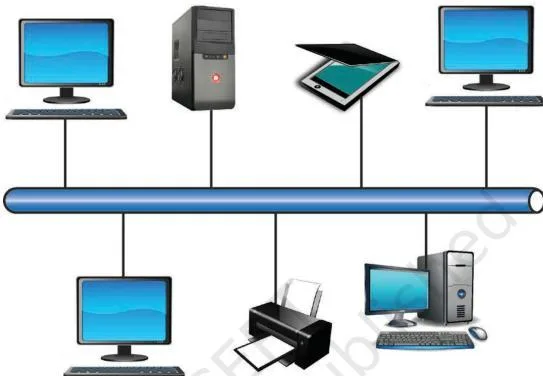
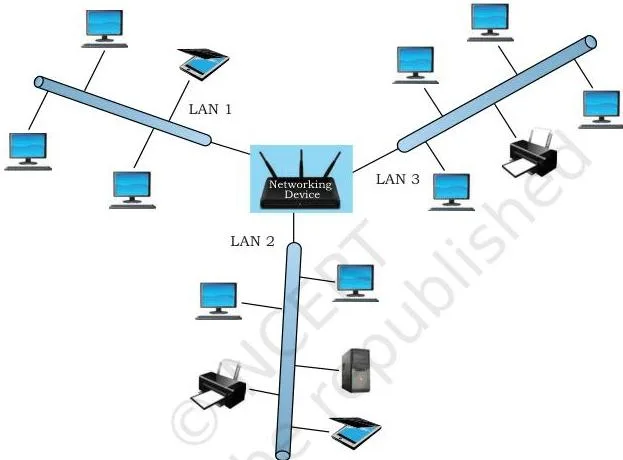
Read the three network figures as one growing picture. Figure 5.3 shows a LAN: the devices sit close together, typically in one room, one floor or one campus. Figure 5.4 widens the same idea to a city — the MAN scale, often built by connecting several LANs.
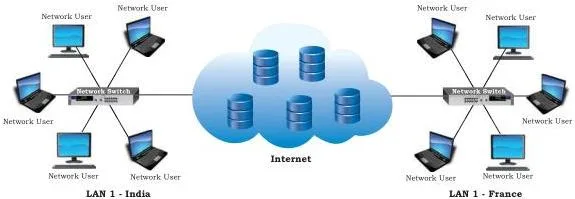
Figure 5.5 shows the WAN scale: LANs in far-apart locations joined across a country or continent, which is exactly how the Internet is formed.
Think and Reflect (bank network): the question asks whether a bank’s network is a LAN, MAN or WAN. Inter-branch connectivity across the world runs on a WAN, because a WAN is defined as connecting LANs and MANs across countries and continents; the network inside a single branch is a LAN, since it is confined to one premise.
Network Devices: Modem, NIC, Repeater, Hub, Switch, Router, Gateway
Networks are built from a small set of devices, each with one clear job. The table below is the core of this section.
| Device | What it does | One key detail |
|---|---|---|
| Modem (MOdulator DEModulator) | Converts between analog signals and digital bits | Sender’s modem modulates (digital → analog); receiver’s modem demodulates (analog → digital) (NCERT, p. 142) |
| Ethernet card / NIC (Network Interface Card) | Interface between a computer and a wired network | Circuit board on the motherboard; each NIC carries a unique MAC address |
| Repeater | Regenerates a weakened signal and puts it back on the cable | Signals normally travel only about 100 m before losing strength |
| Hub | Connects devices; data arriving on any line is sent out on all other lines | If two devices send at the same time, the data collides |
| Switch | Connects devices, but reads the destination address and forwards data selectively | Drops noisy or corrupted signals and asks the sender to resend |
| Router | Connects a LAN to the Internet; analyses data and transmits it to other networks | Can repackage data into smaller packets for a different network type |
| Gateway | Entry and exit point of a network to the outside world | Usually a router configured as a gateway, with a firewall integrated |
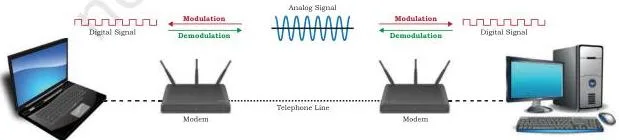
Figure 5.6 shows why two modems are always involved. The sender’s modem acts as a modulator, converting the computer’s digital 0s and 1s into an analog signal that the medium (free space or a cable) can carry. The receiver’s modem acts as a demodulator, converting the analog signal back to digital for the destination node (NCERT, p. 142).
The name — MOdulator DEModulator — is simply the two jobs joined.
A related term: an ISP (Internet Service Provider) is any organisation that provides services for accessing the Internet — the entity a home router connects to.
Choose the right device or network
Test yourself against real situations drawn from the chapter text:
| Situation | Right choice | Why |
|---|---|---|
| Giving phones and laptops Wi-Fi at home | Wireless router | A wireless router provides Wi-Fi and connects the LAN to the incoming broadband line from the ISP |
| Connecting five office computers into one LAN so they can share a printer | Switch | A switch forwards each packet only where it needs to go, which avoids collisions |
| A cable run longer than about 100 m where the signal fades | Repeater | The repeater regenerates the weakened signal and puts it back on the cable |
| Providing broadband or cable TV service across a whole town | MAN | A MAN covers a city or town, up to 30–40 km |
| Linking two company branches in different countries | WAN | A WAN joins LANs and MANs across countries or continents |
| Letting outside users reach an organisation’s internal network | Gateway | The gateway is the entry and exit point, usually with a firewall |
Networking Topologies: Mesh, Ring, Bus, Star and Tree
A network’s topology is the arrangement of its computers and other peripherals. The name in each case describes the shape the connections form.
| Topology | Connection pattern | Main strength | Main weakness |
|---|---|---|---|
| Mesh | Each device is connected to every other device | Reliable — a node going down does not break other nodes; secure; handles heavy traffic | Complex wiring, high cabling cost, many redundant connections |
| Ring | Each node connects to two neighbours, one on each side, forming a loop | Simple structure; data flows in one direction | Unidirectional link — a failed node can break the loop |
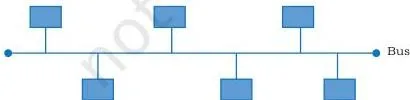
| Bus | All nodes share a single backbone cable (the bus) | Cheap and easy to maintain | Less secure and less reliable |
| Star | Each device connects to a central hub or switch | Fast and effective; disturbance in one device does not affect the rest | Failure of the central device fails the whole network |
| Tree / hybrid | Hierarchical: multiple branches, each branch a basic topology such as star, ring or bus | Combines basic topologies; used where multiple LANs are connected (WANs) | Data passes from the source through the centralised device, then through branches |
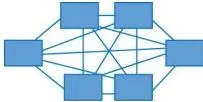
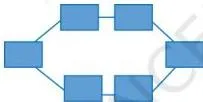
Compare the three diagrams as connection patterns. Figure 5.12 (mesh) is the most interlinked: every device has a dedicated link to every other, which is why it tolerates node failure and heavy traffic. Figure 5.13 (ring) shows each node holding exactly two connections, one on each side, forming a loop.
Figure 5.14 (bus) shows all nodes tapping into one shared backbone cable — the cheapest shape but the least secure.
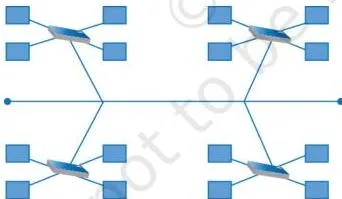
Figure 5.16 shows the hybrid or tree idea: four star topologies connected through a single bus backbone, forming a hierarchy. Because data from a source first reaches the centralised device and then travels through every branch, the tree behaves like several topologies nested inside one another.
The textbook’s star figure (Figure 5.15) is not reproduced here, but its pattern is simple to describe from the text: every device connects by a separate cable to one central hub or switch, which may broadcast to all nodes or selectively forward to the destination.
Mesh wiring formula: a fully connected mesh of \(n\) nodes needs \(\frac{n(n-1)}{2}\) wires (NCERT, p. 147). The reasoning: each of the \(n\) nodes would connect to the other \(n-1\) nodes, which gives \(n(n-1)\), but this count treats every wire twice — once from each end — so the answer is halved.
A worked calculation appears in the Formula Box and Worked Examples below.
Think and Reflect (node failure): in a bus, a failed node does not itself cut the backbone cable, so the remaining nodes can still communicate with each other; the dead node is simply off the network. In a ring, the link is a unidirectional loop, so a failed node breaks the loop and data cannot pass beyond it.
This contrast — cable failure versus node failure — is the quickest way to keep the two topologies apart.
The Internet: Global Network and Backbone
The Internet is the global network of computing devices — desktops, laptops, servers, tablets, mobile phones and peripherals — plus the networking devices (routers, switches, gateways) that join them. It keeps expanding to smart appliances: TVs, air conditioners, refrigerators, drones, vehicles, door locks and security cameras are now part of it too.
Follow the path a home connection takes:
- The computer connects to a modem, by cable or wirelessly through Wi-Fi.
- The modem connects to a local Internet Service Provider (ISP).
- Many ISPs join to form a regional network.
- Regional networks join to form a national network.
- Country-wide networks together form the Internet backbone.
Notice the link back to network types: because it connects millions of LANs from different continents, the Internet is the largest WAN (NCERT, p. 141). Its influence now reaches far beyond technical communication — into education, creativity, entertainment, socialisation and e-commerce.
Internet Services: WWW, Email, Chat and VoIP
The textbook lists four broad services provided through the Internet: the World Wide Web, email, chat and Voice over Internet Protocol (VoIP). The most confusing pair here is the Internet versus the web, so the WWW gets its own treatment first.
The World Wide Web
Sir Tim Berners-Lee invented the WWW in 1990 by defining three fundamental technologies (NCERT, p. 150):
- HTML (HyperText Markup Language) — the language used to design standardised web pages; tags define how the browser displays content.
- URI (Uniform Resource Identifier) — a unique identifier for a resource on the web, by location, by name, or by both.
- HTTP (HyperText Transfer Protocol) — the set of rules for retrieving linked web pages; HTTPS is the more secure version.
A URL (Uniform Resource Locator) is the URI type that identifies a resource by location and gives the mechanism (protocol) to access it. In plain words: protocol + subdomain + domain name. For example, in https://www.ncert.nic.in, https is the protocol, www is the subdomain and ncert.nic.in is the domain name (NCERT, p. 150).
When the address of a page is unknown, a search engine such as google.co.in, bing.com, duckduckgo.com or in.yahoo.com can retrieve it.
The Internet is not the web
Many people confuse the two. The Internet is the huge global network of interconnected computers, which may or may not have any files or pages to share. The web is the interlinking of a collection of web pages on those computers, accessible over the Internet.
In other words, the web runs on the Internet, and email or VoIP — both Internet services — are not part of the web at all.
| Service | What it is | Both parties online at the same time? | Example from the chapter |
|---|---|---|---|
| Internet | The global network of interconnected computers | — (the infrastructure itself) | The backbone of all the services below |
| World Wide Web | Interlinked web pages and resources shared over the Internet | No | A website such as ncert.nic.in |
| Sending and receiving messages, with optional file attachments | No — an email can be sent anytime | Gmail, Yahoo Mail, Outlook | |
| Chat | Real-time text, audio or video messaging | Yes — both parties must be online simultaneously | WhatsApp, Slack, Skype |
Email operates anytime, to any number of recipients, anywhere. Its standard features: composing with attachments, saving drafts, sending to multiple addresses at once, carbon copy (cc) and blind carbon copy (bcc), forwarding, filtering spam, organising into folders, managing contacts, an automatic signature, printing or saving, and searching.
Chat
Chatting or instant messaging is real-time communication through text; with faster Internet it now includes image, document, audio and video, plus group chat and group calls. For a successful session both parties must be online at the same time and must use the same chat application.
VoIP
VoIP (Voice over Internet Protocol) allows voice calls over the Internet instead of the regular telephone network; it is also called Internet Telephony or Broadband Telephony. It works by converting analog voice signals to digital and transmitting them over a broadband line.
Its two advantages: the services are free or very economical (even for international calls), and calls can be made or received from any place with Internet access. Its one disadvantage: call quality depends on Internet connection speed.
The chapter’s Think and Reflect asks for the minimum speed needed for a video call — the textbook leaves the exact number as an exploration task and only notes that VoIP needs a reasonably good connection.
Websites and Web Pages: Static versus Dynamic
A website is a collection of web pages related through hyperlinks, stored on a web server, integrated under one domain name and sharing a common theme and template. Its purpose is to make information available to people at large — selling products and services, posting and finding information, communicating, entertainment, and disseminating content and software.
A web page is a document on the WWW viewed in a browser; its basic structure is created with HTML and CSS, and it can carry text, images, audio, video, software applications and interactive content. Scripts — JavaScript being the most popular, with Python and PHP also used — define how the page behaves on different actions and make it interactive.
The home page is the first page of a website and generally carries links to all the related pages.
Static versus dynamic web pages
| Basis | Static web page | Dynamic web page |
|---|---|---|
| Content for different users | Same for everyone — it does not change from person to person | Can be different for different users, based on their choices |
| What the server does | Locates the stored page and sends it; no additional processing | Runs extra server-side processing — queries a database, updates date/time or weather — before responding |
| When content changes | Only when someone changes the code manually | Changes frequently, often on every load |
| Technologies | HTML, JavaScript, CSS; files carry .htm or .html extensions | JavaScript, PHP, ASP.NET, Python, Java, Ruby; often linked to databases |
| Load behaviour | Simple and quicker to load | More complex and takes more time to load |
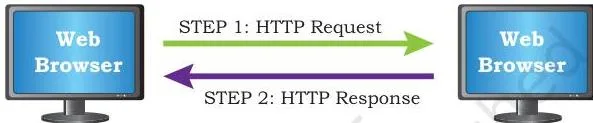
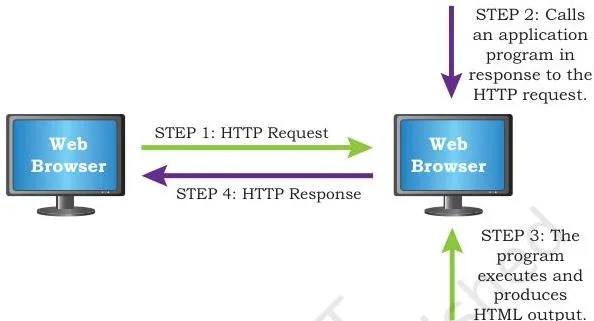
The two flow figures make the difference visual. Figure 5.17 (static) shows a straight path: the browser requests a page, the server finds the stored file and sends it back, with no extra work.
Figure 5.18 (dynamic) adds steps: the server performs additional processing and may access a database before sending the response, which is why the content can differ for each user. Examples of dynamic pages from the chapter: pages showing date, time or weather, and e-commerce applications (NCERT, p. 155).
Web Servers and Hosting: From Request to 404
A web server is both a thing and a program. As hardware, it is the computer that stores the web server software and the website’s contents — HTML pages, images, CSS stylesheets and JavaScript files — connected to the Internet (NCERT, p. 156).
As software, it is the specialised program that understands the URLs (web addresses) arriving as requests from browsers and responds to those requests.
The request–response cycle runs like this (NCERT, pp. 156–157):
- The browser sends an HTTP request for a page.
- The web server accepts, interprets and searches for the page.
- The server sends back an HTTP response; the page is displayed in the browser.
- If the server cannot locate the page, it sends an error page — Error 404: page not found.
Web hosting is the service that puts a website on the Internet and makes it part of the WWW. A site can run on your own hardware server, or you can rent server resources — CPU, RAM and storage — from a cloud service provider and upload the site’s files (HTML, CSS, JavaScript, images, databases) to the allocated space.
The five hosting steps from the textbook:
- Select a web hosting service provider (server space, database, bandwidth, backup, firewall, email support).
- Choose and register a domain name through a domain name registrar.
- Create logins with appropriate rights and note the IP address to manage the web space.
- Upload the files in properly organised folders.
- Map the domain name to the IP address of the web server.
Why is the mapping necessary? Every web server connected to the Internet is assigned a unique numeric IP address, but users cannot conveniently remember numbers.
The DNS (Domain Name System) is the service that maps a domain name to the server’s IP address — when you type a URL, DNS finds the server’s IP for that domain and sends the request there (NCERT, p. 158).
Browsers: Settings, Add-ons, Plug-ins and Cookies
A browser is a software application that helps us view web pages — the data or information retrieved from web servers. Common browsers named in the chapter are Google Chrome, Internet Explorer, Mozilla Firefox and Opera.
Browsers display HTML documents including text, images, audio, video and hyperlinks; Mosaic, developed by the NCSA, was the first web browser, and it supported plain-text HTML pages only, while modern browsers handle interactive and dynamic sites, use encryption and store cookies.
Browser settings (Firefox)
Firefox, an open-source browser, exposes its behaviour through five settings panels:
| Panel | What it controls |
|---|---|
| General | Default browser, language and appearance of text, downloading files, Firefox update settings, browsing and network settings |
| Home | Home page of the browser, browser window and tab settings |
| Search | Settings of the search engine used by Firefox |
| Privacy and Security | Enhanced tracking protection, forms and passwords, history and address bar, cookies and site data, permissions for pop-up windows and installing add-ons |
| Sync | Firefox account setup and management for Mozilla services |
Add-ons versus plug-ins
Both tools extend the browser, but at different levels:
- A plug-in is a complete program or third-party software — Flash and Java are examples. It is installed on the host computer, can be used by the browser for multiple functions, and can even be used by other applications.
- An add-on (also called an extension) is not a complete program; it adds only one particular functionality to the browser, such as the functionality of a sound and graphics card.
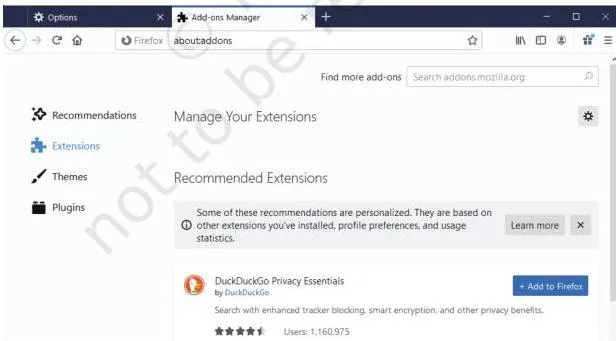
Figure 5.22 shows the browser’s management screen treating add-ons and plug-ins as separate lists, with options to enable or disable each — which is exactly how they stay different in practice: extensions are managed in the Extensions panel, plug-ins in the Plug-ins panel. The chapter’s closing Think and Reflect also asks whether these tools can be compared to utility software.
The chapter does not define utility software, so a grounded answer can only compare the two browser tools with each other: both extend the browser, but a plug-in is a complete installed program while an add-on adds one function.
Cookies
A cookie is a text file containing a string of information that a website transfers to the browser when you browse it; the browser stores it and retransmits it to the server to recognise the user.
Cookies are what let a site identify pages you visited and choices you made — remembering your language choice, allowing auto-login, keeping shopping preferences and showing relevant advertisements.
Are cookies dangerous? Usually not: they cannot access information from the hard disk and cannot transmit a virus or malware by themselves — the browser stores and manages them (NCERT, p. 162). The chapter’s honest caution: viruses can be disguised as cookies, so harm is still possible in that form, and you can disable cookies from the Privacy and Security settings.
The first cookie software was created in 1994 at Netscape to tell first-time visitors from repeat visitors.
Key Terms and Definitions Table
Every key term from the chapter in one place. The meaning column is the definition; the example column fixes it in memory.
| Term | Meaning | One-line example |
|---|---|---|
| Network | A group of two or more similar things or people interconnected with each other | Railway network, social network |
| Computer network | Interconnection of two or more computers or computing devices to share data and resources | Computers in a school lab sharing one printer |
| Node | A device in a network that can receive, create, store or send data | Desktop, server, printer, router |
| Packet | A smaller chunk into which data is divided for transmission | A file split into packets before travelling |
| LAN | Network covering a limited distance, extendable up to 1 km | College campus network |
| MAN | Extended LAN covering a city or town, up to 30–40 km | City cable TV network |
| WAN | Network joining LANs and MANs across countries or continents | The Internet |
| Ethernet | Set of rules deciding how devices connect through cables in a LAN | 10 Mbps Ethernet |
| Modem | Device converting between analog signals and digital bits (MOdulator DEModulator) | Modem at each end of a broadband connection |
| NIC | Network Interface Card; the adaptor interfacing a computer with a wired network | Ethernet card on the motherboard |
| MAC address | Unique hardware address of a NIC identifying a computer on a network | Like a permanent ID of the network card |
| Repeater | Device that regenerates a weakened signal and puts it back on the cable | Placed about every 100 m on a long cable run |
| Hub | Device that sends data arriving on any line out on all other lines | 8-port Ethernet hub |
| Switch | Device that reads the destination address and forwards data to selected devices only | Home or office LAN switch |
| Router | Device that connects a LAN to the Internet, analysing and repackaging data | Home Wi-Fi router |
| Gateway | Entry and exit point of a network to the outside world; usually a router with a firewall | Organisation’s gateway to the Internet |
| Topology | Arrangement of computers and peripherals in a network | Mesh, ring, bus, star, tree |
| URL | Uniform Resource Locator; web address giving the location and protocol of a resource | https://books.example.in |
| Website | Collection of related hyperlinked web pages under one domain name | NCERT website |
| Web page | Document on the WWW viewed in a browser, built with HTML and CSS | A course page on SWAYAM |
| Static web page | Page whose content is the same for every user until code is manually changed | Fixed college notice page |
| Dynamic web page | Page whose content can differ per user; server processes it before responding | Weather or e-commerce page |
| Web server | Hardware or software that stores a website and answers HTTP requests | Server hosting a company’s site |
| DNS | Domain Name System; maps a domain name to the server’s IP address | Converts example.in to its IP |
| Web hosting | Service that puts a website on the Internet for all users | Renting cloud storage for a site |
| Browser | Software application for viewing web pages | Google Chrome, Mozilla Firefox |
| Add-on | Small tool adding one particular functionality to a browser; also called an extension | Adding sound and graphics card functionality |
| Plug-in | Complete third-party program installed on the host computer | Adobe Flash Player, Java |
| Cookie | Text file a website stores in the browser to recognise the user | Remembers the language you chose for browsing |
Formula Box: Mesh Wiring and Quick References
The only formula in this chapter is for mesh wiring. A fully connected mesh of \(n\) nodes requires:
\[ \text{wires needed} = \frac{n(n-1)}{2} \]
where \(n\) is the number of nodes and the result is counted in wires (cables). The reason for the formula: each of the \(n\) nodes would link to the other \(n-1\) nodes, giving \(n(n-1)\), but every link gets counted from both ends, so the answer is divided by 2.
Numbers worth memorising, all with their units:
| Quantity | Value or rule | Unit / note |
|---|---|---|
| LAN maximum span | 1 | km |
| MAN span | 30–40 | km |
| Repeater signal range | about 100 | m (metres) |
| Ethernet data rate | 10–1000 | Mbps (Megabits per second) |
| Modem | modulator + demodulator | two ends of the connection |
| URL parts | protocol, subdomain, domain name | e.g. https, www, example.in |
Worked Examples: Mesh Cables, URL Parts, Topology and Pages
Example 1: Counting cables in a fully connected mesh (6 nodes)
Method: use the fully connected mesh formula, wires = \(\frac{n(n-1)}{2}\).
- Step 1: identify the number of nodes, \(n = 6\).
- Step 2: substitute into the formula — each of the 6 nodes would connect to the other 5 nodes.
\[ \text{wires} = \frac{6 \times (6-1)}{2} = \frac{6 \times 5}{2} = \frac{30}{2} = 15 \]
Final answer: a fully connected mesh of 6 nodes needs 15 wires.
Example 2: Breaking a URL into its parts
Take the web address https://books.example.in (an original example, not from the textbook). Reading it left to right:
Protocol: https — the mechanism used to access the resource; the secure form of http.
Subdomain: books — the section of the site in front of the domain.
Domain name: example.in — the registered name of the site, which DNS maps to the server’s IP address.
Example 3: Spotting the topology from a description
Case A: five computers, each linked directly to every other computer.
Pattern = fully connected → mesh topology.
Case B: all devices wired to one central switch with separate cables.
Pattern = central node with spokes → star topology.
Case C: data moves in one direction through neighbouring nodes around a closed loop.
Pattern = each node has two neighbours → ring topology.
Example 4: Static or dynamic?
Case A: a college notice page that shows the same text to every visitor until the office edits it.
The server just sends the stored file → static web page.
Case B: a page that shows today’s weather report for the visitor’s city.
The server updates the weather information before responding → dynamic web page.
Common Mistakes and How to Correct Them
Six wrong statements students make in this chapter, each paired with the correction and a way to check yourself:
| Mistake | Correct idea | How to check |
|---|---|---|
| “The Internet and the web are the same thing.” | The Internet is the global network; the web is the interlinked collection of pages running over it. Email and VoIP are Internet services that are not the web. | Ask: does the service need hyperlinks and a browser? If not (email, voice call), it is Internet but not web. |
| “A hub and a switch work alike.” | A hub sends data out on all other lines, so simultaneous data collides. A switch reads the destination address and forwards to the selected device only. | Ask: does the device look at the destination address before forwarding? Only the switch does. |
| “A modem only converts digital to analog.” | A modem does both jobs — it modulates at the sender’s end (digital → analog) and demodulates at the receiver’s end (analog → digital). | Write both ends separately: sender modulates, receiver demodulates. |
| “Mbps means megabytes per second.” | Mbps is Megabits per second, the unit used for Ethernet rates in the chapter. | Read the b in Mbps as “bits”, not “bytes”. |
| “Dynamic pages change by themselves.” | Nothing changes until a request arrives: the server runs code and may query a database before sending each response. | Ask where the extra work happens — it is server-side, before the page is sent. |
| “Cookies are viruses.” | Cookies are text files managed by the browser; they cannot read the hard disk or transmit a virus by themselves, though malware can be disguised as a cookie. | Ask who stores the cookie — the browser does, and you can disable them in privacy settings. |
Exam Notes: Answer Structures for This Chapter
The exercise set on pages 165–166 of the chapter uses a fixed set of question types. Match each type with its complete-answer structure:
- Fill in the blanks: supply the single vocabulary term the sentence points to. The chapter’s summary lines on pages 162–165 carry almost all of these exact phrases, so that summary is your source for the precise wording.
- Expand the abbreviation: write the full form first, then one line of context. The chapter gives ISP (Internet Service Provider) and URL (Uniform Resource Locator). Honest note: the chapter does not provide ARPANET’s expansion, so do not guess it — a complete answer cannot be reliably built from this chapter for that item.
- Name the device: give the full device name (e.g., Modem, Repeater) and then its function in one line, using the chapter’s wording such as “converts between analog signals and digital bits” or “regenerates signals”.
- Differentiate between: use a table with basis of comparison | term A | term B. For MAN vs WAN use area covered, distance and an example; for router vs gateway use what each connects and its position in the network; for static vs dynamic use server behaviour and content for different users.
- Define and explain: define the term in your own words, add one characteristic, then give an example. For “define a network and its need”, give the definition plus the two reasons — communication and resource sharing.
- Identify the topology: match the description to the connection pattern — a single shared cable is bus; independent cables to a central device are star.
- Scenario or application questions: name the service or device, then justify with a reason from the chapter. A report with images and videos fits email because email supports attachments; advertising to people at large fits the web because a website’s purpose is to make information available to people at large.
One-Page Revision Summary
The seven devices in one line each: modem converts analog↔digital · NIC interfaces a computer with the wired network and carries a MAC address · repeater regenerates weak signals (about 100 m) · hub broadcasts to all lines and collides · switch forwards selectively by reading the destination · router connects a LAN to the Internet and repackages data · gateway is the network’s entry/exit point with a firewall.
| Topic | One-line recap |
|---|---|
| Topologies | Mesh — every node to every other, reliable but costly · Ring — closed unidirectional loop, a node down can break it · Bus — one shared backbone, cheap but less secure · Star — central hub/switch, central failure kills it · Tree/hybrid — basic topologies joined, e.g., four stars on a bus |
| Network sizes | LAN up to 1 km, 10–1000 Mbps · MAN covers a city/town, 30–40 km · WAN joins LANs and MANs across countries — the Internet is the largest WAN |
| Internet services | WWW — interlinked pages (HTML, URL, HTTP) · Email — messages and attachments anytime · Chat — real time, both online · VoIP — voice calls over the Internet, quality depends on speed |
| Pages | Static — server sends the stored file, same for everyone · Dynamic — server processes and may query a database, content can differ per user |
| Hosting and DNS | Web server answers HTTP requests (Error 404 if not found) · hosting puts the site online · DNS maps the domain name to the server’s IP address |
| Browsers | Software to view pages · add-on extends with one function · plug-in is a complete installed program · cookie is a text file that recognises the user |
Mesh formula: a fully connected mesh of \(n\) nodes uses \(\frac{n(n-1)}{2}\) wires. URL parts: protocol + subdomain + domain name. When you need to jump to another subject or class, the CBSE notes directory lists all of them.
Frequently Asked Questions
What is the difference between the Internet and the World Wide Web?
The Internet is the global network of interconnected computers, while the World Wide Web is the collection of interlinked web pages that runs over that network. The Internet can exist without the web — many computers on the Internet may share nothing — but the web cannot exist without the Internet.
Email and VoIP are Internet services that are not part of the web.
Why is a switch better than a hub?
A switch is better because it forwards data selectively instead of blindly. The switch reads the destination address from each packet, looks it up in a table, and sends the packet only to the selected device; it can forward multiple packets at once and it drops corrupted signals.
A hub sends every incoming signal out on all other lines, so two devices sending at the same moment cause a collision.
What is a MAC address and what is it used for?
A MAC address is the unique hardware address of a Network Interface Card (NIC). It is used to uniquely identify a computer on the network — every NIC carries its own MAC address, which is how two machines on the same LAN are told apart at the hardware level.
How does DNS help when you type a website address?
DNS (the Domain Name System) maps the domain name to the server’s IP address. When you type a URL in the browser, DNS finds the IP address of the server corresponding to that domain and sends the request to that server. This matters because users can remember names like ncert.nic.in, but computers need the unique numeric IP address.
What is the difference between static and dynamic web pages?
A static web page shows the same content to every user, and the server simply locates the stored file and sends it without processing. A dynamic web page can show different content to different users: before responding, the server runs code and may retrieve information from a database or update date, time and weather.
Static pages are quicker to load; dynamic pages change frequently and are more complex.
Are cookies harmful to my computer?
Cookies are usually harmless. A cookie is a text file stored and managed by the browser; it cannot read information from your hard disk and cannot transmit a virus or malware by itself.
The caution the chapter gives is that viruses can be disguised as cookies, and you can disable cookies from the Privacy and Security settings of the browser if you want to.
Reference: NCERT Class 12 Informatics Practices textbook, chapter Internet and Web.
Explore Class 12 Informatics Practices Notes
- Class 12 Informatics Practices Notes
- Class 12 CBSE Notes
- CBSE Notes for Classes 1 to 12
- Previous: Plotting Data using Matplotlib
- Next: Societal Impacts
Related chapters:
- Data Handling Using Pandas – I notes
- Data Handling using Pandas – II notes
- Project Based Learning notes