
These overview of computerised accounting system class 12 notes put the entire opening chapter of your Class 12 Accountancy textbook — Computerised Accounting System, Chapter 1 — into one page you can actually revise from: the meaning and five components of CAS, data versus information, the five salient features of CAS software, the accounting cycle and accounting equation, grouping and codification of accounts, security features, advantages and limitations, and the twelve sub-systems of the Accounting Information System.
The notes follow the 2026-27 rationalised NCERT session and match the NCERT text page by page, so definitions and tables line up with your book.
Use the page one block at a time: read a section, glance at its table, then try the worked example or question-mapping section at the end. Everything you need for a last-minute revision is here.
Reference: NCERT Class 12 Accountancy (Computerised Accounting System) textbook, chapter “Overview of Computerised Accounting System”.
Chapter Map: What “Overview of Computerised Accounting System” Covers
One glance shows where every idea sits in the chapter. Page numbers refer to the NCERT textbook.
- Meaning, components and outputs of CAS — pp. 1–2
- Data vs information — pp. 2–3
- Accounting cycle and accounting equation — pp. 3–5
- Salient features of CAS software — p. 4
- Grouping of accounts — pp. 4–6
- Codification: methods and coding structure — pp. 6–9
- Using CAS software: activities and security — p. 10
- Advantages and limitations of CAS — pp. 10–11
- The twelve AIS sub-systems — pp. 11–13
- Exercise questions with answers — pp. 14–16
This chapter belongs to the Class 12 Accountancy notes inside the wider Class 12 notes hub. If you want the textbook’s own wording side by side with these notes, open the official NCERT PDF for this chapter on ncert.nic.in.
Computerised Accounting System: Meaning, Components and Outputs
Computerised Accounting System (CAS) is the processing of accounting transactions through hardware and software to produce accounting records and reports (NCERT, p. 2). The journal, ledger, trial balance and final-accounts work you do manually is, in CAS, done by accounting software running on computer hardware.
The textbook calls the five components the five pillars on which CAS rests (NCERT, p. 1).
| Component | What it means |
|---|---|
| Procedure | A logical sequence of actions to perform a task |
| Data | The raw fact (as input) for any business application |
| People | Users |
| Hardware | Computer, associated peripherals, and their network |
| Software | System software and application software |
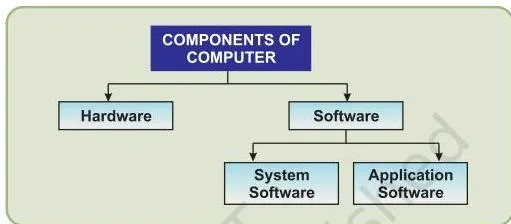
Figure 1.1 shows the hardware side of the system CAS rests on. The chapter text explains how it works: the computer processes data through hardware, and the user commands that hardware through software (NCERT, p. 1).
In practice, hardware means the CPU, RAM, monitor, keyboard, mouse, mass-storage devices and printer; software means the set of instructions — system software or application software, which is what accounting software is (NCERT, p. 13).
Remember the five pillars with the memory device “Please Don’t Pour Hot Soup”: Procedure, Data, People, Hardware, Software.
CAS takes accounting transactions as inputs, processes them through accounting software, and produces five reports (NCERT, p. 2):
- Day books / journals
- Ledger
- Trial balance
- Position statement (balance sheet)
- Statement of profit and loss (profit and loss account)
Data to Information: How Transactions Become Reports
The whole chapter builds on one distinction. Data is the raw fact fed in as input — for a business application, the items that make up a transaction. Information is processed data that a decision maker can actually act on.
An accounting transaction carries four data elements (NCERT, p. 3):
- Name of account
- Accounting code
- Date of transaction
- Amount
A transaction is a record of the inflow and outflow of resources (NCERT, p. 3).
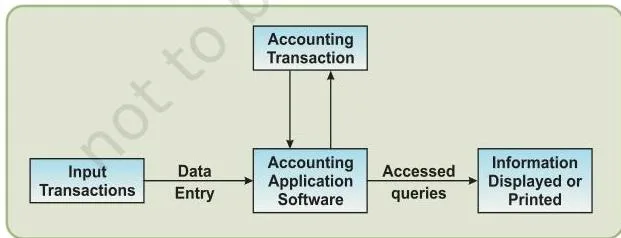
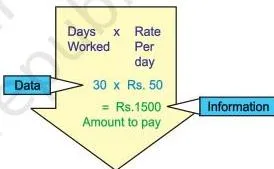
Figure 1.2 shows the step where business application software turns the data entered into it into information. Figure 1.3 makes that conversion concrete with the textbook’s pay calculation: days worked and rate per day are the data; multiplying them gives the amount to pay, which is the information (NCERT, p. 3).
The same item can be information at one level and data at the next, depending on what the decision maker needs.
A fresh way to hold this: data are raw ingredients; information is the finished dish a manager can act on. The reason businesses bother with computers at all is that fast, accurate access to such information sharpens the competitive edge and enhances profitability (NCERT, p. 1).
Five Salient Features of CAS Software
The textbook requires these five features of any CAS software (NCERT, p. 4). They are a favourite short-answer block, so learn the list and one example for each.
| Feature | What it means | Why it matters |
|---|---|---|
| Simple and integrated | Automates and integrates sales, finance, purchase, inventory and manufacturing | Rapid, accurate, up-to-date business information; can carry enhanced MIS, multi-lingual and data-organisation capabilities |
| Transparency and control | Greater transparency of day-to-day operations and better data access | Plans get enough time, data accessibility rises, user satisfaction improves |
| Accuracy and speed | User-definable templates (data-entry screens or forms) for fast, accurate entry | Helps generate the desired documents and reports correctly |
| Scalability | Volume of data processing changes with the size of the business | Works for any size of business and any type of organisation |
| Reliability | Critical financial information stays accurate, controlled and secured | Management can trust the figures it reports on |
The Accounting Cycle and the Accounting Equation
Before computers, this cycle was done by hand; CAS simply processes the same cycle through hardware and software. The eight phases are (NCERT, p. 3):
- Business transactions are analysed.
- Transactions are recorded in the journal.
- Journal entries are posted to the ledger accounts.
- A trial balance is prepared from the balances of accounts.
- Accounts are reviewed and the necessary adjustments are made.
- Adjustments are posted in the ledger to prepare an adjusted trial balance.
- The adjusted trial balance is used to prepare the balance sheet and profit and loss account.
- Financial statements are prepared from the finally adjusted ledger, balancing the accounts.
One point students miss: CAS automates the processing, not the principles. Financial statements are still prepared in accordance with Generally Accepted Accounting Principles (GAAP) (NCERT, p. 3).
The Accounting Equation
The double-entry system implies equality of assets and equities (NCERT, p. 4):
\[ A = E,\quad \text{where } E = L + C \]
So the basic equation is:
\[ A = L + C \]
where A = Assets, L = Liabilities, and C = Capital. Liabilities are the claims of creditors on the firm; capital is the claim of the owners. Because the owners’ claim changes with profit or loss, the equation expands to (NCERT, pp. 4–5):
\[ \text{Assets} = \text{Liabilities} + \text{Capital} + (\text{Revenues} – \text{Expenses}) \]
Why this is true: revenue is the inflow of resources from selling goods or services in the normal course of business, and it increases capital; expenses are the consumption of resources in generating revenue, and they reduce capital (NCERT, p. 5). The income statement summarises these flows for an accounting period.
Worked Example: Finding Capital from the Expanded Equation
Method: expanded accounting equation method.
- Step 1: Write the expanded equation: \( \text{Assets} = \text{Liabilities} + \text{Capital} + (\text{Revenues} – \text{Expenses}) \).
- Step 2: Substitute the figures — Assets = ₹8,00,000, Liabilities = ₹2,40,000, Revenues = ₹6,00,000, Expenses = ₹4,50,000:
\[ 8{,}00{,}000 = 2{,}40{,}000 + C + (6{,}00{,}000 – 4{,}50{,}000) \]
- Step 1: Work out the profit part first: \( 6{,}00{,}000 – 4{,}50{,}000 = 1{,}50{,}000 \).
- Step 2: Solve for \( C \):
\[ 8{,}00{,}000 = 2{,}40{,}000 + C + 1{,}50{,}000 \]
\[ C = 8{,}00{,}000 – 3{,}90{,}000 = 4{,}10{,}000 \]
Step 5: Check by re-adding: \( 2{,}40{,}000 + 4{,}10{,}000 + 1{,}50{,}000 = 8{,}00{,}000 \), which matches the assets on the other side of the equation, so the answer checks.
Final answer: Capital = ₹4,10,000. This is the owners’ claim in the firm after the period’s profit is considered.
Grouping of Accounts: The Hierarchy Behind the Balance Sheet
As transaction volume grows, data must be properly classified, and the basic classification is done through the accounting equation (NCERT, p. 4). Each component of the equation divides into groups of accounts, and those groups form a hierarchy — the hierarchy that generates the Balance Sheet and Profit and Loss formats (NCERT, pp. 5–6).
| Top-level group | Sub-groups |
|---|---|
| Equity and Liabilities | Shareholder’s Funds (share capital, reserves and surplus, money received against share warrants, share application money pending allotment); Non-Current Liabilities (long-term borrowings, deferred tax liabilities, other long-term liabilities, long-term provisions); Current Liabilities (short-term borrowings, trade payables, other current liabilities, short-term provisions) |
| Assets | Non-Current Assets (fixed assets — tangible and intangible, capital work-in-progress, intangible assets under development, fixed assets held for sale, non-current investments, deferred tax assets, long-term loans and advances, other non-current assets); Current Assets (current investments, inventories, trade receivables, cash and cash equivalents, short-term loans and advances, other current assets) |
| Revenues | Sales; Other income |
| Expenses | Material consumed; salary and wages; manufacturing expenses; depreciation; administrative expenses; interest; selling and distribution expenses |
To keep this hierarchical relationship between a group and its sub-groups neat, proper codification is required (NCERT, p. 6) — which is exactly the next topic.
Codification of Accounts: Methods and Coding Structure
A code is an identification mark: a system of letters or figures carrying an agreed meaning, used for brevity and for machine processing of information (NCERT, p. 6). The coding scheme of account-heads should lead to grouping of accounts at various levels, so that the Balance Sheet and Profit and Loss Account can be generated from it (NCERT, p. 7).
The textbook’s top-level scheme uses the first digit for the four top groups and the second for sub-groups (NCERT, p. 7):
| Code | Group |
|---|---|
| 1 | Equity and Liabilities |
| 2 | Assets |
| 3 | Revenues |
| 4 | Expenses |
| 11 | Shareholder’s Funds |
| 13 | Non-Current Liabilities |
| 14 | Current Liabilities |
| 21 | Non-Current Assets |
| 23 | Current Assets |
Note the deliberate gap in the second digit: under group 1, codes jump from 11 to 13, leaving 12 unused. That gap provides flexibility to insert a new sub-group later without renumbering everything (NCERT, p. 7). The major pay-off: if account codes are listed in ascending order, they are automatically listed in the desired hierarchy.
The Three Coding Methods
| Method | How it works | Example from the text | Best suited when |
|---|---|---|---|
| Sequential codes | Numbers or letters assigned in consecutive order | CL001, CL002, CL003 for customer accounts | Numbering source documents such as cheques and invoices; tracing a document or spotting missing numbers (NCERT, p. 7) |
| Block codes | A range of numbers partitioned into sub-ranges, each allotted to a specific group; within a sub-range numbers rise consecutively | 100–199 Small Pumps, 200–299 Medium Pumps, 300–399 Pipes, 400–499 Motors | Classifying a population into known groups, such as dealer types (NCERT, pp. 7–8) |
| Mnemonic codes | Alphabets or abbreviations used as symbols | SJ for Sales Journal, HQ for Head Quarters; DLH for Delhi, NDLS for New Delhi, BRC for Baroda | When the code should remind the user of the item it names, like railway station codes (NCERT, p. 8) |
Methodology: Building a Coding Structure
The textbook’s method is the same for any coding job: fix the hierarchy first, then fix digit widths from maximum possible values.
Its school-trust example uses the hierarchy Trust → School → Entry-year → Stream → Class → Section → Student, reserves the value 0 for levels that do not apply (such as Stream for primary classes), and allocates digits so that even the largest expected count fits (NCERT, pp. 8–9).
A code built this way carries meaning within itself — from the code alone you can tell the stream, class, section and entry year of a student.
Worked Example: Building a Coding Structure for a Retail Chain
Method: coding-structure development method (hierarchy → digit widths → code).
Step 1: Fix the hierarchy.
For ShineMart, a retail chain, the natural order is Chain → Region → Store → Department → Product.
Step 2: Decide digit widths from maximum possible values.
There are only 6 regions, so the region needs 1 digit.
Each region has at most 40 stores → 2 digits.
Each store has at most 8 departments → 1 digit.
Each department has at most 150 products → 3 digits (enough up to 999).
Total length = 1 + 2 + 1 + 3 = 7 digits.
Step 3: Note the single-chain assumption.
ShineMart is one chain, so no chain code is needed — exactly as the textbook’s trust example omits a trust code because there is only one trust (NCERT, p. 8).
- Step 1: Assemble the structure: Region (1 digit) | Store (2 digits) | Department (1 digit) | Product (3 digits).
- Step 2: Build a sample code.
Region 3, Store 12, Department 5, Product 007 → 3125007.
Step 6: Decode it digit by digit: 3 → third region; 12 → store 12 of that region; 5 → department 5 of that store; 007 → product number 7, written in three digits.
Final answer: A 7-digit code in the form Region–Store–Department–Product; the sample code 3125007 decodes as Region 3, Store 12, Department 5, Product 7.
This is exactly the skill tested by the chapter’s skill-review exercise on inventory items (Q2, p. 16) — try it yourself after these notes.
Using CAS Software: Activities, Vouchers and Security Features
Operating any CAS software involves two kinds of activity (NCERT, p. 10):
| One-time activities | Recurring activities |
|---|---|
| Creation of organisation details, accounting year, type of ledger — together called creation of master files | Entry of transactions and generation of reports |
Transactions are recorded through vouchers — cash, bank, purchase, sales and journal vouchers. Reports generated include day books, ledgers, trial balance, statement of profit and loss, position statement and cash flow statement. The textbook itself defers the details of report generation to Chapter 5 of this book (NCERT, p. 10), so this chapter’s revision focus stays on concepts, grouping and coding methods.
For the hands-on side of this book, the spreadsheet notes in Class 12 Accountancy are a good follow-up.
Security Features of CAS Software
- Password security: a password is the key (code) that allows access to the system. The system defines user rights according to organisation policy, so one employee may access one data set and be denied another (NCERT, p. 10).
- Data audit: records who made what changes to the original data, fixing responsibility and ensuring data integrity — basically an audit trail (NCERT, p. 10).
- Data vault: extra security through encryption. Encryption scrambles information so that interpretation is extremely difficult — almost impossible — so data stays safe even if it lands in the wrong hands, because the receiver cannot decode it (NCERT, p. 10).
Advantages and Limitations of Computerised Accounting
The two balanced lists below are the ones you must be able to reproduce. Notice how each advantage has a related limitation (NCERT, pp. 10–11).
| Advantage | Related limitation |
|---|---|
| Timely generation of reports in the desired format | Un-programmed and un-specified reports cannot be generated — the software only produces what its design allows |
| Efficient record keeping | Data may be lost or corrupted due to power interruptions |
| Effective control over the system | Data are prone to hacking |
| Economy in the processing of accounting data (lower processing cost) | Faster obsolescence of technology forces repeated investment in shorter periods |
| Confidentiality of data is maintained | Data prone to hacking is a direct threat to confidentiality |
Accounting Information System and Its Twelve Sub-Systems
An Accounting Information System (AIS) can be implemented through CAS, and it works as a family of twelve sub-systems (NCERT, p. 11). Figure 1.4 shows how they sit together; the table below gives what each deals with and what it produces.
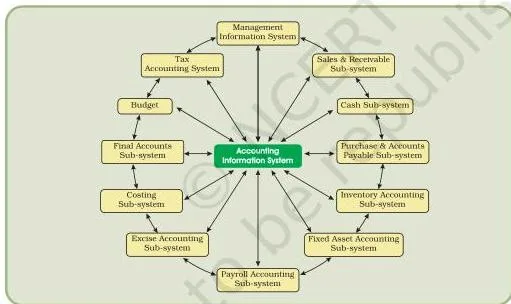
| Sub-system | What it deals with | Key output |
|---|---|---|
| Cash and Bank | Receipt and payment of physical cash and electronic fund transfer | Cash/bank records; transfers by credit card or electronic banking |
| Sales and Accounts Receivable | Recording sales, maintaining the sales ledger and receivables | Periodic sales and collection reports, overdue accounts, ageing schedule of receivables (NCERT, p. 11) |
| Inventory | Recording items purchased and issued with price, quantity and date | Inventory position and valuation report |
| Purchase and Accounts Payable | Ordering goods, sorting purchase expenses, paying creditors | Supplier performance, payment schedule, creditors’ position |
| Payroll Accounting | Wages and salaries — basic pay, dearness allowance, other allowances, and deductions for provident fund, taxes, loans and advances | Wage bill, overtime payment, leave encashment reports |
| Fixed Assets | Purchases, additions, deletions and usage of land, buildings, machinery and equipment | Cost, depreciation and book value of assets |
| Expense Accounting | Expenses grouped as manufacturing, administrative, financial, selling and distribution | Expense reports by group |
| Tax Accounting | VAT, excise, customs and income-tax compliance | Tax compliance records; used mainly in large organisations |
| Final Accounts | Preparation of profit and loss account, balance sheet and cash flow statement | Reporting statements for the period |
| Costing | Ascertainment of the cost of goods produced, using input from other sub-systems | Information on changes in cost during the period |
| Budget | Preparing the budget for the coming financial year and comparing actuals with it | Budget vs actual-performance comparison |
| Management Information System (MIS) | Generation and processing of reports vital for management decision-making | Customised reports for planning, organising, staffing, control and decision-making — the decision-support layer (NCERT, p. 13) |
See the sub-systems in your own life: a UPI transfer or credit-card payment flows through the cash-and-bank sub-system, and a salary slip showing basic pay, dearness allowance and deductions is a payroll report.
Key Terms: Definitions with Examples at a Glance
Last-minute revision runs on definitions. This table covers every term the chapter expects you to know.
| Term | Meaning | Example |
|---|---|---|
| Computerised Accounting System | Processing accounting transactions through hardware and software to produce accounting records and reports | Entering a sale voucher in accounting software and getting an updated ledger |
| Data | Raw fact fed in as input | Days worked; rate per day |
| Information | Processed data a decision maker can act on | Amount to pay = days worked × rate per day |
| Transaction | A record of inflow and outflow of resources | A credit sale of goods to a customer |
| Code | Letters or figures with an agreed meaning, used for brevity and machine processing | Account code 23 for Current Assets |
| Sequential code | Numbers or letters assigned in consecutive order | CL001, CL002, CL003 |
| Block code | A number range partitioned into sub-ranges for specific groups | 100–199 Small Pumps, 200–299 Medium Pumps |
| Mnemonic code | Alphabets or abbreviations used as symbols | SJ (Sales Journal), HQ (Head Quarters), DLH (Delhi) |
| Master files | Basic records created once — organisation details, accounting year, type of ledger | Company name, financial year, ledger names set at setup |
| Password security | A key/code that allows access to the system, with user rights per organisation policy | An employee who can view sales data but not change it |
| Data audit | Records who changed what in the original data, fixing responsibility | Knowing which user altered an entry — an audit trail |
| Data vault | Additional security through data encryption | Encrypted backup of accounting files |
| Encryption | Scrambling information so it is almost impossible to interpret without decoding | Intercepted encrypted data that the receiver cannot read |
Common Mistakes Students Make in This Chapter
| Mistake | Correct rule (and reason) | How to check your answer |
|---|---|---|
| “Data and information are the same thing” | Data is the raw input (days worked, rate per day); information is the processed output a manager can act on (amount to pay). Processing sits between them. | Ask: can a decision be made directly from it? If yes, it is information. |
| “CAS just means printing statements on a computer” | CAS processes accounting transactions through hardware and software to produce records and reports (NCERT, p. 2). | Does your definition include processing plus output records/reports? If not, it is incomplete. |
| “The five components include network and database” | The five pillars are Procedure, Data, People, Hardware, Software (NCERT, p. 1). | Run the “Please Don’t Pour Hot Soup” list and tick each component off. |
| “The accounting equation is only A = L + C” | Expand to A = L + C + (Revenues − Expenses) because profit raises and loss lowers the owners’ claim (NCERT, p. 5). | Would the owners’ claim change if the firm earned a profit? Then the expanded form is needed. |
| “Sequential and block codes work the same way” | Sequential codes number items consecutively, like cheques; block codes partition a number range into sub-ranges for groups (NCERT, pp. 7–8). | Is the example numbering items one after another (sequential) or splitting a range into bands (block)? |
| “Encryption stops hackers from entering the system” | Encryption scrambles data so that even intercepted data cannot be interpreted — it protects the data itself; passwords control access (NCERT, p. 10). | Is the question about access control (password) or about protecting the data (encryption)? |
| “CAS removes the need for accounting principles” | GAAP still governs; the computer automates the processing, not the principles (NCERT, p. 3). | Remember: financial statements are still prepared according to GAAP. |
How to Write Complete Answers to This Chapter’s Questions
A complete answer to the chapter’s short questions (Part Q2, pp. 15–16) follows one shape: definition first → component points → an example → a one-line wrap. Model outlines for the four question families:
- Why is computerisation of financial accounting required and useful? Open with timely access to information that supports decision-making (NCERT, p. 1), then list the advantages — timely reports, efficient record keeping, effective control, economy in processing, confidentiality (NCERT, p. 10) — and close with the competitive edge it gives the business.
- Write differences between data and information with examples. Define each term in one line, then give the pay calculation: days worked and rate per day are data, and the amount to pay is information (NCERT, p. 3). A comparison table of three or four points makes the answer complete.
- Explain the types of coding methods and where each is best suited. Write three short paragraphs — sequential, block and mnemonic — each with a definition, a concrete example and its best-use situation (NCERT, pp. 7–8). The examples matter: CL001–CL003, 100–199, SJ/DLH.
- Show how a transaction appears in the chart of accounts by hierarchical grouping. Trace one transaction, say a credit sale: it belongs under the Revenue group in the account Sales, and that group sits inside the hierarchy that produces the Balance Sheet and Profit and Loss formats (NCERT, pp. 5–6).
The objective questions at the end of the chapter (Q1, p. 14) are self-checkable — the book prints an answer key on p. 16. The debate topic and the skill-review coding exercise (Q2, p. 16) are classroom practice, not written-answer material; still, the skill-review problem is the best possible rehearsal for the coding-structure method.
Revision Summary: The Chapter at a Glance
| Topic | What to remember |
|---|---|
| Meaning of CAS | Processing accounting transactions through hardware and software to produce accounting records and reports |
| Five components | Procedure, Data, People, Hardware, Software — “Please Don’t Pour Hot Soup” |
| Data vs information | Data = raw facts (input); information = processed data a decision maker uses (output) |
| Salient features | Simple and integrated; transparency and control; accuracy and speed; scalability; reliability |
| Accounting cycle | Eight phases from analysing transactions to final financial statements; GAAP still applies |
| Accounting equation | A = L + C + (Revenues − Expenses) |
| Top-level groups | Equity and Liabilities, Assets, Revenues, Expenses — the hierarchy behind the Balance Sheet and Profit and Loss formats |
| Coding methods | Sequential, block, mnemonic; codes in ascending order automatically follow the account hierarchy |
| Using CAS | One-time activities (master files) vs recurring activities (data entry, reports); vouchers: cash, bank, purchase, sales, journal |
| Security | Password security, data audit, data vault (encryption) |
| Advantages / limitations | Five of each — timely reports, record keeping, control, economy, confidentiality vs obsolescence, power failures, hacking, no un-programmed reports |
| Twelve AIS sub-systems | Operational: cash & bank, sales & receivables, inventory, purchase & payables, payroll, fixed assets, expense, tax, final accounts, costing, budget; decision support: MIS |
Two closing lines to hold the whole chapter: the five-pillar idea — a CAS is Procedure + Data + People + Hardware + Software — and the grouping insight — because codes listed in ascending order automatically follow the account hierarchy, codification is what keeps the financial statement formats intact. For the full set of subjects and classes, browse the main CBSE notes index.
Frequently Asked Questions
What is the difference between data and information in a computerised accounting system?
Data is the raw fact fed in as input, such as days worked and rate per day. Information is processed data that a decision maker can act on, such as the amount to pay that results from multiplying the two. The same item can be information at one level and data at the next (NCERT, p. 3).
Why is codification of accounts necessary in a computerised accounting system?
Codification maintains the hierarchical relationship between a group and its sub-groups, keeping the classification neat (NCERT, p. 6). It also gives every account an identification mark for brevity and machine processing, and because codes listed in ascending order automatically follow the account hierarchy, it keeps the Balance Sheet and Profit and Loss formats intact (NCERT, p. 7).
Which coding method — sequential, block or mnemonic — should be used in which situation?
Sequential codes suit source documents such as cheques and invoices, where consecutive numbering helps trace documents or find missing ones. Block codes suit classifying a population into known groups, like the dealer codes 100–199, 200–299. Mnemonic codes suit cases where the code should remind users of the item — SJ for Sales Journal, DLH for Delhi (NCERT, pp. 7–8).
What is encryption and how does it help in CAS?
Encryption scrambles information so that interpretation is extremely difficult, almost impossible (NCERT, p. 10). It helps CAS by protecting the data itself: even if encrypted data lands in the wrong hands, the receiver cannot decode and interpret it. It is the mechanism behind the data vault security feature.
What are one-time and recurring activities in CAS software?
One-time activities are set-up jobs — creation of organisation details, accounting year and type of ledger, together called creation of master files. Recurring activities are the ongoing jobs of entering transactions and generating reports (NCERT, p. 10).
How does the accounting equation help in grouping accounts in CAS?
The basic classification of accounts comes through the accounting equation (NCERT, p. 4). Equity, liabilities and assets come from A = L + C, and revenues and expenses come from the expanded form A = L + C + (Revenues − Expenses); each component then divides into the groups and sub-groups that generate the financial statement formats (NCERT, pp. 5–6).
Reference: NCERT Class 12 Accountancy (Computerised Accounting System) textbook, chapter “Overview of Computerised Accounting System”.
Explore Class 12 Accountancy Notes
- Class 12 Accountancy Notes
- Class 12 CBSE Notes
- CBSE Notes for Classes 1 to 12
- Next: Spreadsheet
Class 12 Accountancy on LearnCBSE:
Related chapters:
- Graphs and Charts notes