
These are the complete revision notes for Structured Query Language (SQL), Chapter 9 of the CBSE Class 12 Computer Science textbook. They condense the whole chapter — from MySQL data types and constraints to two-table JOINs — into a read you can finish in under an hour. These notes follow the NCERT Rationalised textbook for the 2026-27 session.
The chapter teaches every concept through sample databases: StudentAttendance, OFFICE and CARSHOWROOM, plus the small DANCE/MUSIC and UNIFORM/COST relation pairs. These notes keep that thread alive, so the page references stay meaningful. If you want the full text beside your notes, the official chapter PDF is available on the NCERT website.
You will find every command with its syntax, the SELECT query toolkit, single-row and aggregate functions, GROUP BY and HAVING, set operations, JOINs, worked examples with fresh numbers, a common-mistakes table, and guidance on writing the NCERT exercise answers. For the rest of the subject, browse the Class 12 hub or the full CBSE notes library.
The Sample Databases That Carry the Whole Chapter
This chapter teaches SQL as the language for creating, manipulating and querying relational databases, and it practises every statement on MySQL (NCERT, p. 131-132). Five small schemas carry the teaching, and each one exists for a specific skill. The map below shows which database teaches what.
| Database / relations | Concepts it teaches | Where it appears |
|---|---|---|
| StudentAttendance — STUDENT, GUARDIAN, ATTENDANCE | CREATE, ALTER, INSERT, UPDATE, DELETE — the DDL and DML cycle | p. 131-144, p. 154-155 |
| OFFICE — EMPLOYEE | SELECT, WHERE, DISTINCT, aliases, computed columns, ORDER BY, NULL, LIKE | p. 145-153 |
| CARSHOWROOM — INVENTORY, CUSTOMER, SALE, EMPLOYEE | single-row and aggregate functions, GROUP BY and HAVING | p. 156-168 |
| DANCE and MUSIC | UNION, INTERSECT, MINUS, Cartesian product | p. 169-172 |
| UNIFORM and COST | JOINs — the three equivalent ways to write them | p. 173-175 |
The chapter itself moves in a fixed order: definitions and data types, data definition (DDL), data manipulation (DML), data query (SELECT), functions, GROUP BY, set operations, and finally two-table queries (p. 131).
The Database Concepts notes for Chapter 8 built the StudentAttendance schema that the DDL and DML sections keep using; for the rest of the subject, the Class 12 Computer Science notes hub collects the chapters, and the Computer Networks notes continue from this chapter in the same book.
The chapter assumes you already know the relational vocabulary. One line each:
| Term | What it means in this chapter |
|---|---|
| Relation | a table of rows and columns — the object CREATE TABLE builds (NCERT, p. 133) |
| Attribute | a column of a relation (NCERT, p. 133) |
| Tuple | a row (record) of a relation (NCERT, p. 169) |
| Degree | the number of attributes (columns) in a relation (NCERT, p. 135) |
| Cardinality | the number of tuples (rows) in a relation (NCERT, p. 171) |
| NULL | a special marker for a missing or unknown value (NCERT, p. 151) |
| Schema | the structure of a relation — its attributes, data types and constraints (NCERT, p. 134) |
SQL Essentials: Talking to MySQL
SQL is the most popular query language, used by major relational DBMS products such as MySQL, Oracle and SQL Server (NCERT, p. 131-132). One idea explains almost everything about it: SQL is declarative — you state what to retrieve, and SQL itself works out how to get it (NCERT, p. 132).
You never describe the access path; the DBMS decides it behind the scenes.
Typing statements at the MySQL prompt follows three simple rules:
- Every statement ends with a semicolon (;).
- SQL is case-insensitive: ‘salary’ and ‘SALARY’ name the same column (NCERT, p. 133).
- A long statement can continue on the next line; the prompt changes from mysql> to >>, and the semicolon goes only after the last line (NCERT, p. 132-133).
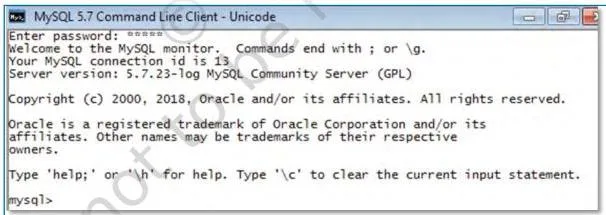 prompt that appears when MySQL is ready to accept a SQL statement” />
Figure 9.1 is the MySQL shell window you start every session in. The mysql> prompt is the signal that MySQL is ready to accept a statement; type the statement, end it with a semicolon, and press Enter.
Four housekeeping commands open and inspect any working session:
| Command | What it does |
|---|---|
| CREATE DATABASE dbname; | creates a new, empty database (NCERT, p. 134) |
| SHOW DATABASES; | lists the databases on the server (NCERT, p. 135) |
| USE dbname; | selects the database to work in (NCERT, p. 135) |
| SHOW TABLES; | lists the tables in the current database — a brand-new database shows Empty set (NCERT, p. 135) |
Data Types and Constraints in MySQL
Every attribute of a relation has a data type, which decides the values it can hold and the operations allowed on them — arithmetic works on numeric data but not on character data (NCERT, p. 133). Table 9.1 of the textbook lists the five commonly used types; the details students get quizzed on are below.
| Data type | Size / length | The detail that matters |
|---|---|---|
| CHAR(n) | fixed length, n from 0 to 255 | reserves n spaces; a shorter value is padded on the right with spaces |
| VARCHAR(n) | variable length, n from 0 to 65535 | allocates only the bytes the entered string actually needs |
| INT | 4 bytes | unsigned range 0 to 4,294,967,295; use BIGINT (8 bytes) for larger values |
| FLOAT | 4 bytes | holds numbers with decimal points |
| DATE | ‘YYYY-MM-DD’ | supported range ‘1000-01-01’ to ‘9999-12-31’ |
On top of the type, a constraint restricts the values an attribute may take (NCERT, p. 134). The five constraints of Table 9.2:
| Constraint | What it guarantees |
|---|---|
| NOT NULL | the column cannot hold NULL |
| UNIQUE | all values in the column are distinct |
| DEFAULT | a default value is used when none is supplied |
| PRIMARY KEY | the column that uniquely identifies each row |
| FOREIGN KEY | the column that refers to the primary key of another table |
Watch how the chapter chooses types for the STUDENT relation (NCERT, p. 135-136): roll numbers run 1 to 100, so three digits fit in INT; names vary in length, so SName is VARCHAR(20); birth dates need DATE; and the 12-digit Aadhaar GUID is CHAR(12) — a fixed length that is never used in arithmetic.
The same logic gives GPhone in GUARDIAN the type CHAR(10) with a UNIQUE constraint (NCERT, p. 136).
Two “Think and Reflect” probes from the chapter get fixed answers here. A primary key is, in effect, NOT NULL + UNIQUE applied together (NCERT, p. 134) — UNIQUE alone still allows one NULL.
And for a mobile number, prefer CHAR: a phone number is fixed-length, it is never used in arithmetic, and storing it as a number would drop a leading zero — CHAR, being a character type, keeps the digits exactly as entered (NCERT, p. 137).
Data Definition Language: CREATE, DESCRIBE, ALTER, DROP
Data Definition Language (DDL) is the part of SQL that defines, modifies and deletes relation schemas (NCERT, p. 134). Build in this order: create the database, create the tables, inspect them, alter if needed, drop when obsolete.
Create the database and move into it: CREATE DATABASE StudentAttendance; then USE StudentAttendance; (NCERT, p. 134-135).
Define a relation with CREATE TABLE (NCERT, p. 135):
CREATE TABLE tablename (attributename1 datatype constraint, attributename2 datatype constraint, …); The number of columns is the relation’s degree (NCERT, p. 135). By default every attribute can take NULL except the primary key (NCERT, p. 136).
Inspect the structure with DESCRIBE — DESCRIBE tablename; — which lists each field with its type, whether NULL is allowed, and its key role (NCERT, p. 137).
When the schema must change, ALTER TABLE provides nine variants (NCERT, p. 138-140):
| Task | Syntax | Example |
|---|---|---|
| Add primary key (single or composite) | ALTER TABLE t ADD PRIMARY KEY (cols); | ADD PRIMARY KEY (AttendanceDate, RollNumber); |
| Add foreign key | ALTER TABLE t ADD FOREIGN KEY (attr) REFERENCES refT (attr); | ADD FOREIGN KEY (GUID) REFERENCES GUARDIAN (GUID); |
| Add UNIQUE | ALTER TABLE t ADD UNIQUE (attr); | ADD UNIQUE (GPhone); |
| Add an attribute | ALTER TABLE t ADD attr DATATYPE; | ADD income INT; |
| Modify datatype | ALTER TABLE t MODIFY attr DATATYPE; | MODIFY GAddress VARCHAR(40); |
| Set NOT NULL | ALTER TABLE t MODIFY attr DATATYPE NOT NULL; | MODIFY SName VARCHAR(20) NOT NULL; |
| Add a default value | ALTER TABLE t MODIFY attr DATATYPE DEFAULT value; | MODIFY SDateofBirth DATE DEFAULT ‘2000-05-15’; |
| Remove an attribute | ALTER TABLE t DROP attr; | DROP income; |
| Remove the primary key | ALTER TABLE t DROP PRIMARY KEY; | DROP PRIMARY KEY; |
Adding a foreign key carries three preconditions (NCERT, p. 138): the referenced table must already exist; the referenced attribute must be part of its primary key; and the data types and sizes of the two attributes must match.
Note also that after dropping a primary key, you normally add it back, because every table should keep a primary key to maintain uniqueness (NCERT, p. 141).
Finally, DROP removes a table or the whole database permanently (NCERT, p. 141):
DROP TABLE table_name; DROP DATABASE database_name; The chapter’s caution is blunt: DROP cannot be undone, and dropping a database removes every table inside it (NCERT, p. 141).
Data Manipulation Language: INSERT, UPDATE, DELETE
Data Manipulation Language (DML) handles the data itself — inserting new records, modifying existing ones, and removing them. The textbook spreads these across p. 141-144 (INSERT) and p. 154-156 (UPDATE, DELETE); here they sit together in the natural order: populate, modify, delete.
INSERT has two forms (NCERT, p. 141-142):
- INSERT INTO t VALUES (v1, v2, …); — no column names, so the values must match the table’s attribute order exactly.
- INSERT INTO t (col1, col2, …) VALUES (v1, v2, …); — names the columns; needed when you insert only some attributes and leave the rest NULL, as with GPhone (NCERT, p. 142).
Quoting is a one-line rule: text and date values go inside single quotes; numbers and NULL do not (NCERT, p. 142-143). And when a table has a foreign key, populate the referenced table first (NCERT, p. 141).
UPDATE modifies existing rows (NCERT, p. 154):
UPDATE table_name SET attr1 = value1, attr2 = value2, … WHERE condition; You can set several columns in one statement by separating them with commas (NCERT, p. 155). The danger lives in the WHERE clause:
If the WHERE clause is missing, every row of the table is changed (NCERT, p. 154).
DELETE removes rows (NCERT, p. 155):
DELETE FROM table_name WHERE condition; The same warning applies: without WHERE, all rows are removed (NCERT, p. 155).
WHERE-safety rule: before running any UPDATE or DELETE, write the WHERE clause and ask “which rows?” — if you cannot answer, the statement is not ready.
SELECT Queries: Filtering, Sorting and Pattern Matching
The SELECT statement retrieves data and shows it as a table (NCERT, p. 144). It is the largest skill block of the chapter, so build it piece by piece.
Basic SELECT, computed columns and aliases
The general shape is SELECT attributes FROM table WHERE condition — the FROM clause is always written with SELECT; WHERE is optional (NCERT, p. 144). SELECT * returns every column. A SELECT can also compute a column on the fly, as in Salary*12 for annual income, or rename a column with an alias: EName AS Name (NCERT, p. 146). Three rules about aliases:
- A computed column is display-only — it is not stored in the table (NCERT, p. 147).
- An alias containing a space must be quoted, as in AS ‘Annual Income’ (NCERT, p. 147).
- By default SQL shows every retrieved row, duplicates included; prefix SELECT with DISTINCT to list each value once, e.g. SELECT DISTINCT DeptId (NCERT, p. 147).
WHERE, BETWEEN, IN and logical operators
The WHERE clause keeps only rows that meet a condition (NCERT, p. 148). Conditions are built from relational operators (=, <, <=, >, >=, !=), the logical operators AND, OR, NOT, and three special tests — BETWEEN for an inclusive range, IN for membership in a value set, and IS NULL / IS NOT NULL for missing values (NCERT, p. 148-152).
Remember that string values in conditions are quoted — WHERE DeptId = ‘D01’ — while numbers are not (NCERT, p. 148).
| Operator | What it tests | Example |
|---|---|---|
| =, <, <=, >, >=, != | relational comparison | WHERE Salary > 5000 |
| AND, OR, NOT | combine or invert conditions | WHERE Salary > 5000 AND DeptId = ‘D04’ |
| BETWEEN a AND b | value falls in a range, boundaries inclusive | WHERE Salary BETWEEN 20000 AND 50000 |
| IN (list) / NOT IN (list) | value belongs (or not) to a set | WHERE DeptId IN (‘D01’, ‘D02’) |
| IS NULL / IS NOT NULL | tests for missing values | WHERE Bonus IS NULL |
| LIKE ‘pattern’ | substring match with % and _ | WHERE Ename LIKE ‘K%’ |
| ORDER BY col [DESC] | sorts the output | ORDER BY Salary DESC |
| DISTINCT | removes duplicate rows | SELECT DISTINCT DeptId |
BETWEEN is inclusive: BETWEEN 20000 AND 50000 keeps 20000 and 50000 themselves (NCERT, p. 149). IN is shorthand for a chain of OR conditions — WHERE DeptId IN (‘D01’, ‘D02’, ‘D04’) replaces three ORs (NCERT, p. 150).
ORDER BY and NULL
ORDER BY sorts the output by a column — ascending by default, descending when you add DESC (NCERT, p. 151). NULL needs special handling: it represents a missing or unknown value, it is not 0 and not an empty string, and arithmetic with NULL yields NULL — for instance 5 + NULL = NULL (NCERT, p. 151).
You cannot test it with = or !=; the only correct tests are IS NULL and IS NOT NULL (NCERT, p. 151-152). The full NULL treatment lands in the common-mistakes section.
LIKE pattern matching
LIKE finds patterns instead of exact values, using two wildcards: % stands for zero, one or many characters, and _ stands for exactly one character (NCERT, p. 152-153).
| Pattern | Meaning | Example use |
|---|---|---|
| ‘K%’ | starts with K | Ename LIKE ‘K%’ finds Kritika |
| ‘%a’ | ends with a | Ename LIKE ‘%a’ |
| ‘_ANYA’ | exactly five letters, ANYA in positions 2-5 | finds Sanya, Tanya |
| ‘%se%’ | contains ‘se’ anywhere | finds Joseph, Vergese |
| ‘_a%’ | ‘a’ as the second character | finds Aaliya, Sanya, Tanya |
Real life is full of these clauses. E-commerce filter bars are WHERE and BETWEEN conditions (“price between Rs 10,000 and Rs 20,000”); price-sort buttons run ORDER BY price; a bank app that groups your spending by category is running GROUP BY. If you can name the everyday button, you already know the clause — the chapter’s point is recognising which is which.
SQL Functions: Single Row and Aggregate
Functions in SQL fall into two broad families, and most of this section runs on the CARSHOWROOM database — four relations (INVENTORY, CUSTOMER, SALE, EMPLOYEE) — plus a MANAGER table used for COUNT examples. Figure 9.2 shows the schema.
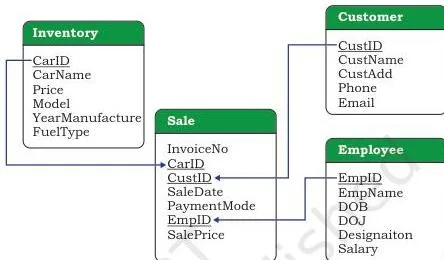
Read the four boxes in Figure 9.2 as the chapter’s four relations. SALE is the link relation: each sale stores a CarId, a CustId and an EmpID, so it connects INVENTORY, CUSTOMER and EMPLOYEE through these shared values (NCERT, p. 156).
Figure 9.3 classifies the first family of functions.
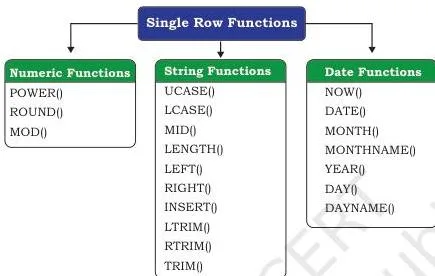
Single-row (scalar) functions work on one value and return one value, in three categories (NCERT, p. 158): Math functions take a numeric input and return a number; String functions take character input and return characters or numbers; Date and Time functions take date/time input and may return numbers, strings or dates.
Math functions
| Function | What it does | Example |
|---|---|---|
| POWER(x, y) or POW(x, y) | x raised to the power y | POWER(2, 3) returns 8 |
| ROUND(n, d) | rounds n to d decimal places; when d is omitted, rounds to the nearest integer | ROUND(2912.564, 1) returns 2912.6; ROUND(283.2) returns 283 |
| MOD(a, b) | remainder when a is divided by b | MOD(21, 2) returns 1 |
Math functions come from Table 9.13 of the textbook (NCERT, p. 158).
String functions
| Function | What it does | Example |
|---|---|---|
| UCASE(s) / UPPER(s) | converts s to uppercase | UCASE(‘Informatics Practices’) returns INFORMATICS PRACTICES |
| LOWER(s) / LCASE(s) | converts s to lowercase | LOWER(‘Informatics Practices’) returns informatics practices |
| MID(s, pos, n) / SUBSTRING / SUBSTR | substring of size n starting at position pos; without n, to the end | MID(‘Informatics’, 3, 4) returns form; MID(‘Informatics’, 7) returns atics |
| LENGTH(s) | number of characters in s | LENGTH(‘Informatics’) returns 11 |
| LEFT(s, n) | n characters from the left | LEFT(‘Computer’, 4) returns Comp |
| RIGHT(s, n) | n characters from the right | RIGHT(‘SCIENCE’, 3) returns NCE |
| INSTR(s, sub) | position of the first occurrence of sub; returns 0 if absent | INSTR(‘Informatics’, ‘ma’) returns 6 |
| LTRIM(s) / RTRIM(s) / TRIM(s) | removes leading / trailing / both spaces | TRIM(‘ SQL ‘) returns ‘SQL’ |
These come from Table 9.14 (NCERT, p. 161-162). The classic INSTR trick: to cut the part of an email before ‘@’, use LEFT(Email, INSTR(Email, ‘@’) – 1) — INSTR locates the ‘@’ and subtracting 1 drops the ‘@’ itself (NCERT, p. 162-163).
Date functions
| Function | What it does | Example |
|---|---|---|
| NOW() | current system date and time | NOW() returns 2019-07-11 19:41:17 |
| DATE(x) | extracts the date part of a date/time value | DATE(NOW()) returns 2019-07-11 |
| MONTH(d) | month as a number | MONTH(‘2003-11-28’) returns 11 |
| MONTHNAME(d) | month name | MONTHNAME(‘2003-11-28’) returns November |
| YEAR(d) | four-digit year | YEAR(‘2003-10-03’) returns 2003 |
| DAY(d) | day of the month | DAY(‘2003-03-24’) returns 24 |
| DAYNAME(d) | name of the weekday | DAYNAME(‘2019-07-11’) returns Thursday |
These come from Table 9.15 (NCERT, p. 163-164). Dates are stored in the ‘YYYY-MM-DD’ format, so the string ‘2003-11-28’ is read directly as 28 November 2003.
Aggregate (multiple-row) functions
Aggregate functions — also called multiple-row functions — work on a whole set of records and return one value per column they are applied to (NCERT, p. 165). The set is MAX, MIN, AVG, SUM and COUNT; for aggregates the column must be numeric except for COUNT (NCERT, p. 165).
| Function | What it returns |
|---|---|
| MAX(column) | largest value in the column |
| MIN(column) | smallest value in the column |
| AVG(column) | average of the values |
| SUM(column) | total of the values |
| COUNT(*) | number of records in the table |
| COUNT(column) | number of non-NULL values in the column |
| COUNT(DISTINCT column) | number of distinct values, ignoring repeats |
COUNT is the subtle one. In a MANAGER table with four rows, COUNT(*) gives 4, but COUNT(MEMNAME) gives 3 because one row holds NULL (NCERT, p. 165). Use COUNT(DISTINCT Model) to count different models — the CARSHOWROOM INVENTORY has 6 distinct models (NCERT, p. 166).
The textbook’s comparison table separates the two families (NCERT, p. 165):
| Single-row functions | Aggregate (multiple-row) functions |
|---|---|
| operate on one row at a time | operate on groups of rows |
| return one result per row | return one result per group |
| usable in SELECT, WHERE and ORDER BY | usable in the SELECT clause only |
That last row decides where an aggregate may appear: because aggregates work on groups, you cannot place AVG(Price) in a WHERE clause that must judge single rows first. The one place a group condition is legal is HAVING, which comes next.
GROUP BY and HAVING: Summarising Data in Groups
GROUP BY merges every row that holds the same value in a specified column into one group (NCERT, p. 167). In the SALE table, columns like SaleDate, EmpID and PaymentMode can repeat their values across rows, so they can form groups; aggregate functions then summarise each group (NCERT, p. 167).
The pattern is always the same: put the grouped column in the SELECT list and apply an aggregate to the rest (NCERT, p. 168):
SELECT CustID, COUNT(*) FROM SALE GROUP BY CustID; — how many cars each customer bought.
SELECT PaymentMode, COUNT(PaymentMode) FROM SALE GROUP BY PaymentMode; — how many sales used each mode.
HAVING puts a condition on the groups after aggregation — HAVING COUNT(*) > 1 keeps only the groups that bought more than one car (NCERT, p. 168).
| Question | WHERE | HAVING |
|---|---|---|
| Runs when | before grouping | after grouping |
| Works on | individual rows | groups |
| Can it use aggregate functions? | no | yes |
| Typical use | WHERE PaymentMode = ‘Cheque’ | HAVING COUNT(*) > 1 |
Keep the execution order in mind: FROM → WHERE → GROUP BY → HAVING → SELECT → ORDER BY. That is why a WHERE filter can never see an aggregate result — grouping has not happened yet when WHERE runs.
Set Operations on Relations: UNION, INTERSECT, MINUS and Cartesian Product
These four binary operations merge tuples from two tables, but they work only when both relations have the same number of attributes and corresponding attributes share the same domain (NCERT, p. 169). The chapter demonstrates them on DANCE (4 tuples) and MUSIC (5 tuples), both of degree 3. The results below are the ones the chapter produces.
| Operation | Symbol | What it keeps | DANCE/MUSIC result |
|---|---|---|---|
| UNION | \( \cup \) | all rows of both tables, duplicates shown once | 7 tuples (NCERT, p. 169-170) |
| INTERSECT | \( \cap \) | tuples present in both tables | 2 tuples — Mahira and Sanjay (NCERT, p. 170) |
| MINUS | \( – \) | tuples present in the first table but not the second | the “only in MUSIC, not DANCE” list — 3 tuples: Mehak, Lavanya, Abhay (NCERT, p. 170-171) |
| Cartesian product | \( \times \) | every row of the first paired with every row of the second | degree 6, cardinality 20 (NCERT, p. 171) |
UNION lists students in either event; INTERSECT lists students in both; MINUS lists students in one but not the other. The two formulas for the Cartesian product are the closest thing this chapter has to a formula list, so treat them as such:
\[ \text{degree}(A \times B) = \text{degree}(A) + \text{degree}(B) \]
\[ \text{cardinality}(A \times B) = \text{cardinality}(A) \times \text{cardinality}(B) \]
Check the arithmetic with DANCE (degree 3, cardinality 4) and MUSIC (degree 3, cardinality 5): the product has degree 3 + 3 = 6 and cardinality 4 × 5 = 20 — expressed with LaTeX, \( 3 + 3 = 6 \) and \( 4 \times 5 = 20 \) (NCERT, p. 171).
Querying Two Relations: Table Aliases and JOINs
Writing two table names in the FROM clause, separated by a comma, makes MySQL first form their Cartesian product and then trim it with the WHERE clause (NCERT, p. 172). Example 9.24 shows the idea on DANCE and MUSIC: after pairing every row with every row, WHERE D.Name = M.Name keeps only the pairs with equal names (NCERT, p. 172).
That query also introduces table aliases — D for DANCE and M for MUSIC. An alias is valid only for the current query, and once aliased, the original table name cannot be used in the same query (NCERT, p. 172-173).
For the JOIN form, the chapter switches to the UNIFORM and COST pair: UCode is the primary key of UNIFORM, and UCode together with Size forms the composite key of COST, so UCode is the shared attribute that links the two tables (NCERT, p. 173). Example 9.25 then writes the same query three ways:
| Style | Statement shape | Notes |
|---|---|---|
| Condition in WHERE | SELECT * FROM UNIFORM U, COST C WHERE U.UCode = C.UCode; | two tables in FROM, join condition in WHERE (NCERT, p. 174) |
| Explicit JOIN | SELECT * FROM UNIFORM U JOIN COST C ON U.UCode = C.UCode; | condition moves to the ON clause (NCERT, p. 174) |
| NATURAL JOIN | SELECT * FROM UNIFORM NATURAL JOIN COST; | removes the duplicated join column — UCode appears once (NCERT, p. 174-175) |
Three rules close the section (NCERT, p. 173-175):
- The join attribute is usually a primary key in one table and a foreign key in the other (NCERT, p. 173).
- To join N tables on an equality condition you need N − 1 joins (NCERT, p. 175).
- JOIN is not limited to =; it works with other relational operators as well (NCERT, p. 175).
One complete two-table query for the shape (StudentAttendance):
SELECT SName, GPhone FROM STUDENT S, GUARDIAN G WHERE S.GUID = G.GUID; It projects the student’s name and the guardian’s phone by matching the GUID foreign key across the two tables.
Worked Examples: Building a Library Database from Scratch
Three examples chain the chapter’s commands in a realistic building order on an original LIBRARY database with tables MEMBER and ISSUE. All names, numbers and dates are fresh — none appear in the NCERT chapter — so you can run them mentally and check each step.
Example 1 (DDL): Create the database and two related tables
Method: create a database, create a parent table with constraints, then a child table with a composite primary key and a foreign key; verify with DESCRIBE.
-
Create the database and select it:
CREATE DATABASE LibraryStudy; USE LibraryStudy;
-
Create the MEMBER table with a primary key, a NOT NULL column and a phone column:
CREATE TABLE MEMBER (MemberID INT PRIMARY KEY, MName VARCHAR(25) NOT NULL, MPhone CHAR(10));
-
Create the ISSUE table with a composite primary key and a foreign key:
CREATE TABLE ISSUE (BookID INT, MemberID INT, IssueDate DATE, PRIMARY KEY (BookID, MemberID), FOREIGN KEY (MemberID) REFERENCES MEMBER(MemberID)); ISSUE holds three columns, so its degree is 3; the pair (BookID, MemberID) uniquely identifies a row, just as (AttendanceDate, RollNumber) does in ATTENDANCE.
This form writes the keys inside CREATE TABLE; the chapter’s ALTER statements in Section 9.4.4 achieve the same ends on a table that already exists.
-
View the structure:
DESCRIBE MEMBER; Expected: three rows, one per column — MemberID (int, key PRI), MName (varchar(25), NOT NULL), MPhone (char(10), NULL allowed).
Example 2 (DML + SELECT): Populate, then query with alias, IN and BETWEEN
Method: insert into the referenced table first, then into the referencing table; then run SELECT with a quoted alias, an IN filter and a BETWEEN range.
-
Insert three members — MEMBER is referenced by ISSUE, so it is populated first (the caution from NCERT, p. 141):
INSERT INTO MEMBER VALUES (101, ‘Aarav Mehta’, ‘9811122233’); INSERT INTO MEMBER VALUES (102, ‘Bhavna Iyer’, ‘9822211133’); INSERT INTO MEMBER (MemberID, MName) VALUES (103, ‘Chetan Rao’); Row 103 leaves MPhone NULL — that is why the column names are written explicitly. Expected: 3 rows.
-
Insert two issues dated in 2025:
INSERT INTO ISSUE VALUES (501, 101, ‘2025-07-14’); INSERT INTO ISSUE VALUES (502, 101, ‘2025-07-18’); Expected: 2 rows. Both issues belong to member 101, which the next example exploits.
-
Query with an aliased, quoted column — only members 101 and 102:
SELECT MName AS ‘Member Name’ FROM MEMBER WHERE MemberID IN (101, 102); Expected: 2 rows — Aarav Mehta, Bhavna Iyer.
-
Query a date range with BETWEEN — inclusive of both boundaries:
SELECT * FROM ISSUE WHERE IssueDate BETWEEN ‘2025-07-15’ AND ‘2025-07-31’; Expected: 1 row — only issue 502 (2025-07-18) falls in the range; issue 501 (2025-07-14) is just outside it.
Example 3 (GROUP BY/HAVING, then JOIN): Summarise and cross tables
Method: group the ISSUE rows by member, filter the groups with HAVING, then write the same two-table query twice — comma-in-FROM and explicit JOIN — using table aliases.
-
Count issues per member and keep only members with more than one:
SELECT MemberID, COUNT(*) AS ‘Books Issued’ FROM ISSUE GROUP BY MemberID HAVING COUNT(*) > 1; Expected: 1 row — member 101 with 2 books. Had any member appeared only once, HAVING would have dropped that group.
-
Join ISSUE and MEMBER with the comma-in-FROM style, aliasing the tables as I and M:
SELECT I.MemberID, M.MName, I.BookID FROM ISSUE I, MEMBER M WHERE I.MemberID = M.MemberID;
-
Write the same join with explicit JOIN … ON:
SELECT I.MemberID, M.MName, I.BookID FROM ISSUE I JOIN MEMBER M ON I.MemberID = M.MemberID; Expected for both forms: 2 rows — each ISSUE row paired with its member’s name: (101, ‘Aarav Mehta’, 501) and (101, ‘Aarav Mehta’, 502). MEMBER has 3 rows but the join returns 2, because ISSUE drives the join and only member 101 appears in it.
Common Mistakes Students Make in SQL
NULL: a misconception autopsy
NULL trips more students than any operator, so here is the full treatment (NCERT, p. 151-152, p. 165):
- NULL is not 0 and not an empty string. 0 and ” are real values; NULL is the absence of a value — missing, unknown or not applicable (NCERT, p. 151).
- Nothing can equal NULL. WHERE Bonus = NULL compares each Bonus with an unknown, and the comparison itself evaluates to NULL — never TRUE — so no row passes (NCERT, p. 151).
- Arithmetic with NULL gives NULL. 5 + NULL = NULL, because an unknown added to a known quantity is still unknown (NCERT, p. 151).
- COUNT(column) skips NULLs. That is why COUNT(MEMNAME) is 3 in a table of 4 rows, while COUNT(*) is 4 (NCERT, p. 165).
Error-to-correction table
| Students write | Because of this | Correct rule (and how to check) |
|---|---|---|
| WHERE Bonus = NULL | NULL is unknown, so the comparison never becomes TRUE | Use WHERE Bonus IS NULL. Check by listing the returned rows — they should be exactly the rows without a bonus (NCERT, p. 151-152). |
| UPDATE STUDENT SET GUID = 101010101010 with no WHERE | every row gets the new value (NCERT, p. 154) | Add WHERE RollNumber = 3. Check: run SELECT with the same WHERE first and confirm it names the intended rows. |
| DELETE FROM STUDENT with no WHERE | all rows are removed (NCERT, p. 155) | Add a WHERE condition naming the row to delete. Check: SELECT with that WHERE first; the rows shown are the rows that will vanish. |
| DELETE and DROP used interchangeably | DELETE removes rows and keeps the table structure; DROP TABLE removes the table itself permanently and cannot be undone (NCERT, p. 141, 155) | Use DELETE for records you still need a table for; use DROP only when the table itself must go. |
| ALTER and UPDATE mixed up | ALTER changes the table structure; UPDATE changes the data values (NCERT, p. 138-140, 154) | Structure change (column, constraint) → ALTER; value change → UPDATE with SET. |
| COUNT(*) reached for when COUNT(column) is the right call | COUNT(*) counts all rows including NULLs; COUNT(column) counts only non-NULL values (NCERT, p. 165) | Decide first: should NULL rows count? MANAGER example — 4 rows, COUNT(MEMNAME) = 3. |
| Group condition written in WHERE | WHERE runs before grouping and cannot see aggregate results | Move the condition to HAVING; it is evaluated on groups, after aggregation. |
| Storing names in CHAR and fixed codes in VARCHAR | CHAR(20) pads short names with spaces on the right; fixed-length identifiers are safer in CHAR, which reserves exactly the needed length (NCERT, p. 135-136) | Variable text → VARCHAR; fixed-length codes such as Aadhaar (CHAR(12)) or phone (CHAR(10)) → CHAR. |
| Forgetting or misplacing quotes | text and dates must be in single quotes; numbers and NULL must not be quoted (NCERT, p. 142-143) | ‘Amit Ahuja’, ‘2003-05-15’, 5711492685, NULL. Check every string literal is quoted and every number is not. |
Confusing command pairs at a glance
| Pair | First one … | Second one … | One-line rule |
|---|---|---|---|
| ALTER vs UPDATE | changes table structure (ADD, MODIFY, DROP) | changes data values (SET … WHERE) | structure → ALTER; data → UPDATE |
| DELETE vs DROP | removes rows, keeps the table | removes the whole table permanently | DROP is permanent; it cannot be undone |
| WHERE vs HAVING | filters rows before grouping; no aggregates | filters groups after grouping; aggregates allowed | aggregate condition → HAVING |
| COUNT(*) vs COUNT(column) | counts every row, NULLs included | counts only non-NULL values | decide whether NULL rows should count |
How to Write Complete Answers for the NCERT Exercise
The exercise on NCERT, p. 176-180 has five question types: definitions, differentiations, output prediction, query-writing and schema design. Each type has a shape that makes an answer complete. The method below shows the structure without giving the answers away.
- Differentiate questions (Q1c single-row vs aggregate; Q1e ALTER vs UPDATE, DELETE vs DROP): open with the one-line difference, then give one supporting detail for each side. The difference first, the detail after — for example state that ALTER rewrites the table’s structure while UPDATE rewrites the data inside it, then back each side with one clause.
- Definition questions (Q1a RDBMS, Q1d Cartesian product): give a one-sentence definition, then add a one-line example. The example carries the completeness — a definition alone reads as half an answer.
- Output questions (Q2): show the working, never just the result. For ROUND(342.9234, -1), explain that a negative d rounds to the left of the decimal — here the tens place — so the result is 340; write that reasoning line before the answer. Apply the same stepwise habit to every Q2 part.
- Query-writing questions (Q3, Q5, Q7, Q8): write the complete statement ending with the semicolon; use single quotes for string values; and for UPDATE or DELETE, show the WHERE clause deliberately, with a one-line caution about what happens without it.
- Schema questions (Q4, Q6): choose a data type plus a constraint for each column and justify each choice in one line — a TeamID holding integers 1 to 9 is INT with PRIMARY KEY; a TeamName that must hold at least 10 characters is VARCHAR sized well beyond 10, say VARCHAR(15).
The chapter’s embedded “Think and Reflect” probes are also fair practice.
The three closed questions have fixed answers: a primary key is NOT NULL + UNIQUE together (NCERT, p. 134); a mobile number is better as CHAR (NCERT, p. 137); and the foreign keys are ATTENDANCE.RollNumber (referencing STUDENT.RollNumber) and STUDENT.GUID (referencing GUARDIAN.GUID), while GUARDIAN has no foreign key (NCERT, p. 138).
Revision Summary: The SQL Command Sheet
Everything on one sheet. The page column tells you where each command lives in the chapter.
| Command / operator | Syntax template | What it does (page) |
|---|---|---|
| CREATE DATABASE | CREATE DATABASE dbname; | creates a new empty database (p. 134) |
| SHOW DATABASES | SHOW DATABASES; | lists databases on the server (p. 135) |
| USE | USE dbname; | selects the working database (p. 135) |
| SHOW TABLES | SHOW TABLES; | lists tables in the current database (p. 135) |
| CREATE TABLE | CREATE TABLE t (attr datatype constraint, …); | builds a relation; column count = degree (p. 135) |
| DESCRIBE | DESCRIBE t; | shows the table structure (p. 137) |
| ALTER — constraints | ALTER TABLE t ADD PRIMARY KEY (a, b); / ADD FOREIGN KEY (a) REFERENCES rt (a); / ADD UNIQUE (a); | adds keys and uniqueness (p. 138) |
| ALTER — columns | ALTER TABLE t ADD attr DATATYPE; / MODIFY attr DATATYPE [NOT NULL] [DEFAULT value]; / DROP attr; | adds, modifies or removes a column (p. 139-140) |
| ALTER — primary key | ALTER TABLE t DROP PRIMARY KEY; | removes the PK; re-add one afterwards (p. 140-141) |
| DROP | DROP TABLE t; / DROP DATABASE db; | permanent removal; cannot be undone (p. 141) |
| INSERT | INSERT INTO t VALUES (…); / INSERT INTO t (c1, c2) VALUES (…); | adds records; the first form needs full column order (p. 141-142) |
| UPDATE | UPDATE t SET attr = value, … WHERE condition; | changes values; missing WHERE changes all rows (p. 154-155) |
| DELETE | DELETE FROM t WHERE condition; | removes rows; missing WHERE removes all (p. 155) |
| SELECT | SELECT attrs FROM t WHERE condition; | retrieves data as a table (p. 144) |
| SELECT DISTINCT | SELECT DISTINCT attr FROM t; | removes duplicate rows (p. 147) |
| Relational + logical | =, <, <=, >, >=, != and AND, OR, NOT | build conditions (p. 148) |
| BETWEEN | attr BETWEEN a AND b | inclusive range test (p. 149) |
| IN / NOT IN | attr IN (v1, v2, …) | membership test (p. 150) |
| ORDER BY | ORDER BY attr [DESC] | sorts output; ascending by default (p. 151) |
| IS NULL | attr IS NULL / IS NOT NULL | the only correct NULL test (p. 151-152) |
| LIKE | attr LIKE ‘pattern’ | substring match; % = many characters, _ = exactly one (p. 152-153) |
| Math functions | POWER(x, y), ROUND(n, d), MOD(a, b) | powers, rounding, remainders (p. 158) |
| String functions | UCASE, LOWER, MID/SUBSTRING/SUBSTR, LENGTH, LEFT, RIGHT, INSTR, LTRIM, RTRIM, TRIM | case, slicing, length, position, trimming (p. 161-162) |
| Date functions | NOW, DATE, MONTH, MONTHNAME, YEAR, DAY, DAYNAME | current date/time and date parts (p. 163-164) |
| Aggregates | MAX, MIN, AVG, SUM, COUNT(*), COUNT(col), COUNT(DISTINCT col) | one value per column or group (p. 165-166) |
| GROUP BY | … GROUP BY col; | one group per distinct value (p. 167-168) |
| HAVING | … GROUP BY col HAVING condition; | filters groups after aggregation (p. 168) |
| Set operations | UNION, INTERSECT, MINUS | merge tuples; same schema needed (p. 169-171) |
| Cartesian product | FROM t1, t2 | all row pairs; degree adds, cardinality multiplies (p. 171) |
| JOIN | FROM t1 JOIN t2 ON condition; / NATURAL JOIN | combines on matching values; N-1 joins for N tables (p. 172-175) |
The two formulas (Cartesian product):
\[ \text{degree}(A \times B) = \text{degree}(A) + \text{degree}(B), \quad \text{cardinality}(A \times B) = \text{cardinality}(A) \times \text{cardinality}(B) \]
Memory device — the SELECT clause order. The clauses of a SELECT always appear in the order SELECT, FROM, WHERE, GROUP BY, HAVING, ORDER BY. Remember it as “Some Friends Went Gradually Home Onward” — S-F-W-G-H-O. Learn the order once and clause-placement confusion disappears.
WHERE-safety reminder. For UPDATE and DELETE, write the WHERE clause and ask “which rows?” — if you cannot answer, the statement is not ready.
Can you write …? A five-line self-check. You should be able to write all of these from memory:
- create a table with a primary key, a NOT NULL column and a foreign key;
- insert a row into a table without naming all columns, leaving one NULL;
- select rows with a WHERE condition and sort them descending;
- group rows and keep only groups with more than two members;
- bring one column from each of two tables into a single result using a JOIN.
SQL FAQ: Quick Answers for Last-Minute Revision
Why does WHERE Bonus = NULL not return rows?
Because NULL means unknown — no value can be said to equal an unknown, so the comparison evaluates to NULL instead of TRUE, and no row satisfies it. The only correct test is IS NULL: WHERE Bonus IS NULL (NCERT, p. 151-152).
When should a condition go in HAVING instead of WHERE?
When the condition filters groups after aggregation — in practice, whenever it involves an aggregate function such as COUNT(*). WHERE runs on individual rows before grouping and cannot see aggregate results, so a grouped condition there is an error; HAVING is its proper home (NCERT, p. 168).
Should a mobile number be stored as CHAR or VARCHAR?
CHAR. A mobile number has a fixed length, it is never used in arithmetic, and storing it as a number would drop a leading zero — CHAR, a character type, keeps the digits exactly as entered and reserves exactly 10 positions. The chapter’s own design stores GPhone as CHAR(10) (NCERT, p. 136-137).
Why do two-table queries need table aliases?
When two tables share an attribute name — UCode exists in both UNIFORM and COST — MySQL cannot tell which table’s UCode you mean. A table alias qualifies the attribute (U.UCode, C.UCode) and shortens the query; it is valid only for the current query (NCERT, p. 172-173).
Why is COUNT(*) different from COUNT(column)?
COUNT(*) counts rows; COUNT(column) counts non-NULL values. The MANAGER example makes it concrete: the table has 4 rows, but COUNT(MEMNAME) returns 3 because one row holds NULL in that column (NCERT, p. 165).
What happens if UPDATE or DELETE has no WHERE clause?
UPDATE sets the given value on every row, and DELETE removes every row. There is no confirmation step — the command just runs. Always write the WHERE clause to name the rows you mean (NCERT, p. 154-155).
Reference: NCERT Class 12 Computer Science textbook, chapter Structured Query Language (SQL).
Explore Class 12 Computer Science Notes
- Class 12 Computer Science Notes
- Class 12 CBSE Notes
- CBSE Notes for Classes 1 to 12
- Previous: Database Concepts
- Next: Computer Networks
Class 12 Computer Science on LearnCBSE:
Related chapters:
- File Handling in Python notes
- Queue notes
- Sorting notes