
“An idea that is developed and put into action is more important than an idea that exists only as an idea.” — Gautama Buddha
That epigraph opens Chapter 13 of the NCERT Computer Science textbook, and it is the whole chapter in one line: project based learning means learning by doing.
These project based learning class 12 computer-science notes compress Chapter 13 into the five project steps, the three solving approaches, the six teamwork components, and a plain-language decoding of all three NCERT project descriptions — enough to revise the theory quickly and to plan your own group project afterwards. These notes follow the 2026-27 session.
If you want to verify the original wording or Figure 13.1 against this page, the official NCERT PDF of Chapter 13, Project Based Learning (pages 241–248), is available on the NCERT website.
What This Chapter Teaches and How It Connects to Your Own Project
Project based learning is a “learn by doing” method. Students take a real problem, analyse it, break it into small modules, solve each module, and then integrate the module solutions into one complete answer. Along the way the team gathers relevant data, processes it, and reports the results in a predetermined format (NCERT, pp. 241–242).
What makes it different from ordinary study is that students organise the work themselves, in groups, and pick up skills such as problem solving and decision making while doing it.
The chapter has two halves. Sections 13.1–13.3 build the concepts — what project based learning is, the approaches for solving a project, and teamwork. Section 13.4 then gives three worked project descriptions: Stay Healthy, the bomb puzzle, and Match the Sum.
The chapter says a group may take up any of these examples or choose any other project in consultation with the guide teacher (NCERT, p. 245), so read the three descriptions as models to imitate, not as a fixed list.
This chapter is part of the Class 12 Computer Science notes. Where a chapter like Security Aspects taught you how to protect code and data, this chapter teaches you how to organise the people and the process that produce them — which is exactly what happens when you build your own practical project for the class.
The Five Steps of Project Based Learning
The engine of the chapter is a five-step process (NCERT, pp. 242–243). Figure 13.1 presents these steps in the order section 13.2 lists them, so learn them in that sequence — an answer that scrambles the order reads as a memorised list that slipped.
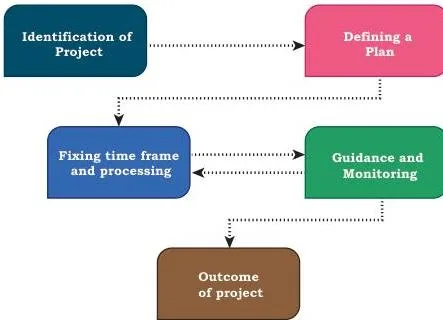
The diagram shows the five steps as one chain: first you choose the project, then you plan it, fix its time frame, guide and monitor it, and finally deliver its outcome. Each step produces something the next step consumes, which is why skipping one breaks the whole project.
| Step | What the team does | Why it matters |
|---|---|---|
| 1. Identification of a project | Pick a problem that comes from a real-life situation; understand its usefulness and impact; interdisciplinary projects are encouraged | A real problem keeps the project grounded and worth building |
| 2. Defining a plan | Choose one project leader, define every member’s role, list the tools for each activity, and think about extreme situations | Thinking about extreme situations forces the plan to handle unusual inputs, not just the happy path |
| 3. Fixing a time frame and processing | Set a time frame — every project is time relevant; the structure stays flexible | Time discipline keeps the project on schedule without making it rigid |
| 4. Providing guidance and monitoring | Participants get stuck; help comes from books, websites, experts, and the guide teacher, while the leader monitors the project | Monitoring catches stalls early, before they cost the time frame |
| 5. Outcome of a project | Deliver a single or multiple outcome; have it peer reviewed and modify it as per feedback from the guide teacher or other users | Feedback turns a finished output into a better one |
To recall the order, use the mnemonic “Idea Develops From Great Output” — Identification, Defining, Fixing, Guidance, Outcome (I-D-F-G-O).
Modular, Top-Down, and Bottom-Up Approaches Compared
The textbook names three approaches for solving a project — modular, top-down, and bottom-up (NCERT, p. 242) — but only expands the modular one. That is why most students cannot contrast them; this table fills the gap.
A modular approach divides the project into manageable modules; each module has a well-defined task and a set of inputs, and its outputs integrate into the desired outcome.
Top-down and bottom-up are two directions for reaching those modules: top-down starts from the big picture and breaks it into smaller sub-problems, while bottom-up builds and tests smaller units first and then integrates upward. In other words, modular describes the final structure of the project, while top-down and bottom-up describe the direction of the work that creates that structure.
| Approach | How it works | When it suits | Restaurant example (Stay Healthy) |
|---|---|---|---|
| Modular | Divide the project into modules with defined inputs and outputs; integrate the outputs | Team projects where members own separate parts | Separate login, menu, billing, and reports modules that join into one application |
| Top-down | Start from the whole system and break it into smaller sub-problems | When the full picture is clear before coding | Start with “restaurant automation”, then break it into order placement, bill generation, and records — and those further into login screens and item entry |
| Bottom-up | Build and test the smallest units first, then combine them upward | When small units are risky or untested | Code and test the bill-calculation function alone, then the menu screen, then join them into the kiosk app |
Key Terms at a Glance
These are the definitions a project based learning answer is built from. Every row gives the chapter’s meaning in simpler words.
| Term | Meaning | Example / where it appears |
|---|---|---|
| Project based learning | Learning by doing: analyse a problem, gather and process data, report results in a fixed format | Every project in section 13.4 |
| Module | A manageable part of a project with a well-defined task, inputs, and outputs | The billing module of Stay Healthy |
| Modular approach | Structuring a project as modules whose outputs integrate into the final outcome | Splitting Stay Healthy into login, menu, billing, reports |
| Top-down approach | Moving from the whole system to smaller sub-problems | Decomposing the restaurant system level by level |
| Bottom-up approach | Building and testing small units first, then integrating upward | Testing the bill function before the full app |
| Teamwork | Efforts made by individuals collectively to accomplish a task (NCERT, p. 243) | Bowler and fielder together taking a catch |
| Time frame | The agreed schedule within which project activities are completed | Milestones fixed in step 3 |
| Project leader | The member identified to lead the project and ensure monitoring | Leadership role fixed in step 2 |
| Peer review | The outcome is checked by peers and modified from their feedback | Outcome step (step 5) |
| Interdisciplinary project | A project that draws on more than one subject area | e.g. a seminar project combining science and economics |
| Exception handling | Anticipating and catching runtime errors so the program does not crash | The bomb puzzle note demands it (p. 246) |
The Project Recipe: Step, Action, Deliverable
This chapter has no formulas, so the nearest equivalent to a formula is the project cycle itself. Think of it as a recipe: each step is a method instruction, and each step produces one ingredient — a deliverable — that the next step consumes. Follow the steps in order and you get the finished dish; skip one and the project collapses.
| Step | Action you take | Deliverable you produce |
|---|---|---|
| 1. Identification | Choose a real-life problem and check its usefulness and impact | One-paragraph project idea |
| 2. Defining a plan | Name a leader, fix each member’s role, list the tools | Role chart |
| 3. Fixing a time frame | Fix milestones and deadlines on a flexible schedule | Time frame sheet |
| 4. Guidance and monitoring | Hold check-ins; get help from books, websites, experts, and the guide teacher | Progress log |
| 5. Outcome | Present the output, collect peer feedback, modify | Final output plus a change list |
Use this recipe the next time you plan your own Class 12 project: write the deliverable for step 1 first, and the rest of the plan falls out of it.
Teamwork: The Six Components That Decide Project Success
Teamwork is “efforts made by individuals collectively to accomplish a task” (NCERT, p. 243). The chapter’s cricket example makes the point simply: a good ball from the bowler is wasted if the fielder drops the catch, so both contributions are necessary, and winning needs strength in batting, bowling, and fielding together.
The same holds for a school exhibition team — one member builds the model, another writes the placard, a third handles visitor questions; the stall works fully only when all three contribute.
Technical proficiency alone does not make a team successful; these six components do (NCERT, pp. 244–245).
| Component | Concrete behaviour | Textbook page |
|---|---|---|
| Communicate | Use e-mails, phones, or group meetings so members understand each other and sort out problems | p. 244 |
| Listen | Understand others’ ideas and follow the steps the group agrees on in meetings | p. 244 |
| Share | Exchange ideas, images, and tools; a member well versed in an area shares expertise with the rest | p. 244 |
| Respect | Treat every member respectfully and consider every thought put forward | p. 244 |
| Help | Every member lends a hand; help may also come from people outside the team | p. 244 |
| Participate | Encourage each other to join the project work and discussions so everyone feels important | p. 245 |
Recall the six with the mnemonic “Clear Listening Shares Respect; Help Participate” (C-L-S-R-H-P). The chapter’s own warning is part of this: not respecting a member’s views may cause that member to “not give his best” (NCERT, p. 244).
Teamwork is therefore not the same as simply splitting the work into pieces — it is communication, listening, sharing, respect, help, and participation together.
Decoding the Three NCERT Project Descriptions
Every project description in section 13.4 follows the same two-part anatomy. The Description defines the problem in a few sentences; the Specifications list the hard requirements the program must deliver. Read each specification line as a feature: if the finished program lacks it, the project is incomplete. When you draft your own project, write it in the same Description-then-Specifications pattern.
| Project | Core rule | Python ideas it exercises |
|---|---|---|
| Stay Healthy | Every bill carries a unique id | Modular design, data persistence in a file/database, multiple reports |
| Bomb puzzle | An opened cell reveals how many bombs are adjacent | 2D grid handling, exception handling |
| Match the Sum | Typed digits that sum to 10 are removed | Lists, random digit generation, a game loop that generates digits at timed intervals |
Stay Healthy: Turning Specifications into Modules
The team builds software for a new restaurant: customers place orders at a reception kiosk, the program generates bills and keeps records, and the manager runs reports. This description is the chapter’s invitation to practise modular design, because every owner requirement maps onto one module or function.
| Owner requirement (NCERT, p. 245) | Module that implements it |
|---|---|
| Two login types — one for the manager, one for the customer | Login module with two roles |
| Kiosk screen showing the menu for placing orders | Menu display module |
| Customer enters item codes and quantities | Order entry module |
| Soft bill with an order number displayed after ordering | Bill generation module |
| Unique bill id (date + order number of the day) saved to a file or database | Billing module plus data persistence |
| Order number starts from 1 every day | Order counter that resets daily |
| Manager: add/change menu, delete an order, daily sales summary for a chosen date | Manager module (menu management, order deletion, sales summary report) |
| At least one more report of your choice | Your own extra report — the spec invites the design (p. 246) |
Trace the unique bill id with new numbers. On 14 November 2025, the first order of the day gets id 2025-11-14-01 and the 7th order gets 2025-11-14-07; at midnight the counter resets, so the first order on 15 November gets 2025-11-15-01. Because the date is part of the id, no two bills in the data file can ever collide.
A daily sales summary row might read: “Paneer wrap — 12 sold — Rs 960”, “Fruit juice — 10 — Rs 400”, “Veg sandwich — 8 — Rs 480”, giving Rs 1840 for those three items on that day. The “add at least one more relevant report of your choice” line is the specification’s open invitation: a best-selling-item report or a weekly-total report both satisfy it.
The Bomb Puzzle: Reading the Clues on a 6 × 6 Grid
This is a Minesweeper-style game: a grid of cells, some of which hide bombs, and the player clears the board by clicking cells without detonating any bomb (NCERT, p. 246). Clicking a bomb ends the game; clicking a safe cell reveals a clue — the number of bombs hidden in adjacent cells.
The clue counts all the neighbouring cells around the opened one: eight for an interior cell, fewer at edges and corners. For an original trace, open the cell at row 3, column 4. Its neighbours are (2,3), (2,4), (2,5), (3,3), (3,5), (4,3), (4,4), (4,5). If exactly three of those eight cells hold bombs, the opened cell reveals the clue 3.
By contrast, a corner cell such as (1,1) has only three neighbours, so its clue can never exceed 3.
To reduce complexity, the specification fixes the grid at 6 × 6 with 6 bombs (NCERT, p. 246) — keep that configuration exactly as given. The chapter also asks you to play any Minesweeper game five times before coding; the purpose is “proper understanding” of the project, because you cannot program rules you have only half understood.
The specification ends with a note: handle the various exceptions that may occur while playing. In Python terms this means wrapping risky input and click handling in try/except blocks so a wrong click or bad input never crashes the game.
Match the Sum: The Sum-to-Ten Game Logic
The ICT club builds “Match the Sum”, an edutainment game that helps children aged 5–7 practise summing by forming 10 from 2 or 3 digits (NCERT, p. 246). The screen shows a list of 15 cells, each holding a digit from 1 to 9.
- A digit is generated randomly at equal time intervals and placed in the rightmost cell; every existing digit shifts one cell left.
- The player types 2 or 3 digits that are currently displayed.
- If the typed digits sum to 10, those digits are removed from the list.
- The game continues as long as an empty cell remains to receive the next digit (NCERT, p. 247).
Original trace: the visible list reads 2, 4, 1, 3, 5. A player types 3, 2, 5. Since \( 3 + 2 + 5 = 10 \), those three cells are removed and the remaining 4 and 1 wait for the next generated digit to slide in from the right.
Now the edge case the specification warns about: what if the displayed digits cannot make 10? With digits 4, 7, 9 visible, no pair or triple sums to 10 (\( 4+7=11 \), \( 4+9=13 \), \( 7+9=16 \), \( 4+7+9=20 \)). The game must wait for a new digit to create a fresh possibility instead of crashing or removing the wrong cells (NCERT, p. 247).
The “equal intervals” requirement is a time-handling job for the game loop: the program must pause between digit generations.
Common Mistakes and How to Avoid Them
These six errors appear again and again when students answer or build this chapter’s projects. Each row gives the correction and a quick way to check yourself.
| Mistake | Correct rule | How to check your answer |
|---|---|---|
| We start coding before planning | Finish identification, the plan, and the time frame first — coding is only the execution of that plan | Can you name your leader, the members’ roles, and the deadline before writing line one? |
| Treating modular and top-down as the same thing | Modular means dividing into modules with defined inputs and outputs; top-down is the big-to-small direction used to reach them | Does your sentence describe a structure (modular) or a direction (top-down)? |
| Skipping exception handling in the bomb puzzle | Wrap risky inputs and clicks in try/except — the specification explicitly demands it | Click an invalid cell in a test run; does the program survive? |
| Forgetting the no-valid-sum case in Match the Sum | When no 2 or 3 visible digits sum to 10, the game waits for the next digit rather than crashing | Show a list like 4, 7, 9 — does the program keep running and simply wait? |
| Ignoring a quiet member’s views | Respect and consider every view put forward in meetings | Is every member’s suggestion recorded and discussed before the group decides? |
| Bill ids that repeat | Combine the date and the daily order number, and reset the number at midnight | Do two orders from different days share an id in your test data? |
How to Write Complete Answers on Project Based Learning
This chapter has no exercise questions in the textbook, so there is no solutions list to memorise. Theory answers just need the right framework in the right order, with one concrete behaviour attached to each part. Prepare these answer shapes:
- Steps question: name all five steps in order — identification, plan, time frame, guidance/monitoring, outcome — and attach one behaviour to each (e.g. “defining a plan — choose a leader, fix roles, list tools”).
- Approaches question: define modular, top-down, and bottom-up, contrast them in one line each, and give an original example (the Stay Healthy restaurant works well).
- Teamwork question: list all six components with one behaviour each; the respect warning from p. 244 is a strong closing line.
- Project question: state the project’s core rule (unique bill id, adjacent bomb clues, digits summing to ten) and one specification detail that proves you read the project.
A complete answer opens with the definition, runs the framework, and closes with an example. The night-before self-check: can you name the 5 steps, the 3 approaches, the 6 teamwork components, and the 3 projects with their central rule? If yes, the chapter is covered.
For wider revision, other Class 12 Computer Science topics sit in the Class 12 notes, and every class has its own section in the CBSE notes index.
One-Glance Revision Sheet
Everything in the chapter on one screen. If you can reproduce this table from memory, you have revised the chapter.
| Block | What to recall | Mnemonic |
|---|---|---|
| 5 steps | Identification of a project → Defining a plan → Fixing a time frame and processing → Providing guidance and monitoring → Outcome | “Idea Develops From Great Output” (I-D-F-G-O) |
| 3 approaches | Modular (project into modules with defined inputs/outputs); top-down (whole → sub-problems); bottom-up (units → integrate) | — |
| 6 teamwork components | Communicate, Listen, Share, Respect, Help, Participate | “Clear Listening Shares Respect; Help Participate” (C-L-S-R-H-P) |
| 3 projects | Stay Healthy: unique bill id (date + daily order number). Bomb puzzle: opened cell shows count of bombs in adjacent cells; 6 × 6 grid, 6 bombs. Match the Sum: digits summing to 10 are removed; no valid sum → wait for next digit | — |
Frequently Asked Questions
Is project based learning the same as the project I have to build in Class 12 Computer Science?
In method, yes. The chapter presents these project works “which can be taken up in groups under project based learning”, and adds that a group may choose any other project in consultation with the guide teacher (NCERT, p. 245).
The five-step process and the Description-and-Specifications pattern you revise here are exactly the process you follow to build and present that project: identify a problem, plan roles, fix a time frame, monitor progress, and report the outcome. The exact practical-project rules for your school are set by your own institution; this chapter supplies the method.
What is the difference between modular, top-down, and bottom-up approaches?
Modular is a structure: the project is divided into manageable modules, each with a well-defined task, inputs, and outputs. Top-down and bottom-up are directions for reaching those modules — top-down goes from the whole system to smaller sub-problems, while bottom-up builds and tests small units first and then integrates upward.
Why should I play Minesweeper five times before coding the bomb puzzle game?
Because the chapter says it will help in “proper understanding of your project” (NCERT, p. 246). Five games fix the clue mechanics — adjacent bomb counts, detonation on a bomb cell — in your head, so the behaviour you code matches the real game you practised.
How is every bill unique in the Stay Healthy restaurant project?
The bill id combines the date with the order number of the day, and the order number starts from 1 every day (NCERT, p. 245). Since the same daily number would otherwise repeat, the date part guarantees uniqueness across the data file — for example, the 7th order on 14 November 2025 becomes 2025-11-14-07.
What happens in Match the Sum when the digits on the list never add up to 10?
The game continues and waits for a new digit; it must not crash. The specification’s note explicitly says to take care of that situation (NCERT, p. 247). With digits 4, 7, 9 visible, no pair or triple sums to 10, so the program simply waits for the next generated digit to change the possibilities.
Which of the three NCERT project descriptions is the easiest to implement in Python?
The textbook gives no ranking. By scope, Match the Sum is the smallest: one list of 15 cells, random digit generation, a removal rule, and the no-sum fallback. The bomb puzzle adds a 6 × 6 grid plus the exception-handling note.
Stay Healthy is the largest: two logins, billing with a unique id, data persistence, and multiple reports — which is exactly why it is the best showcase of modular design.
Reference: NCERT Class 12 Computer Science textbook, chapter Project Based Learning.
Explore Class 12 Computer Science Notes
- Class 12 Computer Science Notes
- Class 12 CBSE Notes
- CBSE Notes for Classes 1 to 12
- Previous: Security Aspects
Class 12 Computer Science on LearnCBSE:
Related chapters:
- File Handling in Python notes
- Queue notes
- Sorting notes
Official source: download the NCERT textbook free from ncert.nic.in.