
These database concepts class 12 notes compress Chapter 8 of the NCERT Computer Science textbook into one revision pass: the six file system limitations, what a DBMS is and where it is used, the relational data model, and all five key types — with worked examples and mistake corrections you can revise from alone.
The chapter builds everything on one running example, the school attendance register (NCERT, p. 111), and these notes keep that example throughout so every term lands in a context you already know. These notes follow the 2026-27 session. If you need the ideas behind data first, check the Understanding Data notes from the previous chapter.
Chapter 8 at a Glance: From Attendance Registers to Relational Databases
The chapter is one long chain of “problem → solution”. Each stage gives you the terms the next stage needs, so revise in this order:
- Manual record keeping — \(50 \times 26 = 1300\) register entries every month, and hand-written records go wrong.
- File system — storing the same data in computer files helps, but files bring six limitations of their own.
- DBMS — software that creates and manages databases, replacing the file system.
- The redesign — the school’s two files (STUDENT, ATTENDANCE) become three related tables (STUDENT, GUARDIAN, ATTENDANCE).
- Key DBMS terms — schema, constraint, metadata, instance, query, data manipulation, engine.
- Relational data model — the vocabulary: relation, attribute, tuple, domain, degree, cardinality.
- Keys — candidate, primary, alternate, composite, foreign; the rules that keep tuples unique and tables linked.
The same STUDENT–GUARDIAN–ATTENDANCE example runs through every stage, and the chapter’s own summary on pages 125–126 recaps the whole chain. This is the order a teacher would build the ideas — one prerequisite at a time.
Why the File System Fails: Six Limitations That Pushed Data into Databases
A file is a container that stores data on a computer — text, CSV, program code, images (NCERT, p. 112). The school keeps student details in a STUDENT file (six columns) and attendance in an ATTENDANCE file (four columns). That is better than paper, but the file system has six built-in limitations (NCERT, pp. 114–115):
| Limitation | What it means | Example from the school files |
|---|---|---|
| Difficulty in Access | Files have no built-in retrieval mechanism; every new way of using the data needs a new application program. | Showing a monthly attendance report on the school website requires writing a program for it (p. 113). |
| Data Redundancy | The same data is stored in more than one place. | SName appears in both STUDENT and ATTENDANCE; the guardian of roll numbers 3 and 5 is stored twice. |
| Data Inconsistency | Copies of the same data stop matching each other. | A student changes the spelling of her name; it is corrected in one file but not the other. |
| Data Isolation | Files are not linked, so related data cannot be combined easily. | STUDENT and ATTENDANCE are both about students, but there is no mapping between them. |
| Data Dependence | Programs are tied to the file’s structure; changing the structure breaks them. | Adding a column to STUDENT forces every program that reads it to change. |
| Controlled Data Sharing | There is no practical way to give different users different access rights. | Office staff should see attendance, but only the teacher should edit it. |
Redundancy and inconsistency are the pair students merge. Redundancy is the storage problem — the same fact exists twice. Inconsistency is the consequence — the two copies disagree. The book says redundancy “may cause” inconsistency (p. 114), so removing redundancy prevents inconsistency.
What a DBMS Is: Software, Examples and Where Databases Are Used
A database management system (DBMS) is software used to create and manage databases; it acts as the interface between the database and end users or application programs (NCERT, p. 116). With a DBMS you can create a database, store data, update or modify it, and retrieve it. Retrieving data through special commands is called querying the database (p. 116).
The book’s DBMS examples: MySQL, Oracle, PostgreSQL, SQL Server, Microsoft Access, MongoDB (p. 115). Real-life applications from Table 8.3:
| Application | Database maintains data about |
|---|---|
| Banking | customer information, account details, loan details, transaction details |
| Crop Loan | kisan credit card data, farmer’s personal data, land area and cultivation data, loan history, repayment data |
| Inventory Management | product details, customer information, order details, delivery data |
| Organisation Resource Management | employee records, salary details, department information, branch locations |
| Online Shopping | item descriptions, user login details, user preference details |
The book also admits two DBMS drawbacks (p. 120): increased complexity in maintaining security, consistency, sharing and integrity, and increased data vulnerability — data is centralised, so a hardware or software failure can halt all operations for every user.
The Redesign: Turning Two Files into Three Related Tables
Tables in a database are linked through one or more common columns (NCERT, p. 116). To convert the two school files into a database, the book makes three changes (pp. 116–117):
- SName is removed from ATTENDANCE. The name already exists in STUDENT. The two tables link through the common column RollNumber, so the name can be fetched when needed.
- GUARDIAN is split off from STUDENT. Roll numbers 3 and 5 are siblings sharing the guardian Himanshu Shah. Keeping guardian details inside STUDENT would store that guardian’s data twice. A separate GUARDIAN table keeps each guardian’s data once.
- A new column GUID (guardian ID) is created. Guardian names can repeat, so a name cannot identify a guardian. GUID takes a unique value for each guardian and sits in both GUARDIAN and STUDENT to link them.
Note the book’s warning: phone numbers could distinguish guardians, but a phone number can change and therefore may not truly distinguish a guardian (p. 117). That is why GUID is needed.
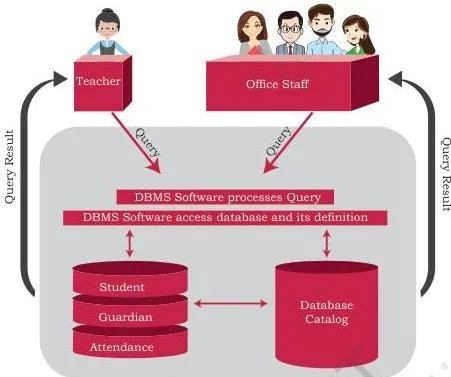
Figure 8.2 shows the database environment after the redesign: the DBMS maintains a single centralised repository of data, and multiple users — office staff and the teacher — use it at the same time (p. 119). The populated snapshots in Tables 8.4, 8.5 and 8.6 are the states of STUDENT, GUARDIAN and ATTENDANCE once real data is loaded into this structure.
DBMS Key Terms: Schema, Constraints, Metadata, Instance, Query and More
These seven terms (NCERT, pp. 118–120) are the chapter’s vocabulary. Learn each one against its school-database example:
| Term | Meaning | School-database example |
|---|---|---|
| Database Schema | The design or skeleton of the database: table names, columns, data types, constraints, relationships (p. 118). | STUDENT(RollNumber, SName, SDateofBirth, GUID) |
| Data Constraint | A restriction on the data that can be inserted into a column (p. 119). | NOT NULL and UNIQUE on RollNumber |
| Meta-data / Data Dictionary | Data about the data; the schema and constraints stored by the DBMS in a catalog (p. 119). | The catalog records every column’s name, type and rule |
| Database Instance | The snapshot of the database at a given time after data is loaded (p. 119). | The populated state of STUDENT in Table 8.4 |
| Query | A request to the database for information (p. 120). | “Find names of all students present on 2018-09-02” |
| Data Manipulation | Insertion, deletion or update of data (p. 120). | Rivaan joins → insertion; a student leaves → deletion; Atharv’s guardian changes mobile number → update |
| Database Engine | The underlying component that creates the database and handles queries (p. 120). | The engine inside MySQL that executes your query |
The chapter summary (pp. 125–126) names SQL as the standard query language for relational DBMS like MySQL — it gets its own chapter later in the book.
The Relational Data Model: Relations, Attributes, Tuples and Domains
In the relational data model, tables are called relations, rows are tuples, and columns are attributes (NCERT, p. 120). A database built on this model is a relational database. The other models the book names are object-oriented, entity-relationship, document and hierarchical (p. 120).
Relations are not independent tables. ATTENDANCE.RollNumber links each attendance row to the matching student in STUDENT, and STUDENT.GUID links to the guardian in GUARDIAN (pp. 120–121). Without these linking attributes the database cannot stay in a correct state.
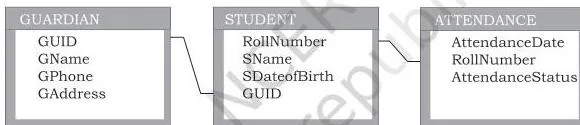
Figure 8.3 shows the same STUDENTATTENDANCE database drawn under the relational model — three relations with their connecting attributes. Each tuple (row) corresponds to a real-world entity such as a student, a guardian or an attendance record (p. 122).
The Three Properties That Make a Table a Relation
A relation is not just any table. Three properties (NCERT, p. 123) separate a relation from an ordinary data file:
| Property | Rules it imposes |
|---|---|
| Property 1 — on attributes | Each attribute has a unique name; the sequence of attributes is immaterial. |
| Property 2 — on tuples | Each tuple is distinct; the sequence of tuples is immaterial. |
| Property 3 — on the state | All values in an attribute come from the same domain; every value is atomic; no attribute holds several values in one tuple; NULL represents unknown or non-applicable values. |
Misconception autopsy: an ordinary table is not automatically a relation. A spreadsheet that lists a student’s two favourite sports inside one cell breaks Property 3 (no multi-valued attribute). Two identical rows break Property 2 (tuples must be distinct). A column that mixes numbers and text breaks Property 3 (same domain). And row order?
Property 2 says the sequence of tuples is immaterial — so two tables carrying the same data in different row orders are equivalent relations. This is exactly the reasoning behind the textbook’s two Sports Preferences tables in the exercise (Q7).
Relations in Numbers: Degree, Cardinality and the Data Rules
The chapter has no algebraic formulas; its “calculations” are counting rules and data rules. Keep this quick-reference card handy:
| Rule | Meaning | Example |
|---|---|---|
| Degree | Number of attributes (columns) in a relation. | GUARDIAN has degree 4 (p. 122). |
| Cardinality | Number of tuples (rows) in a relation. | GUARDIAN has cardinality 5 (p. 122). |
| Domain | The set of values an attribute can take, usually set by a data type. | RollNumber’s domain is integers; SName’s domain is character strings. |
| Atomic value | A value that cannot be divided into meaningful subparts. | A ten-digit GPhone is atomic. |
| No multi-valued attribute | One attribute cannot hold several values in one tuple. | One GPhone per guardian, not a list of numbers. |
| NULL | A special value for unknown or non-applicable data. | A guardian who does not share a contact number has GPhone = NULL. |
The GUARDIAN relation is also a flat file: each column has a single value and each record has the same number of columns (p. 122). Quick check: a relation with 3 attributes and 4 tuples has degree 3 and cardinality 4.
Memory aids: Cardinality and Count both start with C — cardinality counts rows. Degree and Dimension both start with D — degree measures columns. For foreign keys: a foreign key may store NULL only when it is not part of its own table’s primary key.
Keys in a Relational Database: Candidate, Primary, Alternate, Composite, Foreign
Tuples in a relation must be distinct, so at least one attribute must hold values that are unique and not NULL (NCERT, p. 123). Keys are the constraints that guarantee this. They form a hierarchy:
- Candidate Key — an attribute that can uniquely identify tuples; every candidate is a potential primary key. In GUARDIAN, both GUID and GPhone qualify (p. 124).
- Primary Key — the candidate the database designer chooses to identify tuples. The remaining candidates become alternate keys. Choose GUID as primary key, and GPhone becomes the alternate key (p. 124).
- Composite Primary Key — two or more attributes taken together when no single attribute is unique. In ATTENDANCE, RollNumber repeats across dates and AttendanceDate repeats across roll numbers, but the pair {RollNumber, AttendanceDate} is always unique (p. 124).
- Foreign Key — an attribute in one relation that refers to the primary key of another relation. The referencing relation is the foreign relation; the referenced one is the primary or master relation. A foreign key may hold NULL when it is not part of its own table’s primary key (p. 125).
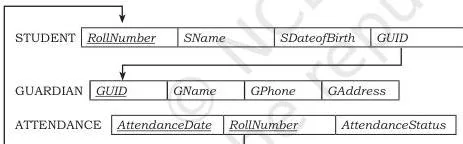
Figure 8.5 shows the keys on the schema diagram: underlined attributes are primary keys, and directed arcs (arrows) run from each foreign key to the primary key it references (p. 125).
Why GPhone is rejected as a key: the book’s note is that phone numbers can change (p. 117). The real-life version is mobile number portability — you can switch network providers and keep the same number, and old numbers get reassigned to new owners.
A value that can change or be recycled cannot permanently identify a guardian, which is why the database invents a stable GUID.
Worked Examples: Reading a Relation and Choosing Keys
Method first. Both examples rest on the same uniqueness test (unique plus NOT NULL) applied to every attribute to find candidate keys and choose the primary key; Example A also counts columns for degree and rows for cardinality.
Example A: Degree, Cardinality and Primary Key of a Hospital Relation
Consider a fresh relation PATIENT(PatientID, PatientName, WardNo, DoctorID) with the following data:
| PatientID | PatientName | WardNo | DoctorID |
|---|---|---|---|
| P101 | Meera Nair | Ward 2 | D11 |
| P102 | Rohan Das | Ward 4 | D23 |
| P103 | Simran Kaur | Ward 2 | D11 |
| P104 | Arjun Mehta | Ward 5 | NULL |
| P105 | Kavya Iyer | Ward 4 | D23 |
- Step 1: Count the attributes (columns): PatientID, PatientName, WardNo, DoctorID → degree = 4.
- Step 2: Count the tuples (rows): 5 → cardinality = 5.
- Step 3: Apply the uniqueness test to every attribute.
PatientID is unique in all 5 rows.
PatientName could repeat (two patients can share a name).
WardNo repeats (Ward 2 and Ward 4 appear twice).
DoctorID repeats (D11 twice, D23 twice) and contains a NULL.
- Step 1: Only PatientID passes, so the primary key is PatientID — unique and never NULL.
- Step 2: NULL check.
DoctorID holds NULL for P104, meaning a doctor is not yet assigned.
That is acceptable because DoctorID is not the primary key.
NULL would never be acceptable in PatientID.
Final answer: degree = 4, cardinality = 5, primary key = PatientID.
Example B: Composite Keys and Foreign Keys in a Library Database
Consider a LIBRARY database with three relations: BOOK(BookID, Title, AuthorID), AUTHOR(AuthorID, AuthorName) and ISSUE(IssueDate, BookID, MemberID).
- Step 1: BOOK: BookID is unique for every book → primary key of BOOK.
- Step 2: AUTHOR: AuthorID is unique for every author → primary key of AUTHOR.
- Step 3: ISSUE: no single attribute is unique — the same book is issued many times, the same member borrows many books, and many issues happen on one date.
So ISSUE needs a composite primary key: {IssueDate, BookID, MemberID}, because a given member borrows a given book on a given date at most once.
Step 4: Find the foreign keys and state the direction of each reference.
BOOK.AuthorID references AUTHOR.AuthorID (one author writes many books, so AuthorID repeats in BOOK).
ISSUE.BookID references BOOK.BookID.
ISSUE.MemberID would reference the primary key of a MEMBER relation if one existed.
Final answer: primary keys — BookID, AuthorID, {IssueDate, BookID, MemberID}; foreign keys with references — BOOK.AuthorID → AUTHOR.AuthorID, ISSUE.BookID → BOOK.BookID. Arrows always point from the foreign key to the primary key it references.
Common Mistakes in Database Concepts (and the Correct Version)
| Mistake | Correct rule | How to check your answer |
|---|---|---|
| “Degree means the number of rows.” | Degree is the number of attributes (columns); cardinality is the number of tuples (rows). | Count columns for degree, rows for cardinality. |
| “A primary key can contain one NULL.” | A primary key is NOT NULL and UNIQUE — NULL is never allowed. | Every primary-key value must be present and different. |
| “A foreign key must hold unique values.” | Foreign key values can repeat, and may be NULL when not part of their own table’s primary key. | Only the referenced primary key must be unique. |
| “Phone number is a safe key because it is unique.” | Phone numbers can change, so they may not truly distinguish a record. | Use a stable ID such as GUID. |
| “NULL is the same as 0 or blank.” | NULL means unknown or non-applicable (p. 123). | 0 is a real value; NULL is the absence of a value. |
| “Reordering rows changes the relation.” | The sequence of tuples is immaterial (Property 2, p. 123). | Compare the data content, not the arrangement. |
| “Every table needs a one-column primary key.” | When no single attribute is unique, use a composite primary key. | {RollNumber, AttendanceDate} in ATTENDANCE. |
How to Write Answers for the Textbook Exercises
This page is revision notes, not a solutions page, so here is a framework for each question type in the exercise (NCERT, pp. 126–130).
- “Give the terms” (Q1): write the term plus a defining phrase that shows its job — for a candidate key, say “an attribute that can uniquely identify tuples in a relation”.
- “Differentiate” (Q3): answer as a two-column table with basis points — definition, uniqueness, NULL allowed, example — one contrast per row.
- “Can a tuple be inserted?” (Q10): check constraints in this order — (1) primary key: is the value duplicated or NULL? (2) NOT NULL: is any required column empty? (3) other rule: does the value satisfy the stated constraint (such as Price > 0)? End with the verdict and name the constraint that was violated.
- “Are the two relation states equivalent?” (Q7): cite Properties 1 and 2 — the sequence of attributes and tuples is immaterial — then compare the data content of the two tables, not their arrangement. Matching content means equivalent states.
- Design questions (Q8, Q12): name the relations and their attributes with data types, mark the primary key (underline it in your answer), mark the foreign keys, and state which redundancy or restriction each design choice removes.
For more help across the syllabus, browse all Class 12 Computer Science revision notes.
Revision Summary: File Systems, DBMS and Keys on One Screen
Every file system problem and its DBMS remedy:
| File system limitation | DBMS feature that removes it |
|---|---|
| Data Redundancy | Controlled, integrated storage — a fact is stored once and referenced by a key. |
| Data Inconsistency | A centralised single copy — one change updates everyone who reads it. |
| Data Isolation | Related tables linked through common columns / foreign keys. |
| Data Dependence | The DBMS decouples application programs from the physical storage structure. |
| Controlled Data Sharing | Access control and constraints enforced by the DBMS itself. |
| Difficulty in Access | A query language (SQL) — no new program for every report. |
Keys at a glance:
| Key type | Rule | Chapter example |
|---|---|---|
| Candidate Key | Uniquely identifies tuples; candidate for primary key. | GUID, GPhone in GUARDIAN |
| Primary Key | The chosen candidate; NOT NULL and UNIQUE. | GUID |
| Alternate Key | A candidate not chosen as primary key. | GPhone |
| Composite Primary Key | Two or more attributes taken together. | {RollNumber, AttendanceDate} in ATTENDANCE |
| Foreign Key | Refers to the primary key of another relation; NULL allowed when not part of its own primary key. | STUDENT.GUID → GUARDIAN.GUID |
60-second terms checklist: schema, instance, metadata, query, relation, attribute, tuple, domain, degree, cardinality. If you can define all ten in one sentence each, the chapter is done. Memory devices once more: Cardinality/Count = rows, Degree/Dimension = columns.
SQL is the standard language for relational DBMS like MySQL and is the natural next chapter — see our SQL notes. The full textbook is available on the official NCERT website if you want to read the chapter’s original text, and the complete Class 12 notes collection plus the CBSE notes index cover every other chapter and subject.
Frequently Asked Questions About Database Concepts
What is the difference between a database and a DBMS?
A database is a collection of logically related data organised as tables. A DBMS is the software that creates and manages that database — the database is the data, the DBMS is the tool. MySQL is a DBMS; the STUDENTATTENDANCE tables are a database.
Why is a foreign key allowed to store NULL values?
A foreign key exists to refer to a row in another table. When no such reference exists yet — a student whose guardian is not recorded — NULL expresses “no reference”. The book allows it only when the foreign key is not part of its own table’s primary key (p. 125).
How do degree and cardinality of a relation differ?
Degree is the number of attributes (columns); cardinality is the number of tuples (rows). The GUARDIAN relation has degree 4 and cardinality 5 (p. 122).
Why is the guardian’s phone number not used as a primary key even though it is unique?
Because phone numbers can change (p. 117). Mobile number portability lets you switch carriers and keep the same number, and old numbers get reassigned. A value that can change or be reused cannot permanently identify a guardian, so the database invents GUID.
What is the difference between a database schema and a database instance?
The schema is the design — the skeleton of tables, columns, data types and constraints — defined before data is entered (p. 118). The instance is the snapshot of the database at a given time after data is loaded (p. 119). A schema can have many instances as data changes.
When do we need a composite primary key instead of a single attribute key?
When no single attribute is unique. In ATTENDANCE, RollNumber repeats across dates and AttendanceDate repeats across roll numbers, but the pair {RollNumber, AttendanceDate} is always unique (p. 124).
Reference: NCERT Class 12 Computer Science textbook, chapter Database Concepts.
Explore Class 12 Computer Science Notes
- Class 12 Computer Science Notes
- Class 12 CBSE Notes
- CBSE Notes for Classes 1 to 12
- Previous: Understanding Data
- Next: Structured Query Language (SQL)
Class 12 Computer Science on LearnCBSE:
Related chapters:
- File Handling in Python notes
- Queue notes
- Sorting notes