
These are the Data Communication class 12 notes for Chapter 11 of the NCERT Class 12 Computer Science textbook, following the 2026-27 session.
The page condenses the whole chapter — the five components of communication, bandwidth and data transfer rate, communication modes, switching, transmission media, mobile generations and protocols — into definitions, tables and stepwise calculations you can revise from alone, with textbook page numbers cited so you can verify anything against the book.
Use the chapter map below to locate a weak area, then jump to it from the table of contents. If you have only a few minutes, read the Key Terms table, the worked examples and the Chapter at a Glance table at the end — those three carry most of what the chapter expects you to recall.
Chapter Map: What These Notes Cover
Every topic in this chapter builds on the earlier ones: components of communication → measuring the channel → modes → switching → media → wireless technologies → mobile generations → protocols. The map below shows where each topic sits in the textbook (pages 203–222) so you can revise a weak area directly.
The official textbook PDF is available on the official NCERT portal if you want to check any detail against the source.
| Topic | Textbook pages | What you will revise |
|---|---|---|
| Concept and components | 203–205 | definition of data communication, five components, nodes |
| Measuring channel capacity | 205–206 | bandwidth (Hz), data transfer rate (bps), conversions |
| Types of data communication | 206–208 | simplex, half-duplex, full-duplex, VoIP, VoLTE |
| Switching techniques | 208 | circuit switching, packet switching |
| Transmission media | 209–213 | guided: twisted pair, coaxial, optical fibre; unguided: radio, microwave, infrared |
| Wireless technologies | 213–215 | Bluetooth, Wi-Fi, WiMax, access points |
| Mobile telecommunication technologies | 215–216 | 1G to 5G, IoT, M2M |
| Protocol | 216–220 | need for protocols, HTTP, FTP, PPP, SMTP, TCP/IP |
For the full set of subject pages, browse the Class 12 notes collection, and the Class 12 Computer Science notes hub for the rest of this subject. Neighbouring networking ideas are explained in the Computer Networks notes, and the Security Aspects notes pair naturally with the protocol discussion later in this chapter.
You can also reach every subject from the main CBSE notes page.
What Is Data Communication? The Five Components
Data can be any text, image, audio, video or multimedia file. Communication is the act of sending or receiving data. So data communication is the exchange of data between two or more networked or connected devices that are capable of sending and receiving over a communication medium (NCERT, p. 203).
Personal computers, mobile phones and laptops are the usual examples of such devices.
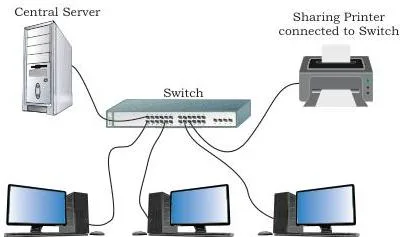
Figure 11.1 shows the simplest version of this idea: a computer, a printer, a server and a switch are connected through media so that information can travel from one device to another. Whenever such devices communicate, five aspects matter — sender, receiver, message, communication media and protocols (NCERT, p. 204).
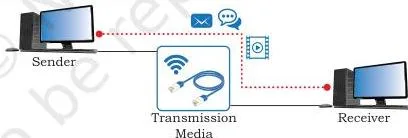
Figure 11.2 anchors these five pieces in one diagram — for any communication you meet, you should be able to point to its sender, receiver, message, media and protocols.
| Component | What it is | Example |
|---|---|---|
| Sender | Device capable of sending data over a network | computer, mobile phone, smartwatch, walkie-talkie, video recording device |
| Receiver | Device capable of receiving data from a network | computer, laptop, printer, mobile phone, television |
| Message | The data or information to be exchanged | text, number, image, audio, video, multimedia |
| Communication media | The path (link) the message travels through; also called medium; wired or wireless | television cable, telephone cable, ethernet cable, satellite link, microwaves |
| Protocols | Set of rules the communicating parties follow | Ethernet, HTTP |
In computer communication the sender and receiver are together known as nodes (NCERT, p. 204).
Memory device — the letter-post chain. Posting a letter uses all five components: you are the sender, the letter is the message, the postal route is the communication media, the reader is the receiver, and the postal rulebook (address format, stamp, postage rate) is the protocol. Every network communication in this chapter fits the same five slots.
Key Terms and Definitions from This Chapter
This is the table to scan the night before a test. Every term is defined in the chapter.
| Term | Meaning | Example |
|---|---|---|
| Data communication | Exchange of data between two or more networked devices over a medium | a laptop downloading a file from a server |
| Sender | Device capable of sending data over a network | mobile phone, smartwatch, walkie-talkie |
| Receiver | Device capable of receiving data from a network | printer, laptop, television |
| Node | A sender or receiver in a computer network | any computer joined to the network |
| Message | The data or information exchanged between sender and receiver | text, number, image, audio, video |
| Communication media | Path through which the message travels; also called medium or link; wired or wireless | telephone cable, ethernet cable, satellite link |
| Protocol | Set of rules the communicating parties follow for successful reliable communication | Ethernet, HTTP |
| Bandwidth | Range of frequencies available for transmission; difference of maximum and minimum frequency, in Hz | \( 1.4\ \text{GHz} – 400\ \text{MHz} = 1\ \text{GHz} \) |
| Data transfer rate | Number of bits transmitted between source and destination in one second; also called bit rate | 3,840 bps, 6.25 Kbps |
| Simplex | One-way communication; one device always sends, the other always receives | keyboard → computer; IoT appliance control |
| Half-duplex | Two-way communication, but only one direction at a time | walkie-talkie |
| Full-duplex | Two-way communication, both directions simultaneously | mobile phone, landline telephone |
| Circuit switching | Dedicated path established before communication; all packets follow that path | traditional telephone call |
| Packet switching | Message split into packets (header + message part) travelling independently, reassembled at the destination | the Internet |
| Guided media | Physical wired link carrying signals between nodes | twisted pair, coaxial, optical fibre |
| Unguided media | Electromagnetic waves travelling through air using an antenna | radio, microwave, infrared |
| Piconet | Personal area network of Bluetooth devices within about 10 m, in master-slave configuration | Bluetooth headphones with a phone |
| Access point | Device that creates a wireless LAN by connecting to a wired router, switch or hub | office Wi-Fi access point |
| M2M | Machine-to-machine: direct communication between devices, wired or wireless | connected vehicles exchanging data |
| VoIP | Voice over Internet Protocol: delivers voice and multimedia over the Internet Protocol | voice calls carried over the Internet Protocol |
| VoLTE | Voice over Long-Term Evolution: standard for high-speed wireless communication for mobile phones, including IoT and wearables | high-speed voice service on mobile phones |
Bandwidth and Data Transfer Rate: Formulas That Matter
In data communication the transmission medium is also known as the channel. A channel’s capacity is the maximum amount of signals or traffic it can carry, and it is measured in two ways: bandwidth and data transfer rate (NCERT, p. 205).
Bandwidth — a range of frequencies
Bandwidth is the range of frequencies available for transmission through a channel. It is the difference between the maximum and minimum frequency contained in the composite signal, measured in Hertz (Hz) (NCERT, p. 205). The wider the range, the more data the channel can carry — which is why higher bandwidth supports higher data transfer rates.
\[ \text{Bandwidth} = f_{\text{max}} – f_{\text{min}} \]
Frequency conversions use 1000, not 1024:
| Unit | Equivalent | In Hz |
|---|---|---|
| 1 KHz | 1000 Hz | \( 10^3\ \text{Hz} \) |
| 1 MHz | 1000 KHz | \( 10^6\ \text{Hz} \) |
Data transfer rate — bits per second
Data transfer rate (also called bit rate) is the number of bits transmitted between source and destination in one second, measured in bits per second (bps). One signal carries one or more bits over the channel (NCERT, p. 205).
| Unit | Equivalent in bps | Also equal to |
|---|---|---|
| 1 Kbps | \( 2^{10}\ \text{bps} = 1024\ \text{bps} \) | — |
| 1 Mbps | \( 2^{20}\ \text{bps} \) | 1024 Kbps |
| 1 Gbps | \( 2^{30}\ \text{bps} \) | 1024 Mbps |
| 1 Tbps | \( 2^{40}\ \text{bps} \) | 1024 Gbps |
MBps ≠ Mbps. MBps is megabytes per second; Mbps is megabits per second. Since 1 byte = 8 bits, a value in MBps is 8 times smaller than the same value in Mbps (NCERT, p. 205).
Worked Examples: Calculating Data Rate and Bandwidth
Every calculation in this chapter is the same pair of operations — multiply to get total bits, then divide by time, or subtract the two frequencies. The textbook’s own example uploads 10 pages of 1600 characters at 8 bits each in 20 seconds and obtains 6400 bps = 6.25 Kbps (NCERT, p. 206). The examples below use fresh numbers so you can practise the identical method.
Example 1 — required data rate of a channel
Method: Required data rate = total bits ÷ total time.
Step 1: Find the total number of bits in the document.
\[ \text{Total bits} = 6 \times 1200 \times 8 = 57{,}600\ \text{bits} \]
Step 2: Divide by the upload time of 15 seconds.
\[ \text{Required data rate} = \frac{57{,}600}{15} = 3{,}840\ \text{bps} \]
Step 3: Convert bps to Kbps by dividing by 1024.
\[ \frac{3{,}840}{1024} = 3.75\ \text{Kbps} \]
Final answer: the channel must support \( 3{,}840\ \text{bps} = 3.75\ \text{Kbps} \).
Example 2 — bandwidth of a composite signal
Method: Bandwidth = maximum frequency − minimum frequency of the composite signal.
Step 1: Express both frequencies in the same unit: 1.4 GHz = 1400 MHz.
\[ \text{Bandwidth} = 1400\ \text{MHz} – 400\ \text{MHz} = 1000\ \text{MHz} \]
Step 2: Convert to GHz.
\[ 1000\ \text{MHz} = 1\ \text{GHz} \]
Final answer: bandwidth = 1000 MHz = 1 GHz.
Example 3 — converting Gbps to bits per second
Method: Expand the Gbps unit using powers of 2.
\[ 2\ \text{Gbps} = 2 \times 2^{30}\ \text{bps} = 2 \times 1{,}073{,}741{,}824 = 2{,}147{,}483{,}648\ \text{bps} \]
Final answer: 2 Gbps = 2,147,483,648 bits per second.
Practical use — estimating transfer time
Method: The same relation works backwards — transfer time = total bits ÷ channel speed.
\[ \text{Time} = \frac{204{,}800\ \text{bits}}{51{,}200\ \text{bps}} = 4\ \text{s} \]
So a 204,800-bit file takes 4 seconds on a 51,200 bps channel.
Simplex, Half Duplex and Full Duplex: The Three Communication Modes
Data communication between devices is classified into three modes based on direction and timing (NCERT, p. 206).
Simplex — one way
In simplex communication one device is always the sender and the other always the receiver; data flows only one way, and the devices use the entire capacity of the link. The chapter compares it to a one-way street.
Keyboards sending to a computer, audio sent to a speaker, and — with IoT — controlling home appliances such as fans and lights from outside the home are all simplex uses (NCERT, p. 206).
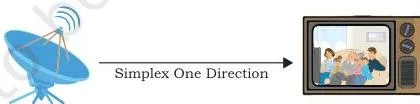
Figure 11.3 shows the IoT version of simplex: a user controlling an appliance such as a fan or light remotely, with commands flowing in one direction only.
Half-duplex — two way, one direction at a time
Half-duplex is bidirectional, but both devices cannot send at the same instant — while one sends, the other receives, and vice versa. The chapter compares it to vehicles sharing a one-way narrow bridge: they cannot pass simultaneously. Essentially, it is a simplex channel whose direction of transmission can be switched.
A walkie-talkie is the classic example — pressing push-to-talk turns on the transmitter and turns off the receiver, so others can only listen (NCERT, pp. 206–207).
Full-duplex — both directions at once
Full-duplex communication lets both devices send and receive simultaneously, like a two-way road. It is the mode used by mobile phones and landline telephones. The link’s capacity is shared between the two directions — either using two physically separate simplex lines (one for sending, one for receiving) or sharing the capacity of a single channel between the signals (NCERT, p. 207).
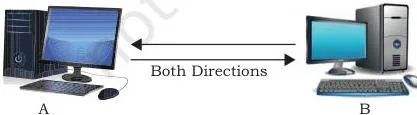
Figure 11.5 shows data travelling in both directions between two devices at the same moment — the defining feature of full duplex.
| Mode | Both devices can transmit? | At the same time? | Example | Analogy |
|---|---|---|---|---|
| Simplex | No — one device only ever sends | No | keyboard → computer; IoT appliance control | one-way street |
| Half-duplex | Yes | No — they take turns | walkie-talkie (push-to-talk) | one-way narrow bridge |
| Full-duplex | Yes | Yes | mobile phone, landline telephone | two-way road |
VoIP and VoLTE (NCERT, p. 208). VoIP (Voice over Internet Protocol) is a communication methodology designed to deliver both voice and multimedia communications over the Internet Protocol. VoLTE (Voice over Long-Term Evolution) is a standard for high-speed wireless communication for mobile phones, including IoT and wearables.
Circuit Switching vs Packet Switching
Connecting every pair of devices with a dedicated link (mesh topology) or through a central device (star topology) is costly in large networks. Switching solves this by routing data through various nodes, forming a temporary route for the transmission (NCERT, p. 208). The two common techniques are circuit switching and packet switching.
Circuit switching: before communication starts, a dedicated path — a connected sequence of links between network nodes — is identified between sender and receiver. All packets follow this same pre-established path. The traditional telephone system worked this way: switching equipment found a physical path all the way from the caller’s telephone to the receiver’s (NCERT, p. 208).
Packet switching: the message is broken into smaller pieces called packets. Each packet has two parts — a header containing the destination address and other information, and the main message part. Packets travel independently and may take different routes depending on availability; at the destination they are reassembled into the complete message.
Unlike circuit switching, a channel is occupied only during the transmission of a packet and is then free for other parties (NCERT, p. 208).
| Feature | Circuit switching | Packet switching |
|---|---|---|
| Path | Dedicated path established before communication | No dedicated path; packets find their own routes |
| Route of packets | All packets follow the same path | Different packets may take different routes |
| Channel use | Reserved for the whole communication | Occupied only while a packet is being transmitted |
| Example | Older telephone system | The Internet |
Because of this flexibility, the Internet uses packet switching.
Guided Media: Twisted Pair, Coaxial Cable and Optical Fibre
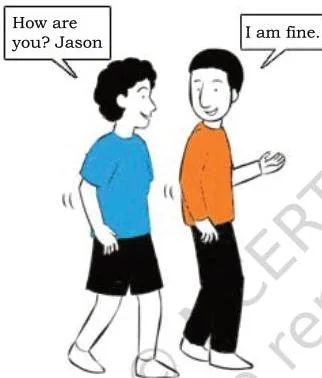
A transmission medium is anything that carries signals between source and destination — the electric wire carrying current to a ceiling fan, or simply the air between two people talking, as in Figure 11.6. In data communication, transmission media are the links that carry messages between communicating devices, and they divide into guided and unguided (NCERT, p. 209).
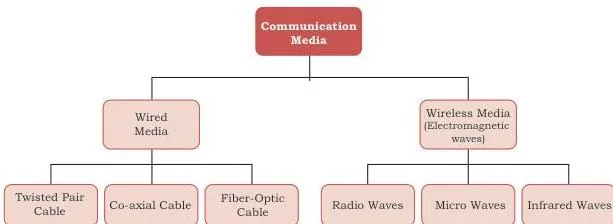
Guided media (wired) are physical links made of wire or cable — metallic cable, fibre-optic cable and so on — through which signals propagate between nodes. Unguided media (wireless) send data through air as electromagnetic waves using an antenna (NCERT, p. 209). Figure 11.7 shows this classification tree.
Twisted pair cable
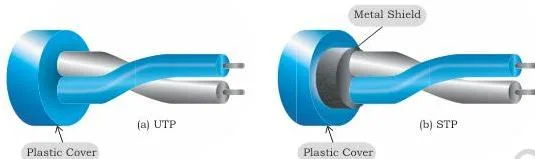
A twisted pair consists of two insulated copper wires twisted like a DNA helical structure. Several such pairs are combined and covered with a protective outer wrapping, and each pair acts as a single communication link. The twisted configuration minimises electrical interference from similar pairs close by.
Twisted pairs are inexpensive and are the most common medium in telephone lines and LANs; they come as UTP (Unshielded twisted-pair) and STP (Shielded twisted-pair) (NCERT, pp. 210–211).
Coaxial cable
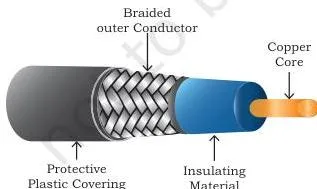
Coaxial cable is better shielded and offers more bandwidth than twisted pair. Its construction, shown in Figure 11.10, runs from the inside out: a copper wire at the core → insulating material around it → an outer conductor (usually a copper mesh) → a plastic cover.
This shielded design lets the copper core transmit data quickly without interference from environmental factors, so coaxial cable carries signals of higher frequencies over a longer distance (NCERT, p. 211).
Optical fibre
Optical fibre carries data as light inside a thin strand of glass, using refraction to direct the light through the media. A thin transparent glass core is covered with a layer of less dense glass called cladding, and the whole arrangement is covered with an outer jacket of PVC or Teflon (NCERT, p. 212).
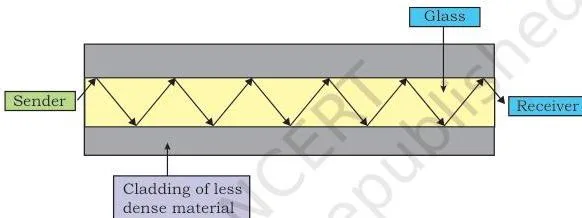
Fibre is lightweight, offers higher bandwidth (so higher data transfer rates), carries signals over longer distances and is immune to electromagnetic noise. It is used in backbone networks — the segments that interconnect different LANs or subnetworks and provide a path for information exchange between them (NCERT, p. 211).
The drawbacks: optical fibre is expensive and unidirectional, so two cables are required for full-duplex communication (NCERT, p. 212).
| Medium | Signal carried | Cost | Bandwidth | Common use |
|---|---|---|---|---|
| Twisted pair | Electrical | Inexpensive | Lowest of the three | Telephone lines, LANs |
| Coaxial cable | Electrical | Not stated as a number in the chapter | More than twisted pair | Higher frequencies over longer distances |
| Optical fibre | Light | Expensive | Highest | Backbone networks |
Unguided Media: Radio Waves, Microwaves and Infrared
Unguided (wireless) media transmit information as electromagnetic waves through air. The usable electromagnetic spectrum for wireless communication ranges from 3 KHz to 900 THz, and it is divided into four categories — radio waves, microwaves, infrared waves and visible (light) waves. Of these, three are useful for wireless communication (NCERT, p. 212).
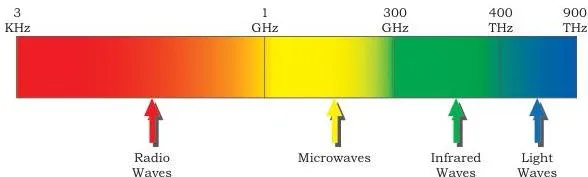
Figure 11.12 arranges the four wave families in order of increasing frequency: radio waves at the low-frequency end, then microwaves, then infrared, with visible light at the top. Read the figure together with Table 11.1 in the chapter (NCERT, p. 213):
- Radio waves are omni-directional — they spread in all directions — and the 3–300 KHz portion can penetrate walls.
- Microwaves are unidirectional and cannot penetrate solid objects such as walls, hills or mountains, so they need line-of-sight propagation: both communicating antennas must face each other.
- Infrared waves are very high frequency, cannot penetrate walls, and serve only short-distance point-to-point links.
| Transmission wave | Frequency range | Direction | Can it pass through walls? | Example use |
|---|---|---|---|---|
| Radio waves | 3 KHz – 1 GHz | Omni-directional | Yes — the 3–300 KHz portion penetrates walls | AM and FM radio, television, cordless phones |
| Microwaves | 1 GHz – 300 GHz | Unidirectional | No | Radar, satellite, point-to-point (unicast) communication |
| Infrared waves | 300 GHz – 400 THz | Short-distance point-to-point | No | Remote control to TV, mobile-to-printer, Bluetooth devices like mouse and keyboards |
For longer distances, dish-shaped antennas are mounted on tall buildings so they stay in line of sight. Because waves gradually become weaker after travelling through air, repeaters are installed to regenerate the signals with the same energy (NCERT, p. 210).
Bluetooth, Wi-Fi and WiMax: Wireless Networks You Use Daily
Bluetooth — short range, personal area
Bluetooth connects devices such as mobile phones, mouse, headphones, keyboards and computers over a short distance — about 10 metres at 1–2 Mbps. Each device carries a low-cost transceiver chip that uses the unlicensed 2.4 GHz frequency band.
Devices within 10 metres build a personal area network called a piconet, working in a master-slave configuration: one master can communicate with up to 7 active slaves at the same time. Up to 255 devices can form the network; of these, 8 can communicate at once and the rest stay inactive, waiting for a response command from the master (NCERT, p. 214).
Wi-Fi — wireless LAN
Wireless LAN is the IEEE standard numbered 802.11, popularly known as Wi-Fi. A WLAN consists of communicating devices (laptops, mobile phones) plus access points (APs) installed in buildings or floors.
An access point is a device that creates a wireless LAN by connecting to a wired router, switch or hub; all wireless devices communicate or access the Internet through it (NCERT, p. 214).
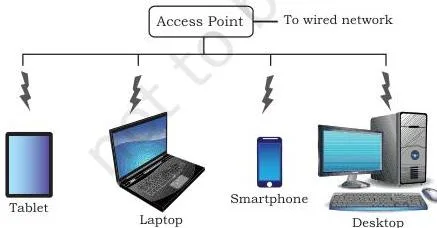
Figure 11.13 shows an access point creating a WLAN that mobile devices join to reach the wired network. The chapter lists these benefits of WLAN (NCERT, pp. 214–215):
- wireless connections can extend or replace an existing wired infrastructure
- increased access for mobile devices
- easy access to the Internet in public places
- users can move around within the network area while staying connected
WiMax — metropolitan area
WiMax (Worldwide Interoperability for Microwave Access) also works in wireless networks, but unlike Wi-Fi it uses a larger spectrum, offers a higher data transfer rate and spans a larger area — which is why it is used in MAN (metropolitan area network) applications (NCERT, p. 215).
| Technology | Area covered | Data rate | Key facts from the chapter |
|---|---|---|---|
| Bluetooth | Short range — about 10 m | 1–2 Mbps | Piconet; master plus up to 7 active slaves; 2.4 GHz unlicensed band |
| Wi-Fi | Wireless LAN — a building or network area | Not given as a number in the chapter | IEEE 802.11; works through access points connected to a wired router, switch or hub |
| WiMax | Larger area — MAN scale | Higher than Wi-Fi (exact value not given) | Larger spectrum; used for MAN applications |
The chapter gives numeric data rates only for Bluetooth; Wi-Fi and WiMax are compared qualitatively.
Mobile Telecommunication Generations: 1G to 5G
Mobile network architecture has evolved in landmark steps called generations — 1G, 2G, 3G, 4G and 5G (NCERT, p. 215). Each generation added something the previous one could not do.
| Generation | Around | What it added |
|---|---|---|
| 1G | 1982 | Analogue signals carrying voice calls only |
| 2G | 1991 | Digital voice — better call quality, more simultaneous calls, encrypted (more secure) signals; added SMS and MMS |
| 3G | Commercially around 2001 | Digital voice plus data; Internet access through the same radio towers that carry voice; greater voice and data capacity; significantly faster data transfer |
| 4G | Developed after 3G; no year given in the chapter | Broadband services: interactive multimedia, voice, video, wireless Internet; technologically very different from 3G |
| 5G | Currently under development | Expected data transfer in Gbps; a milestone for IoT and M2M; expected to support connected vehicles and other future devices |
M2M (Machine-to-Machine) is direct communication between devices, wired or wireless — the idea that lets machines exchange data without human involvement (NCERT, p. 216). The chapter’s Think and Reflect box asks you to explore how 5G can impact society.
Protocols: Why Rules Matter and Which Ones to Know
A protocol is a set of standard rules that the communicating parties — the sender, the receiver and all intermediate devices — need to follow. Protocols exist because the communicating devices may sit on different networks, at different geographic locations, with different data transfer rates and data formats (NCERT, p. 216).
Flow control and access control
Flow control handles speed mismatch. Figure 11.14 shows computer A sending at 1024 Mbps while computer B can receive at only 512 Mbps; if B cannot tell A to slow down, some data is lost. Access control decides which node may use a shared link at a particular instant; without it, simultaneous transmissions collide and the data gets lost or corrupted (NCERT, p. 216).
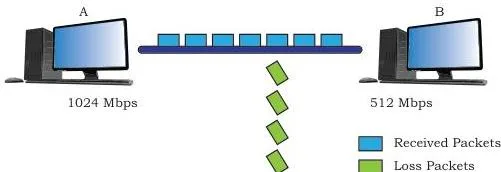
Protocols also define (NCERT, p. 217):
- how computers identify one another on a network
- the form to which data should be converted for transit
- how a node decides whether received data is for it or must be forwarded to another node
- how to ensure all the data reaches the destination without loss
- how to rearrange and process the packets at the destination
The five protocols you must know
| Protocol | Full name | What it does |
|---|---|---|
| HTTP | HyperText Transfer Protocol | Request-response (client-server) protocol that runs over TCP; used between a web browser (client) and a web server; developed by Tim Berners-Lee at CERN in 1989 |
| FTP | File Transfer Protocol | Client-server file transfer; handles differences in file-naming conventions, text/data formats and directory structures between two systems |
| PPP | Point-to-Point Protocol | Establishes a dedicated direct connection between two devices; the devices authenticate each other; maintains data integrity and asks the sender to resend damaged or lost packets (example: home computer to ISP server through a modem) |
| SMTP | Simple Mail Transfer Protocol | Email service; works from the message header (like an envelope on a posted letter), not the email content; the SMTP sender takes mail from an outgoing queue and the SMTP receiver places it in the user mailbox |
| TCP/IP | Transmission Control Protocol / Internet Protocol | IP assigns every node an IP address (it is the adhesive that holds the Internet together); TCP breaks data into IP packets, routes them router to router, guarantees delivery to the designated IP address and orders the packets |
One TCP/IP point worth remembering: because the Internet has many redundant connection paths, two packets of the same message can take different routes depending on congestion, and they are reassembled into the original message at the receiver’s end (NCERT, p. 220). Notice how this connects back to packet switching.
Since protocols govern access and data flow, they are closely tied to security — the Security Aspects notes on this site cover the related threats and protections.
Common Mistakes to Avoid in Data Communication
| Mistake | Correct rule | How to check your answer |
|---|---|---|
| 1 KHz = 1024 Hz | 1 KHz = 1000 Hz. Powers of 1024 apply to bit-rate units (Kbps, Mbps…), not to frequency units | Look at the unit: KHz is a frequency (bandwidth) unit → use 1000. Kbps is a bit-rate unit → use 1024 |
| Mbps and MBps are the same | Mbps = megabits per second; MBps = megabytes per second; 1 byte = 8 bits | Check the word after the M: “bits” or “bytes”. A transfer of 8 Mbps equals 1 MBps |
| Half-duplex means both directions at once | Half-duplex is two-way but one direction at a time; full-duplex is simultaneous | Ask: can both devices transmit at the very same instant? Walkie-talkie — no (half-duplex); mobile phone — yes (full-duplex) |
| One optical fibre cable is enough for full duplex | Optical fibre is unidirectional — light travels one way — so two cables are required for full duplex | Count directions: one cable carries data one way; a second cable handles the return direction |
| All packets follow the same route in packet switching | Packets can take different routes and are reassembled at the destination; the channel is occupied only during transmission | Remember: circuit switching = same path for all packets; packet switching = independent paths |
| Bandwidth and data transfer rate are the same thing | Bandwidth is a frequency range (max − min) measured in Hz; data transfer rate is bits per second | Check the units: Hz versus bps. A higher bandwidth is what makes a higher bit rate possible — they are related, not synonyms |
How to Write Answers for the NCERT Exercise Questions
Match your answer structure to the question type, and the exercise (NCERT, pp. 221–222) becomes straightforward:
- Definition questions (Q1, Q2): open with the definition, then list the five components with a one-line role each — sender sends, receiver receives, message is the data, media is the path, protocols are the rules.
- Comparison questions (Q5): use a two-column table (e.g. wired versus wireless) and close with a one-line conclusion.
- Calculation questions (Q9, Q13): show every step with units. Q9 is a pure conversion — expand Gbps to bps using the powers-of-2 ladder. Q13 uses bandwidth = maximum frequency − minimum frequency, after putting both frequencies in the same unit.
- Short notes (Q11a–e): define the term, give one example or application, then state why it matters.
- Explain with example (Q12): give the definition of protocol, then illustrate it with one concrete protocol such as HTTP or SMTP.
DNS note: DNS appears as short note (d) in Q11, but it is not defined anywhere in the chapter text, so keep that answer brief — two or three lines connecting the idea of naming a computer to the IP-address system that TCP/IP assigns to every node. Do not pad it with detail the chapter never gives.
Chapter at a Glance: Revision Summary
| Topic | Key point to remember |
|---|---|
| Data communication | Exchange of data between two or more networked devices over a medium; data = text, image, audio, video, multimedia |
| Five components | Sender, receiver, message, communication media, protocols; sender and receiver are nodes |
| Bandwidth | Range of frequencies (max − min), measured in Hz; 1 KHz = 1000 Hz |
| Data transfer rate | Bits transmitted per second (bps); 1 Kbps = 1024 bps — power of 2 |
| Three modes | Simplex (one-way), half-duplex (two-way, one at a time), full-duplex (both at once) |
| Switching | Circuit: dedicated path, same route, old telephony; packet: independent packets, different routes, the Internet |
| Guided media | Twisted pair (telephone, LAN), coaxial (higher frequencies, longer distance), optical fibre (light, backbone, unidirectional — two cables for duplex) |
| Wireless waves | Radio (omni-directional, 3–300 KHz penetrates walls), microwave (line-of-sight), infrared (short point-to-point) |
| Bluetooth / Wi-Fi / WiMax | Bluetooth ≈ 10 m piconet, 1–2 Mbps; Wi-Fi = IEEE 802.11 WLAN via access points; WiMax = larger area, MAN |
| 1G to 5G | 1G analogue voice; 2G digital + SMS/MMS; 3G adds data; 4G broadband; 5G expected Gbps, supports IoT and M2M |
| Protocols | HTTP, FTP, PPP, SMTP, TCP/IP; flow control handles speed mismatch, access control prevents collisions |
Frequently Asked Questions About Data Communication
What are the five components of data communication?
The five components are sender, receiver, message, communication media and protocols (NCERT, p. 204). The sender and receiver are together called nodes; the message is the data exchanged; media is the path it travels; protocols are the rules both sides follow.
What is the difference between bandwidth and data transfer rate?
Bandwidth is the range of frequencies a channel can carry — the difference between maximum and minimum frequency — measured in Hz. Data transfer rate is the number of bits transmitted per second, measured in bps. A higher bandwidth is what makes a higher data transfer rate possible (NCERT, p. 205).
Which communication mode do walkie-talkies and mobile phones use?
A walkie-talkie uses half-duplex — two-way communication but one direction at a time (push-to-talk to transmit). Mobile phones use full-duplex — both parties transmit and receive simultaneously (NCERT, pp. 206–207).
Why is optical fibre unidirectional and how does that affect full duplex communication?
Light in an optical fibre travels in one direction, so a single cable carries data only one way. Because full duplex needs both directions at the same time, two optical fibre cables are required for full-duplex communication (NCERT, p. 212).
What is the difference between circuit switching and packet switching?
Circuit switching establishes a dedicated path before communication begins and all packets follow that same path — the old telephone system is the classic example. Packet switching splits the message into packets with a header and a message part; packets travel independently, possibly on different routes, and are reassembled at the destination. The Internet uses packet switching (NCERT, p. 208).
Which wireless waves can pass through walls and which need line of sight?
Radio waves of frequency 3–300 KHz can penetrate walls. Microwaves cannot penetrate walls, hills or mountains and need line-of-sight propagation — both antennas must face each other. Infrared also cannot penetrate walls and works only for short-distance point-to-point communication (NCERT, p. 213).
Reference: NCERT Class 12 Computer Science textbook, chapter Data Communication.
Explore Class 12 Computer Science Notes
- Class 12 Computer Science Notes
- Class 12 CBSE Notes
- CBSE Notes for Classes 1 to 12
- Previous: Computer Networks
- Next: Security Aspects
Class 12 Computer Science on LearnCBSE:
Related chapters:
- File Handling in Python notes
- Queue notes
- Sorting notes